




0
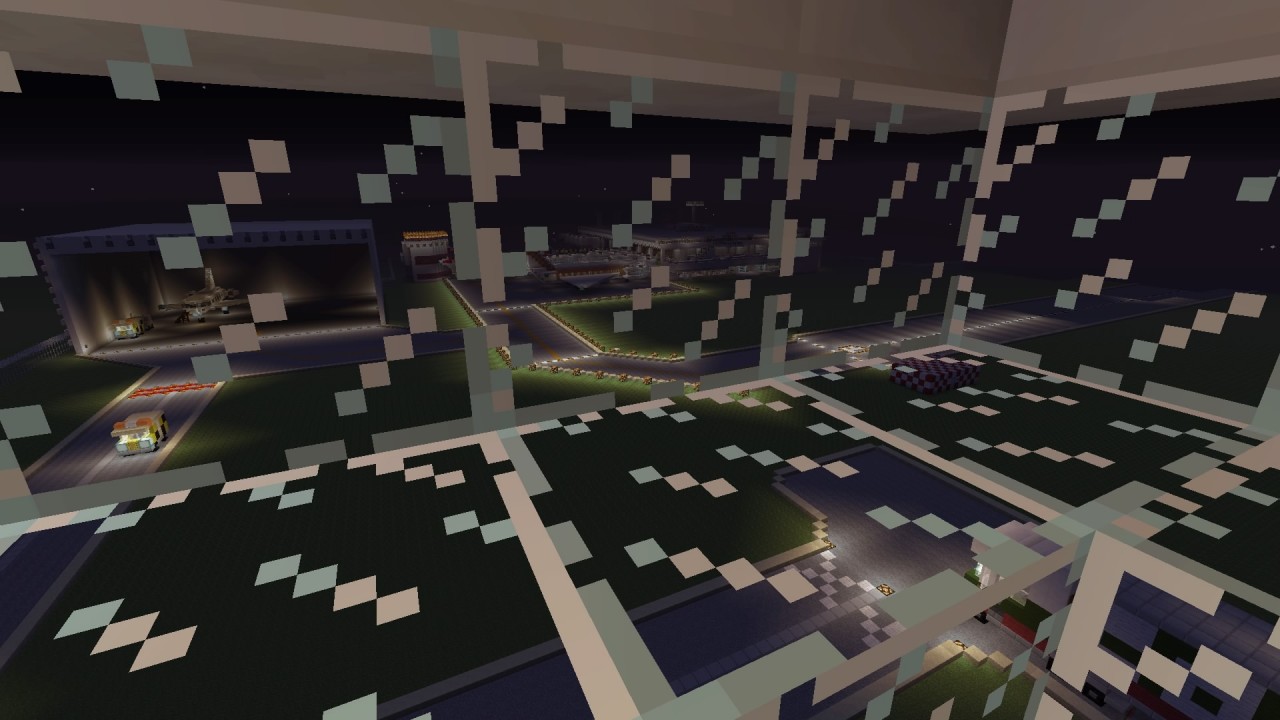
I have made an airport on my PS4 but currently I am adding the finishing touches to it! It should be uploaded soon. If you know how to convert it to a minecraft PC map, please let me know in the comments as it would be very helpful and would allow many more people to access my build!
The build consists of:
Main airport building
Runway -blinking lights along the side*
Taxiway - also has blinking lights*
Hangar - Working ceiling lights and a suprise when you turn them on!
3 Passenger planes - Varied sizes
1 Private jet - Based off of luxor plane from GTA V
Fire station - 3 fire engines, 1 fire car (all in garage)
Police station - 3 police cars inside garage, 1 car outside
Ambulance parking bays - 3 ambulances parked in them
ATC tower - linked to main airport building with an underground minecart track
Deliveries warehouse - Eddie Stobart truck parked outside
2 Security gates - for vehicles if they need to get into the airport grounds, also based off of security gates from GTA V!
Railway - links airport to a house with a farm!
Car park - to be added in the future!
Features of the airport building:
Working sliding doors at entrance and exit
Security gates and check in when you walk in
Secuity office 1 - On the left as you walk in the entrance
Secuity office 2 - On the right as you walk in the entrance
Lots of shops - upstairs and downstairs
Departures side and arrivals side
Colour coded areas - Green -> Departures, Red -> Arrivals, Yellow -> Shops, Grey -> Disabled Areas, Black -> Restricted Areas
Working redstone lift
Viewing platform
Lights upstairs - toggleable
Lockdown switch - located in Security office 2, prevents anyone going upstairs, locks the entrance and exit doors
Fire exits - Located in some shops upstairs, paths to the Fire Assembly Point in the car park
Paths to the passenger planes
Gates - Lead to the planes!!
Lights on top of the airport building - toggleable
Police offices and cells - located upstairs, there are 3 cells in the main office and a mini prison-like place on the opposite side of the floor!
Please be patient as I am not always able to add to the airport so it may take a while for the download to be released!!
The build consists of:
Main airport building
Runway -blinking lights along the side*
Taxiway - also has blinking lights*
Hangar - Working ceiling lights and a suprise when you turn them on!
3 Passenger planes - Varied sizes
1 Private jet - Based off of luxor plane from GTA V
Fire station - 3 fire engines, 1 fire car (all in garage)
Police station - 3 police cars inside garage, 1 car outside
Ambulance parking bays - 3 ambulances parked in them
ATC tower - linked to main airport building with an underground minecart track
Deliveries warehouse - Eddie Stobart truck parked outside
2 Security gates - for vehicles if they need to get into the airport grounds, also based off of security gates from GTA V!
Railway - links airport to a house with a farm!
Car park - to be added in the future!
Features of the airport building:
Working sliding doors at entrance and exit
Security gates and check in when you walk in
Secuity office 1 - On the left as you walk in the entrance
Secuity office 2 - On the right as you walk in the entrance
Lots of shops - upstairs and downstairs
Departures side and arrivals side
Colour coded areas - Green -> Departures, Red -> Arrivals, Yellow -> Shops, Grey -> Disabled Areas, Black -> Restricted Areas
Working redstone lift
Viewing platform
Lights upstairs - toggleable
Lockdown switch - located in Security office 2, prevents anyone going upstairs, locks the entrance and exit doors
Fire exits - Located in some shops upstairs, paths to the Fire Assembly Point in the car park
Paths to the passenger planes
Gates - Lead to the planes!!
Lights on top of the airport building - toggleable
Police offices and cells - located upstairs, there are 3 cells in the main office and a mini prison-like place on the opposite side of the floor!
Please be patient as I am not always able to add to the airport so it may take a while for the download to be released!!
1 Update Logs
DOWNLOAD OUT NOW!! : by Sambob_12 02/17/2016 2:54:10 pmFebruary 17, 2016 @ 7:54 pm UTC
The download is now available!! If you don't know how to get Minecraft world onto your PS4, look at some tutorials on youtube!! If the world doesn't work or it differs to what is shown in the pictures, please tell me as I may have put the wrong save in the download.
Feel free to add anything to the world!! You can also give me suggestions if you would like to!!
Hope you enjoy looking around the world!!
Feel free to add anything to the world!! You can also give me suggestions if you would like to!!
Hope you enjoy looking around the world!!
More like this

![Minecraft Ps4: Blockville City 1.4 [Ps4] Minecraft Map & Project](https://static.planetminecraft.com/files/resource_media/screenshot/1601/12510195_671980096277878_1317429268_o9768523_thumb.jpg) Minecraft Ps4: Blockville City 1.4 [Ps4]Land Structure Map
Minecraft Ps4: Blockville City 1.4 [Ps4]Land Structure Map GamezAreFun
•1/10/16 9:30
78k 30.8k 21x 72631
GamezAreFun
•1/10/16 9:30
78k 30.8k 21x 72631


 mextremel
 Jigglebi
 VJacobs
 Pluky
Pluky3539310
2



 Spickyyyyy








 TopsyKISS
 MineDesigns
 Bobylette_
 Revos
Revos
 ElvYan
Have something to say?