







1
PLATO'S PROJECTS LAB v0.8
java mc v1.14.3
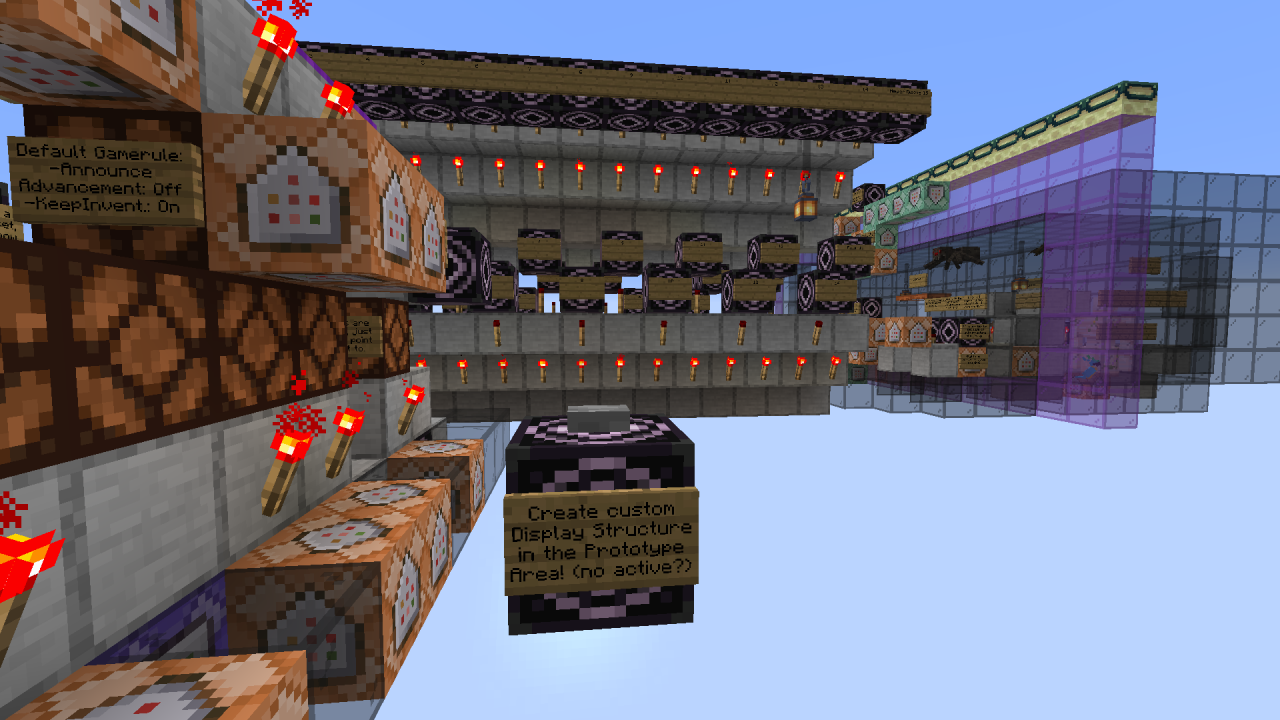
This Lab provides an Environment and Basic Tools, to help Create a Small/Medium sized Project, with some extension capability. It is meant as a stand-alone world, just for it's purpose.
It uses a combination of Redstone, Command Blocks, Structure Blocks! and Functions to achieve it's goal, and attempts to be a Fun! and Supportive Multi-Tool.
[Features]
--Default Accurate Project Coordinates:
*The first block starts exactly at 1 1 1 and the project area ends at 32 32 32. This allows for easier commands and calculations; If you want a grass floor, you could: '/fill 1 1 1 32 1 32 grass'. This property also works nicely with, for example: Helper blocks with factor steps, highlighting each factor.
*Positioning bonus: Everything that involves (manual) coordinates becomes easier, not just the project area.
--Connectable Structure Block Grid:
A 3x3x8 (lwh) Rectangular Prism Grid, with preset (emptying) 32x32x32 Structure Blocks, covering the full height. Because the lab itself takes 1 spot in the grid, the total is (3*3-1)*8 = 64 connecting structure blocks. Because of the range limit, for now, grid structure blocks are located in groups, close to their respective areas. 3 Heights, with 3 Platforms each, some teleporters can be used to jump around. (Because the grid uses a +1 Height Offset, we can't display y=255 with the grid top (8th) structure blocks)
--Project Selector: Quickly load preset projects.
--Palette Selector: 2 palettes a page, can be any combination of blocks, currently: l=28, w=2, h=3.
--Helper Selector: Foundation beneath project floor, can be a combination of blocks.
--Floor Selector: Project floors, can be a combination of blocks.
--Default palettes, floors and helper blocks are included, and I intend to add some more and to improve them.
*Palettes: Stone/Main, Greyscale/Glass, Colours, Noteblock, Lab Demo.
*Helper blocks: Some basic, some grid, and also factor 2-3-5-8 etc. step blocks, visually displaying the factors.
*Floors: Some concepts of custom floors, including (connecting) grids for 4/16/25 tiny/small projects. If you make your own custom floors, they could be of use for specific scenarios.
--2 Display Areas in the Lab Area, close to all other settings, which can be used for more Tools, and/or to display
Atmospheric Buildings. (14x8x31)
--Widgets, which are basically (small) structures for within the Lab Area.
--Snapshots (Pseudo-Save): If enabled, every 5 min. a project snapshot is created (to Memory), cycling 2 slots.
Preview/Restore with button.
--Basic Tools for world settings, lab and project maintenance, etc.
--Some (optional) functions, to remote-control the lab, for help, etc. (See: '/function pl:help')
(I plan to add more, to replace some parts of the uncustomizable lab, it will free up space within the lab area)
--A toggleable, barrier-based 'Defensive Matrix' for lab protection. (Remote-Control: '/function pl:matrix')
Note: The lab currently lacks an instant recovery for the Grid structure blocks and other blocks, outside the lab area.
--Some Atmosphere is included, like a Horde of Animal Companions!;)
[Easy To Use]
--A combination of (subtle) tweaks and automation make it, so you generally just have to push a button or similar, to make use of it's functionality.
--Structure blocks play a central role in many functions, and the lab can for example: Automatically Save (snapshot) a project as structure to Memory, but ANY Structure Save to Disk must be done Manually!
*This means that for hard saving a project/palette/floor etc., as structure, you must use: 'Set Mode: Save', optionally enter an unique new 'Structure Name', click 'SAVE', and 'Set Mode: Load', in the respective structure block(s).
That's the hard part!
*No manually entering coordinates etcetera, with the exception of custom Widgets inside the lab area.
--Because most of the customizable lab parts are made with Basic redstone, command blocks, preset structure blocks, and functions, it's easy to understand and make changes.
[Flexible]
--It's properties can complement other mods/tools, while the lab itself doesn't give any trouble. (I hope^)
--The lab has plenty of customization possibilities; Preferred blocks and settings can all be saved/restored.
--Almost everything is optional; You don't HAVE to use the (grid) structure blocks, or functions, or 'Main Block'.
[Customizable]
--Create/Edit/Swap your own custom selector (project) palettes, floors, display projects, widgets, and more.
--The Lab Area itself can be customized and saved/restored to your own liking, a fail-safe (master reset) is present.
--Add/Remove companions to/from functions like: 'pl:killall', 'pl:petdisband', 'pl:petrecall' and 'pl:petrevive'.
[Organized]
--The layout is small and in such a way, that it's easy to get familiar with. Signs also help out.
--The 'generated\pl\structures' directory, contains directories for several lab aspects. It provides a good practice for name-handling Selector Structures and alike.
*Example structure name for a Default project floor: 'pl:floor/pl_stone_mix'. A custom floor could be saved as, for example: 'pl:floor/labyrinth_stone_1' (youcanjustdoitlikethisthough), or if you have many common files, create an additional directory for those.
*Being separated from the default namespace (minecraft), also provides a 'clean' default directory, and can prevent possible name conflicts with user created projects.
[Other Properties]
--Easy on resources: Few blocks to load, and reduced chunk loading. (Spawn chunks, vertical and structure storage)
--Central place for most settings, and overall short distances.
--Minimal structure block settings required.
--Infinite? amount of custom palettes, floors, helper blocks, etc. (Use unique Names)
--Connecting structure blocks can be used, just to display projects, OR to display and connect to the project area, OR as part of a combination of structure blocks, together forming a project to display, or however you like or not;)
...
Pick Block Tip!
Use 'Ctrl+Middle-Click' to copy a block AND it's NBT data, thus content/command etc. I find this especially useful for picking blocks from palettes, and even more so when working with structure blocks!
Structure Block Tip!
If you create a symbolic link to the lab's structures directory from a different world, you don't have to copy them!
It will look something like this: saves\<other world>\generated\minecraft\structures\<link name>
(You do have to add the link directory name to the structure name in-game. OR use a different namespace)
NOTE: Other than my own OS, I have not tested these; Use at your own risk:
Windows: I found these pages which can help (administrative/advanced):
superuser.com/questions/1020821/how-to-create-a-symbolic-link-on-windows-10
www.howtogeek.com/howto/16226/complete-guide-to-symbolic-links-symlinks-on-windows
MacOS: I assume the Finder still can't make symlinks, but it should work like Linux as below.
Default MacOS path: ~/Library/Application Support/minecraft/<other world>/generated/minecraft/structures
Linux: If your file-manager doesn't support it, you can create one like so (make changes where needed);
First cd to the path (example is for my system), and then create a symbolic link named 'plab':
$ cd ~/.minecraft/<other world>/generated/minecraft/structures
$ ln -s ../../../../Plato\'s\ Projects\ Lab/generated/minecraft/structures plab
It will look something like this: saves\<other world>\generated\minecraft\structures\<link name>
(You do have to add the link directory name to the structure name in-game. OR use a different namespace)
NOTE: Other than my own OS, I have not tested these; Use at your own risk:
Windows: I found these pages which can help (administrative/advanced):
superuser.com/questions/1020821/how-to-create-a-symbolic-link-on-windows-10
www.howtogeek.com/howto/16226/complete-guide-to-symbolic-links-symlinks-on-windows
MacOS: I assume the Finder still can't make symlinks, but it should work like Linux as below.
Default MacOS path: ~/Library/Application Support/minecraft/<other world>/generated/minecraft/structures
Linux: If your file-manager doesn't support it, you can create one like so (make changes where needed);
First cd to the path (example is for my system), and then create a symbolic link named 'plab':
$ cd ~/.minecraft/<other world>/generated/minecraft/structures
$ ln -s ../../../../Plato\'s\ Projects\ Lab/generated/minecraft/structures plab
>>Page 15 of the Palette Selector loads a Demo, showcasing the basic idea, and some structure block power!
-I intend to implement more tools to, control structure blocks, automatically set things, add new functionalities, etc.
-My todo list keeps growing, but this lab should be ready for basic use. I made many changes, and lately just focused on organization and documentation to keep things going smoothly.
-If you have any questions/ideas/tips, etc.. Shoot!
2 Update Logs
Update #2 : by oxihjen 07/13/2019 7:34:35 pmJuly 13, 2019 @ 11:34 pm UTC
*Major Update*
-Added Project Selector: Quickly load preset projects.
-Floor and Helper block Selectors can now also load/save a combination of blocks.
-All 64 connecting structure blocks are now available and set.
-Added 2 Custom Areas, close to other settings, can be used for more tools/atmospheric buildings.
-Snapshots (pseudo-save) can now be previewed.
-Reorganized naming/namespace and paths.
-Added (optional) functions.
-Another, (hopefully) more definite, project text reformat.
-Spinoza (the lab's watchsheep) made new friends;)
-Much more: See project!
-Added Project Selector: Quickly load preset projects.
-Floor and Helper block Selectors can now also load/save a combination of blocks.
-All 64 connecting structure blocks are now available and set.
-Added 2 Custom Areas, close to other settings, can be used for more tools/atmospheric buildings.
-Snapshots (pseudo-save) can now be previewed.
-Reorganized naming/namespace and paths.
-Added (optional) functions.
-Another, (hopefully) more definite, project text reformat.
-Spinoza (the lab's watchsheep) made new friends;)
-Much more: See project!
LOAD MORE LOGS
More like this
 Sarnnox's Redstone LabRedstone Device Map
 Sarnnox
1/17/26 9:38
• posted 3/9/22 11:15
6.8k 1.6k 4x 32627
Sarnnox
1/17/26 9:38
• posted 3/9/22 11:15
6.8k 1.6k 4x 32627
 redstone house with cool redstone lab download nowRedstone Device Map
 XMasterMMOSX
•2/16/16 9:41
963 151 6x 21
XMasterMMOSX
•2/16/16 9:41
963 151 6x 21

 _DeadpooI_
 ZackCrafter
 sdriegle
4326987
2





 AkiroMC




 Janss_33PL
 Hardmuscle



Have something to say?