

63
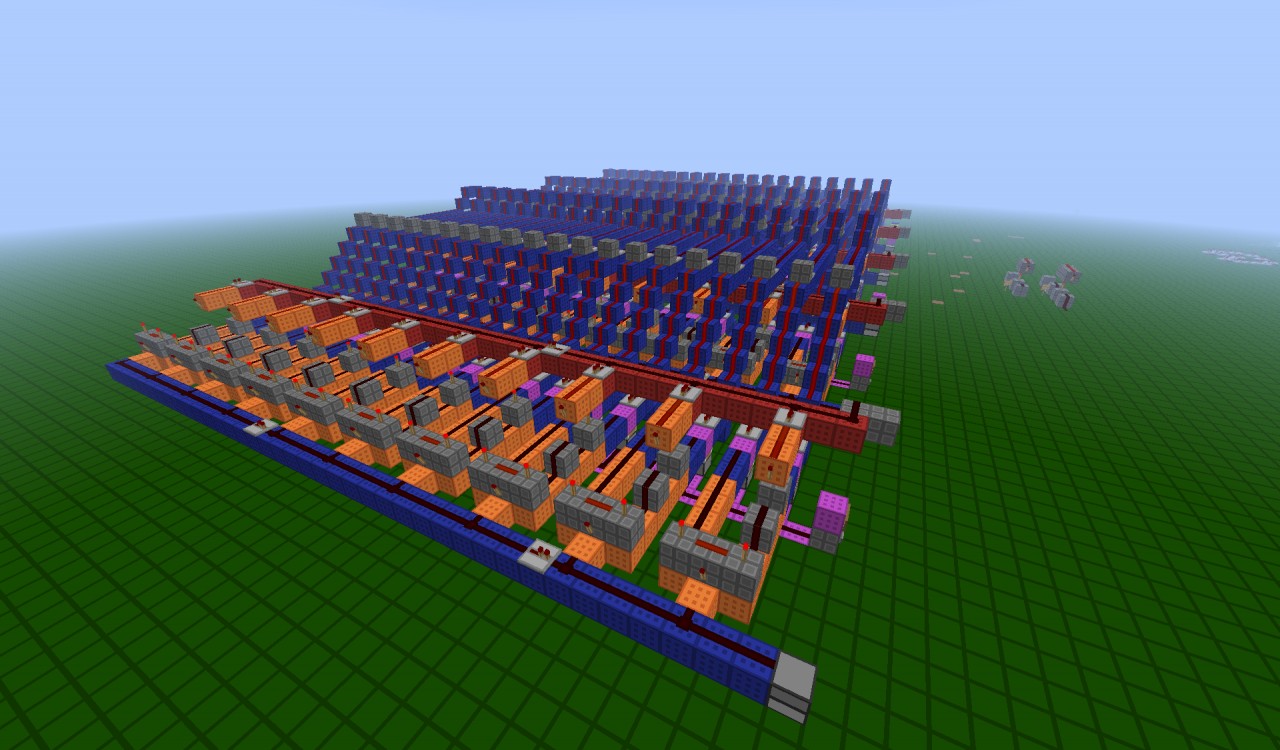
This device is able to store prices of different items and spit out items when there price is entered! This device will use SethBling's item detector to detect a form of currency imputed when 1.3 comes out, so stay tuned for an update around then!
Here are the insructions of how to work this machine. I have no way of recording a tutorial really, so if someone wants to do one contact me.
Specs:
Processing speed - Pretty Dang Fast.
Total number of Items it can sell - 5
Prices that items can be set to - 10
Size - Big
Step 1: Go to one of the Selection Slots. These will have purple wiring, and a lever. Flip a lever to one of those Selection Slots. Also put an item into the dispencer of that Selection Slot.
Step 2: Go to the front and enter a price(numbers 1-10) at the front. This will automatically save the price.
Step 3: Close that Selection Slot by flipping the lever off.
Step 4: Go and open the other Selection Slots and enter prices for them, then flip the levers back off. (Not necessary.)
Step 5: Go flip the lever of the thing you to buy back on.
Step 6: Press the Enter button for however much you set the price(if price was 5, press the Enter button 5 times).
(When 1.3 comes out I will make the device that detects the currency when it is put in, so you wont be able to press the Enter button.)
Notice that the save slot will only output a signal to activate a dispencer when you have pressed the button at least the price number.
Once done, you can press the Cancel button to cancel the pressing of the Enter button, and you can press the Delete buttons to delete save slots.
Special thanks to SethBling for his Item Detector, for I wouldn't have created this if he hadn't created his detector.
Once 1.3 comes out, I will make a Control Center for this device.
Blue wiring means General Wiring.
Red wiring means it pertains to Deleting.
Yellow wiring means it pertains to Canceling.
Orange wiring means it pertains to Saving.
Purple wiring means it pertains to Choice Making.
Here are the insructions of how to work this machine. I have no way of recording a tutorial really, so if someone wants to do one contact me.
Specs:
Processing speed - Pretty Dang Fast.
Total number of Items it can sell - 5
Prices that items can be set to - 10
Size - Big
Step 1: Go to one of the Selection Slots. These will have purple wiring, and a lever. Flip a lever to one of those Selection Slots. Also put an item into the dispencer of that Selection Slot.
Step 2: Go to the front and enter a price(numbers 1-10) at the front. This will automatically save the price.
Step 3: Close that Selection Slot by flipping the lever off.
Step 4: Go and open the other Selection Slots and enter prices for them, then flip the levers back off. (Not necessary.)
Step 5: Go flip the lever of the thing you to buy back on.
Step 6: Press the Enter button for however much you set the price(if price was 5, press the Enter button 5 times).
(When 1.3 comes out I will make the device that detects the currency when it is put in, so you wont be able to press the Enter button.)
Notice that the save slot will only output a signal to activate a dispencer when you have pressed the button at least the price number.
Once done, you can press the Cancel button to cancel the pressing of the Enter button, and you can press the Delete buttons to delete save slots.
Special thanks to SethBling for his Item Detector, for I wouldn't have created this if he hadn't created his detector.
Once 1.3 comes out, I will make a Control Center for this device.
Additional Notes
This project is on my main Redstone World, so I will have other unfinished projects on the map.Blue wiring means General Wiring.
Red wiring means it pertains to Deleting.
Yellow wiring means it pertains to Canceling.
Orange wiring means it pertains to Saving.
Purple wiring means it pertains to Choice Making.
1 Update Logs
Update #1 : by Starwarrior25 07/02/2012 12:25:55 pmJuly 2, 2012 @ 4:25 pm UTC
Found missing wiring and repeaters. Market is now fixed
More like this
 RedStone room v1Redstone Device Map
 Magnet_man16
11/11/12 4:45
• posted 11/19/11 3:52
1.5k 161 12x 382
Magnet_man16
11/11/12 4:45
• posted 11/19/11 3:52
1.5k 161 12x 382


 Sierra_G_117
 ValenceMPC
 CovertSuperior8
 nathanlom
887035
2


 FolkIsntAtlas
 Smurmi
 DreamWanderer




 Nayko206

 Bertoxx
 ProfessorVatcraft
 SOBERANO
Have something to say?