


• • 6/3/12 12:11 am • 1 logs
- 1.7k views • 0 today
- save_alt 210 downloads
- Game Version
- Minecraft 1.2
- Resolution
- 16x
- Progress
- 50% complete
- Changes include
- GUI
- Items
- Misc
- Mobs
- Terrain

12
About the Texture Pack
This is my 3rd Texture Pack.
It didnt really take me long to do the blocks i've done so far, but if you feel like it give me a diamond!
It would be nice for some feedback (for improvements) too!
YOU MUST USE MCPATCHER FOR THIS ONE (if you dont want to, then get my normal one here)
Check out my 64x64 version here
really this was just an experiment for me on how to do animations...
1. Download my Texture Pack
2. Download Mcpatcher from here
3. Go into Mcpatcher and select hd textures (this will use my custom water and custom lava)
4. Click patch minecraft
5. Put my texture pack in your texture pack folder;
Windows XP: click start and click run, then type in %appdata% and go into the .minecraft folder.
Windows 7: click start and in the type in %appdata% OR roaming (it doesnt matter) and go into your .minecraft folder.
Mac OS X: right click on FInder OR control click, click go to folder, in there type in: users/XXXXX/library
(XXXXX = your username) go into application support and scroll down until you find the minecraft folder.
6.In your minecraft or .minecraft folder go into texture packs and put my texture pack in there.
7. Go into minecraft and select my texture pack
8. ENJOY
1. A lot more blocks.
1. Stone block
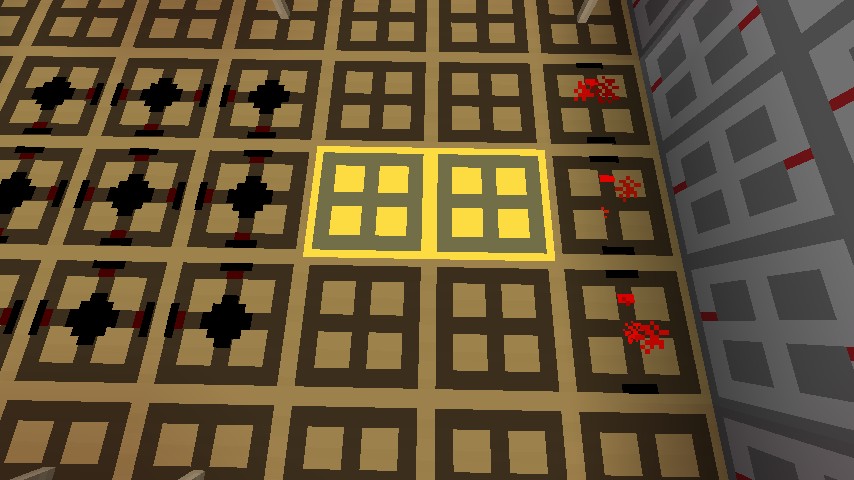
2. Redstone wires
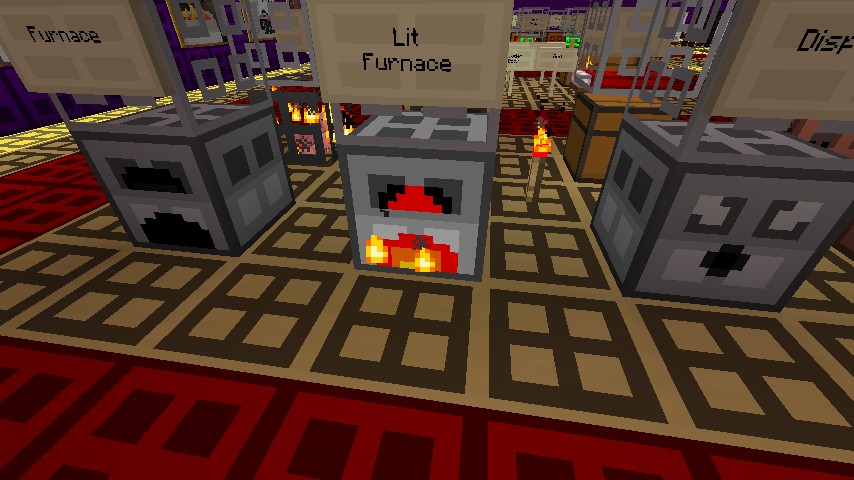
3. Burning Furnace
4. TNT block
This is my 3rd Texture Pack.
It didnt really take me long to do the blocks i've done so far, but if you feel like it give me a diamond!
It would be nice for some feedback (for improvements) too!
YOU MUST USE MCPATCHER FOR THIS ONE (if you dont want to, then get my normal one here)
Check out my 64x64 version here
really this was just an experiment for me on how to do animations...
Installation
1. Download my Texture Pack
2. Download Mcpatcher from here
3. Go into Mcpatcher and select hd textures (this will use my custom water and custom lava)
4. Click patch minecraft
5. Put my texture pack in your texture pack folder;
Windows XP: click start and click run, then type in %appdata% and go into the .minecraft folder.
Windows 7: click start and in the type in %appdata% OR roaming (it doesnt matter) and go into your .minecraft folder.
Mac OS X: right click on FInder OR control click, click go to folder, in there type in: users/XXXXX/library
(XXXXX = your username) go into application support and scroll down until you find the minecraft folder.
6.In your minecraft or .minecraft folder go into texture packs and put my texture pack in there.
7. Go into minecraft and select my texture pack
8. ENJOY
Things To Do
1. A lot more blocks.
Things Done
1. Stone block
2. Redstone wires
3. Burning Furnace
4. TNT block
1 Update Logs
Update #1 : by retribution19 06/03/2012 12:11:57 amJune 3, 2012 @ 4:11 am UTC
discontinued.... :(
More like this
 Quadratum 2.1 (discontinued)16x Minecraft 1.2 Simplistic Texture Pack
 retribution19
7/14/12 9:55
• posted 1/17/12 8:18
12.4k 1.7k 24x 10162
retribution19
7/14/12 9:55
• posted 1/17/12 8:18
12.4k 1.7k 24x 10162 Quadratum 64x64 (discontinued)64x Minecraft 1.2 Simplistic Texture Packretribution19
7/14/12 9:53
• posted 3/11/12 3:07
3.8k 223 8x 15
Quadratum 64x64 (discontinued)64x Minecraft 1.2 Simplistic Texture Packretribution19
7/14/12 9:53
• posted 3/11/12 3:07
3.8k 223 8x 15 Nerfs pack 16x1616x Minecraft 1.4 beta Simplistic Texture Pack
 Nerfenhurder
•10/21/12 2:48
2.4k 159x 531
Nerfenhurder
•10/21/12 2:48
2.4k 159x 531 Lame Pack 16x16x Minecraft 1.7.4 Simplistic Texture Pack
 TheSioux7065
•1/22/14 6:19
1.1k 135 2x 52
TheSioux7065
•1/22/14 6:19
1.1k 135 2x 52 Dizztoons 16x16 Cartoon Texture Pack!16x Minecraft 1.1 Simplistic Texture Pack
 Crazedcrafter1
•1/23/12 4:54
864 80 1x 11
Crazedcrafter1
•1/23/12 4:54
864 80 1x 11
661218
4


 Ray Rocketchu

 User6751809G

 kelmdel

 douxPR
 pvpjonas
 AdamkoAxoDragon
Have something to say?