


• • 7/14/12 9:55 pm • 20 logs
- 12.4k views • 0 today
- save_alt 1.7k downloads
- Game Version
- Minecraft 1.2
- Resolution
- 16x
- Progress
- 100% complete
- Changes include
- Environment
- GUI
- Items
- Misc
- Mobs
- Terrain
Added CreditTyken132


12

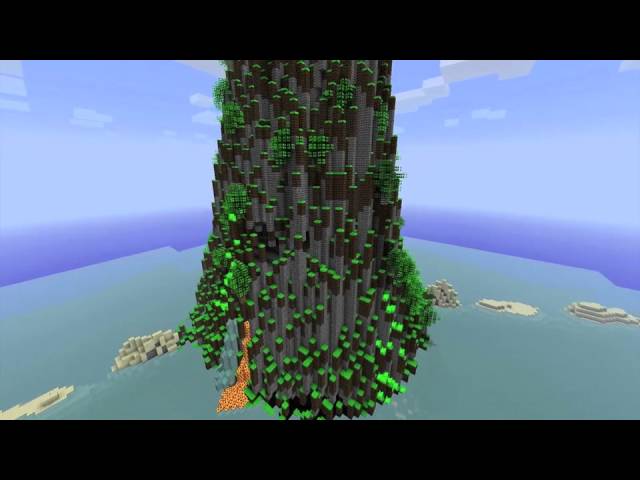
About the Texture pack (discontinued)
SORRY THE VIDEO SAYS QUAD CORE, IT'S NOW QUADRATUM
This is my second texture pack.
It took me awhile to make this so please give me some diamonds and some feedback.
(Really I would prefer feedback over diamonds)
But i like diamonds too!
This is made for miencraft 1.2.4 but works with all previous versions too.
Check out the video of the 64x64 version
IM HAVING A BREAK FROM MAKING TEXTURES, I'LL PROBABLY COME BACK IN A WEEK OR TWO.
Quadratum means square in Latin.
Installation
1. Download my texture pack
2. Download Mcpatcher from here
3. Go into Mcpatcher and select hd textures (this will use my custom water and custom lava)
4. Click patch minecraft
5. Put my texture pack in your texture pack folder;
Windows XP: click start and click run, then type in %appdata% and go into the .minecraft folder.
Windows 7: click start and in the type in %appdata% OR roaming (it doesnt matter) and go into your .minecraft folder.
Mac OS X: right click on FInder OR control click, click go to folder, in there type in: users/XXXXX/library
(XXXXX = your username) go into application support and scroll down until you find the minecraft folder.
6.In your minecraft or .minecraft folder go into texture packs and put my texture pack in there.
7. Go into minecraft and select my texture pack
8. ENJOY
Things to do
1. Update to 1.2.3
2. Finish doing the textures
3. Finish armour in items.png
4. Do mobs
5. Do some items (dont know when ill get to it)
6. Armour (dont know when ill get to it)
7. Add some more images
8. Change the information presentation on planetminecraft.com (get rid of so many colours)
8. Make a higher resolution Quad Core texture pack. (Released)
9. Make a better video
10. Animate some blocks
11. Change long grass texture (cant find texture in terrain.png for some reason!?)
12. Update to 1.2.4
Things you might want to know
Tyken132 is in the credits for 2 reasons and they are:
1. Because i used his texture testing map to test my texture pack.
2. Because i have included a part of his map in one of the pictures.
Additional Notes
Give me a diamond!20 Update Logs
Update #20 : by retribution19 07/14/2012 9:55:10 pmJuly 15, 2012 @ 1:55 am UTC
Fixed link
LOAD MORE LOGS
More like this
 Smooth Craft 1.3 (Discontinued)16x Minecraft 1.3 beta Simplistic Texture Pack
 Clinthoney
8/1/12 9:16
• posted 1/9/12 6:35
6.7k 1.2k 16x 12112
Clinthoney
8/1/12 9:16
• posted 1/9/12 6:35
6.7k 1.2k 16x 12112 Ultracraft 1.6.2(Discontinued)16x Minecraft 1.6 Simplistic Texture Pack
 Duckgod
8/31/13 5:36
• posted 6/15/13 8:15
3.8k 445 7x 362
Duckgod
8/31/13 5:36
• posted 6/15/13 8:15
3.8k 445 7x 362 Quadratum 64x64 (discontinued)64x Minecraft 1.2 Simplistic Texture Pack
 retribution19
7/14/12 9:53
• posted 3/11/12 3:07
3.8k 222 8x 15
retribution19
7/14/12 9:53
• posted 3/11/12 3:07
3.8k 222 8x 15 Quadratum 16x16 animated (discontinued)16x Minecraft 1.2 Simplistic Texture Packretribution19
6/3/12 12:11
• posted 3/14/12 5:26
1.7k 209 1x 42
Quadratum 16x16 animated (discontinued)16x Minecraft 1.2 Simplistic Texture Packretribution19
6/3/12 12:11
• posted 3/14/12 5:26
1.7k 209 1x 42 Simplex pack 1.2.516x Minecraft 1.2.5 Simplistic Texture Pack
xemness64 •7/7/12 2:46
1k 195 1x 111
494755
4


 SonictheSkinner

 User6656435G
 Scary_Tarantula

 littletorby

 Grapegamer8978
 Gameflowplayz
 EnderGideon
 nikinok

Have something to say?
Yours sincerly, a new fan.