


• 1/13/25 8:56 pm
- 1.4k views • 1 today
- save_alt 95 downloads
- Game Version
- Minecraft 1.21.4
- Resolution
- 16x
- Progress
- 100% complete
- Changes include
- Art
- Misc
- Models


204
Resource Pack Indicators
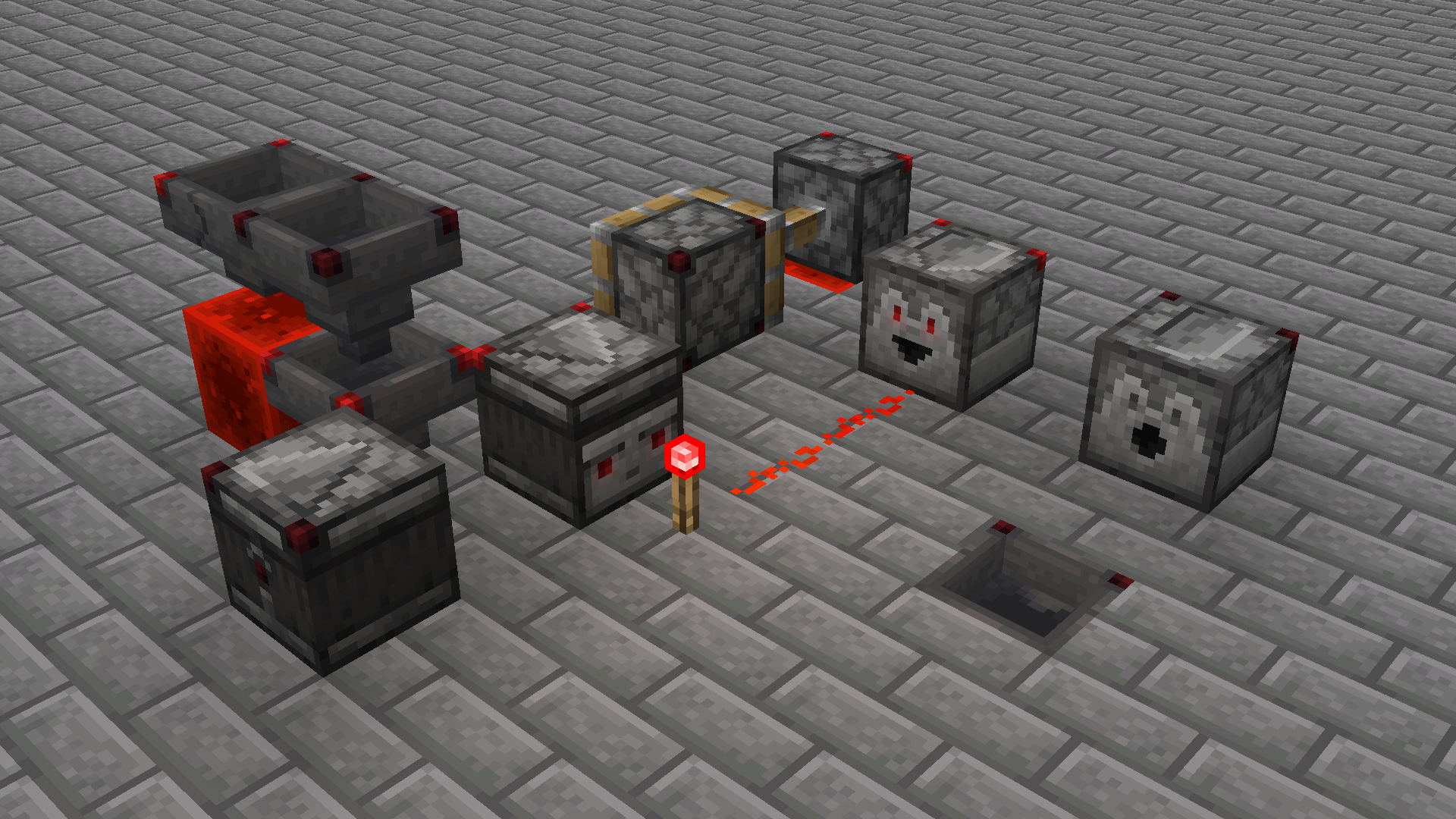
A resource pack that adds the crafter's corner indicators to all redstone inventory blocks, among some other things:
- Pistons and observers also have said corner indicators
- Dispensers, droppers, and observers also flash their eyes on when activated
- Hoppers have various arrows that point to their direction when facing sideways
More like this

 Hexadecimal Redstone Dust16x Minecraft 1.21.5 Other Texture Pack
 3D_Fruiter
•5/7/25 1:18
2k 349x 21
3D_Fruiter
•5/7/25 1:18
2k 349x 21

 Waxed Indication16x Minecraft 1.17 Other Texture Pack
 Crimson_Bear
•6/23/21 11:18
1.2k 72 1x 394
Crimson_Bear
•6/23/21 11:18
1.2k 72 1x 394
 Mothbox
 Amogus2077
 Aldy_0x2
5626789
4


 NoodlesTheWinion


 Noctuspotkus


 IvanTheInsane
 hoppy__
![[26.4-Snapshot-2] (fixed) BVI – FogZero (No Fog, Clear Water & Lava + Transparent Lava Surface) | No Optifine | No ModLoader Minecraft Texture Pack](https://static.planetminecraft.com/files/image/minecraft/texture-pack/2026/577/20187310-image_s.jpg)
 Sgt_Bierfrost
 ADRI GAMER
Have something to say?
A few minor questions:
It does not appear that one would be able to determine either orientation or power state from directly below;
The sides of droppers & dispensers look either the same (or very close to it)
The directional indicators on the sides seem like they would be covered if the top of the block was flush with top slabs (& possibly trapdoors)
Other than which quibbles, an attractive pack with an emphasis on subtlty (particularly as reagards the locked hopper marker). 🍻
- That's as simple as changing the texture, honestly not sure why I didn't already do that.
- For differentiating dispensers & droppers on the sides, I don't think I wanna do basic arrows but definitely something else. I'll play around with my options.
- The corner lights should be visible on the sides still if the top face of a block is covered, so I don't think I entirely understand this point.
Definitely some edits that can be made next update, probably whenever the spring drop happens.SSS [S=top slab, D=dropper] top view
SDS
SSS
SDS . . . . . . . . . . . side view
P=player looking up ↖ at the side of the dropper in the top slab ceiling
The corner lights would be visible if one was above the component, but not [I think] if one was looking up at a component embeded in a ceiling of top slabs…
            "faces": {
                "down":  { "uv": [ 0, 0, 16, 16 ], "texture": "#top", "cullface": "down" },
                "up":    { "uv": [ 0, 16, 16, 0 ], "texture": "#top", "cullface": "up" },
                "north": { "uv": [ 0, 0, 16, 16 ], "texture": "#front", "cullface": "north" },
                "south": { "uv": [ 0, 0, 16, 16 ], "texture": "#bottom", "cullface": "south" },
                "west":  { "uv": [ 16, 0, 0, 16 ], "texture": "#side", "cullface": "west" },
                "east":  { "uv": [ 0, 0, 16, 16 ], "texture": "#side", "cullface": "east" }