



• 12/10/15 9:21 am
- 17.5k views • 0 today
- save_alt 2.2k downloads
- Game Version
- Minecraft 1.8.1
- Resolution
- 32x
- Progress
- 100% complete
- Changes include
- Font
- GUI
- Particles

91
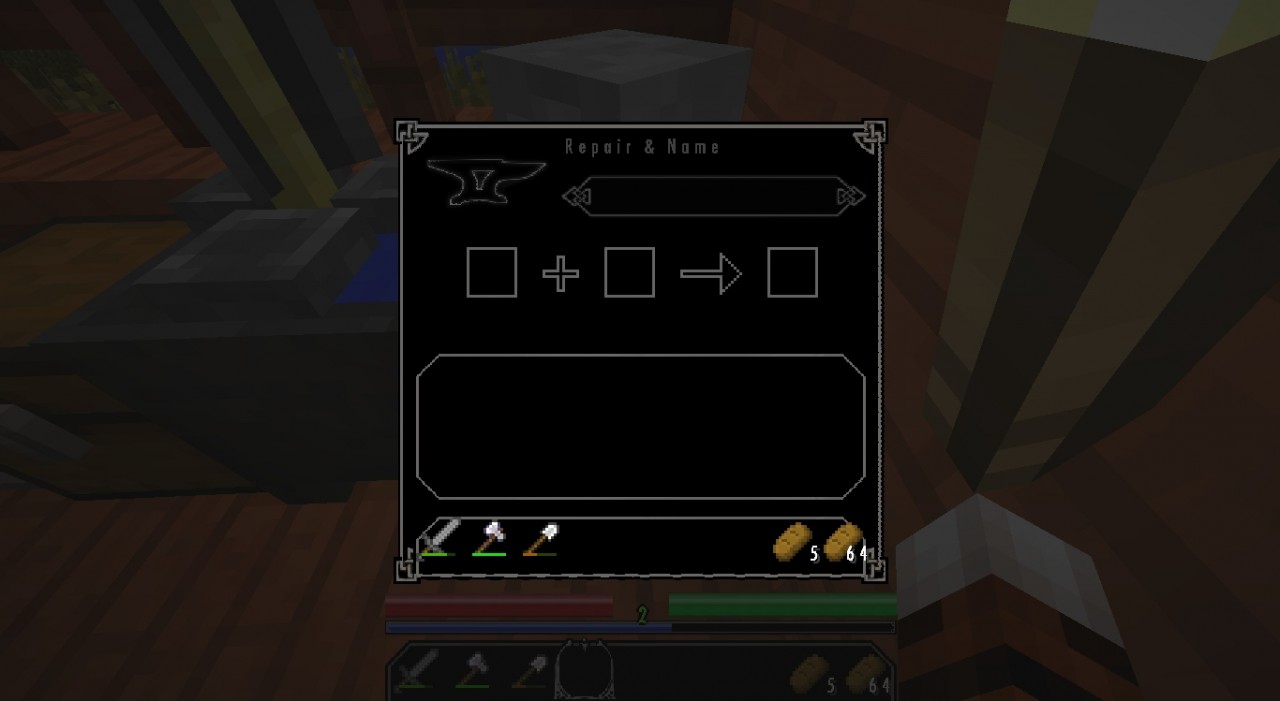
This is my new GUI pack based on The Elder Scrolls V: Skyrim. Hope you enjoy! Feel free to do a review on YouTube as long as you link back here in the description. I also would appreciate it if you could send me a link to said video when it's done too. This is my first 32x pack (yay). I also added special enchanting particles to this one (yay again).
Thanks, Hobbes :)
Thanks, Hobbes :)
More like this
 Skyrim Themed Texture Pack128x Minecraft 1.2 Themed Texture Pack
 Savremo
3/27/12 6:27
• posted 3/26/12 9:03
44.7k 9.1k 20x 7106
Savremo
3/27/12 6:27
• posted 3/26/12 9:03
44.7k 9.1k 20x 7106![Royal Atlantean GUI Pack [Updated for 1.9] Minecraft Texture Pack](https://static.planetminecraft.com/files/resource_media/screenshot/1530/2015-07-22_0836539178704_thumb.jpg) Royal Atlantean GUI Pack [Updated for 1.9]16x Minecraft 1.9.4 Themed Texture Pack
Royal Atlantean GUI Pack [Updated for 1.9]16x Minecraft 1.9.4 Themed Texture Pack Ventgirl_Joanne
•7/22/15 8:50
16.9k 2.5k 8x 6197
Ventgirl_Joanne
•7/22/15 8:50
16.9k 2.5k 8x 6197 Middle Earth GUI Pack16x Minecraft 1.8.1 Themed Texture PackVentgirl_Joanne
•11/10/15 9:56
13.3k 1.7k 20x 52813
Middle Earth GUI Pack16x Minecraft 1.8.1 Themed Texture PackVentgirl_Joanne
•11/10/15 9:56
13.3k 1.7k 20x 52813 Art Deco GUI Pack16x Minecraft 1.8.1 Themed Texture PackVentgirl_Joanne
•11/3/15 9:55
10.5k 864 5x 43014
Art Deco GUI Pack16x Minecraft 1.8.1 Themed Texture PackVentgirl_Joanne
•11/3/15 9:55
10.5k 864 5x 43014![Darkmauw GUI Pack [32x] Minecraft Texture Pack](https://static.planetminecraft.com/files/resource_media/screenshot/1447/2014-11-23_1837018358885_thumb.jpg) Darkmauw GUI Pack [32x]32x Minecraft 1.8 Themed Texture Pack
Darkmauw GUI Pack [32x]32x Minecraft 1.8 Themed Texture Pack Pauw
•11/24/14 3:02
3.6k 804 9x 652
Pauw
•11/24/14 3:02
3.6k 804 9x 652
3542558
4




 Token67



![Warden cosmetics [HMCCosmetics] Minecraft Texture Pack](https://static.planetminecraft.com/files/image/minecraft/texture-pack/2026/249/20117401-warden_s.jpg)
 w11shes
![Guardian cosmetics [HMCCosmetics] Minecraft Texture Pack](https://static.planetminecraft.com/files/image/minecraft/texture-pack/2026/252/20117403-guardian_s.jpg)
![Ghast rider cosmetics [HMCCosmetics] Minecraft Texture Pack](https://static.planetminecraft.com/files/image/minecraft/texture-pack/2026/627/20115365-rider-cosmetics-title_s.jpg)
![Copper cosmetics [HMCCosmetics] Minecraft Texture Pack](https://static.planetminecraft.com/files/image/minecraft/texture-pack/2026/632/20115369-copper-cosmetics-title_s.jpg)

 Paravoxel
Have something to say?
Though it really wouldn't match well with the default resource pack but still good nothertheless!
Hotbar was fine though
The question is if the support applies to the gui you modify.
Best would be to simply try it, then you'll know more.
Maybe that'd be an idea :) - it also won't cause issues with other mods.