


• 7/6/22 4:53 pm
- 1.8k views • 0 today
- save_alt 189 downloads
- Game Version
- Minecraft 1.19
- Resolution
- 16x
- Progress
- 100% complete
- Changes include
- Items


0
Hello Welcome to my resource pack!
This pack includes the retextures of :
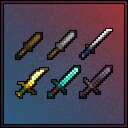
-Sword (Netherite, Diamond, Iron, Stone, Gold, and Wood)
-Pickaxe (Netherite, Diamond, Iron, Stone, Gold, and Wood)
-Axe (Netherite, Diamond, Iron, Stone, Gold, and Wood)
-Shovel (Netherite, Diamond, Iron, Stone, Gold, and Wood)
-Hoe (Netherite, Diamond, Iron, Stone, Gold, and Wood)
This resource/texture pack is used to retexture all of these items and give them either eyes or full faces.
To put the pack into minecraft, place the zipped folder into your resource packs folder in .minecraft and then unzip it. When you open up minecraft go to settings then into resource packs and select it DONE!
If you can't find your .minecraft folder, go into minecraft and then go to settings and go into the resource pack section then click open pack folder. It'll take you straight into your resource pack folder in .minecraft and then put the zipped file straight in there and unzip it DONE!
ENJOY!!
(Also if you wind up using this in some sort of playthrough or youtube video plz do credit me with my youtube channel link)
Oi Check out my YouTube THX : www.youtube.com/channel/UC-Hj1YuWteS-PcHiq1VCWDg
This pack includes the retextures of :
-Sword (Netherite, Diamond, Iron, Stone, Gold, and Wood)
-Pickaxe (Netherite, Diamond, Iron, Stone, Gold, and Wood)
-Axe (Netherite, Diamond, Iron, Stone, Gold, and Wood)
-Shovel (Netherite, Diamond, Iron, Stone, Gold, and Wood)
-Hoe (Netherite, Diamond, Iron, Stone, Gold, and Wood)
This resource/texture pack is used to retexture all of these items and give them either eyes or full faces.
To put the pack into minecraft, place the zipped folder into your resource packs folder in .minecraft and then unzip it. When you open up minecraft go to settings then into resource packs and select it DONE!
If you can't find your .minecraft folder, go into minecraft and then go to settings and go into the resource pack section then click open pack folder. It'll take you straight into your resource pack folder in .minecraft and then put the zipped file straight in there and unzip it DONE!
ENJOY!!
(Also if you wind up using this in some sort of playthrough or youtube video plz do credit me with my youtube channel link)
Oi Check out my YouTube THX : www.youtube.com/channel/UC-Hj1YuWteS-PcHiq1VCWDg
More like this
 Voob’s Better Tools16x Minecraft 1.21.11 Simplistic Texture Pack
 Voobit
2/21/26 7:01
• posted 10/17/23 8:58
12.2k 3.3kx 23327
Voobit
2/21/26 7:01
• posted 10/17/23 8:58
12.2k 3.3kx 23327![Tools Retextured [1.20+] Minecraft Texture Pack](https://static.planetminecraft.com/files/image/minecraft/texture-pack/2023/162/17031053_s.jpg) Tools Retextured [1.20+]16x Minecraft 1.20 Simplistic Texture Pack
Tools Retextured [1.20+]16x Minecraft 1.20 Simplistic Texture Pack Pixel1012
•8/4/23 8:05
11.5k 516 7x 82315
Pixel1012
•8/4/23 8:05
11.5k 516 7x 82315 Vanilla Tools+ 2.016x Minecraft 1.18 Simplistic Texture Pack
 Sheepmilk
•2/20/22 9:37
4.4k 106 2x 873
Sheepmilk
•2/20/22 9:37
4.4k 106 2x 873 Some Cool Tools! - Java16x Minecraft 1.19 Simplistic Texture Pack
 Bothrops_Jararaca
•1/8/23 1:25
2.3k 150x 763
Bothrops_Jararaca
•1/8/23 1:25
2.3k 150x 763 Beautiful Instruments16x Minecraft 1.19 Simplistic Texture Pack
 Nchan
•7/29/22 8:43
1.3k 19x 233
Nchan
•7/29/22 8:43
1.3k 19x 233
5635102
4











 Grapegamer8978
 GameFlowPlayz
 EnderGideon
 nikinok
 limewire2000
Have something to say?