


• • 10/27/24 5:41 pm • 1 logs
- 1.8k views • 1 today
- save_alt 316 downloads • 1 today
- Game Version
- Minecraft 1.19.4
- Resolution
- 16x
- Progress
- 100% complete
- Changes include
- Art
- Misc
- Models
Added CreditVanilla Tweaks team


53
Summary
See what's in your containers, like never before! Containers as-seen in Vanilla Tweaks' visual cauldrons and composters are re-designed to have physical manifestations of holes in the sides of each, which enables other mods (such as Bedrockify) to use block-specific tinting without the need to use image trickery.Purpose
To replace models as-necessary for the express purpose of adding real holes into them, so that the contents of cauldrons, as well how much compost is in a bin can be seen without the need to use additional block side images, as Vanilla Tweaks does with their own visual composters and cauldrons..Changes
Aside from the holes, there are other changes committed to the models:— The bottoms of each cauldron have four extra cubes in the bottom to lower the cauldron's bottom by 1/16th block size
- template_cauldron_1 has a smaller water cube model to prevent Z-collision on the four extra cube faces.
- All Bedrockify-provided cauldron models have their parents replaced with the templates provided in this pack.
- cmp_vt — Vanilla Tweaks' intended visual appearance, with the taller window enabling a (slightly) better view of the interior contents.
- emp_stubby — My interpretation of the visual composter, using the smaller window provided by visual cauldrons for consistency.
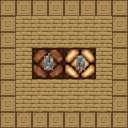
The provided pack.png is a little disingenuous, as the default composter model parent uses the Vanilla Tweaks style which has a window that is a bit taller. To use the shorter window, there are two ways to go about this:
- Extract the contents of this pack to a separate directory (you should normally be able to do this from your system instance's context menu) and edit /assets/minecraft/models/block/composter.json
- Use the advice above, except create a new directory in /resourcepacks for your personal changes (if you don't do that already) and create the directory path shown, then using a word processor / text editor / IDE create a new file as shown;
composter.json
{
    "parent": "block/cmp_stubby",
}
Not all models provided are used. The above advice can also enable you to edit fluid levels for each cauldron state as-desired by modifying the models which use cauldron template models in /assets/minecraft/models/block.
Devlog
10/27/2024
Modified compost contents to have cubes which start at the bottom of the composter, rather than beneath the composter which resolved an issue with texturing for stages 6 and 7 where no texture was applied to part of the cube. This was out-of-sight but still an issue.Modified cauldron and templates to use models with correct UV alignment.
Resolved previous non-logged archive changes where glass was used for a composter test model. Sorry about that.
Performance
Because of how these models are made, having a lot of cauldrons and / or composters which wouldn't likely be a problem when an abnormal amount of them are in a chunk could be a problem with this mod installed.Normally, the composter is made of six (6) cubes (plus one for the compost contents) and thirteen (13) for the cauldron (with contents, including the eight feet cubes).
The models include increase these figures to seventeen (17, with compost) and thirty (30, with contents). If you encounter trouble with these models, let me know and I will consider a simplified version of the cauldron which will include slightly fewer cubes, at the expense of one less possible fluid level.
Support
Bedrockify is the only supported mod which these models will function for. If, however there are others; let me know and I will add them as they are made known to me!Because the addition of Bedrock-specific Cauldron mechanics in Bedrockify is very recent compared to when Bedrockify was a thing for Fabric users, support for this begins with 1.19.4 and is valid from then, to today's Minecraft.
1 Update Logs
A (slightly broken) update : by Hebgbs 10/27/2024 5:41:16 pmOctober 27, 2024 @ 9:41 pm UTC
Still trying to understand how to do the supported format stuff. Expect another update for that soon.
If you added this pack into your game and see anything funky / not as it should, then — unless I seriously messed up — downloading it again should correct the problems encountered.
I was experimenting with things in an endeavour to improve the pack by reducing the cubes required for the effect i am going for. Didn't turn out good. But I did correct the UV alignment issues cauldron models had and spiffed up the compost contents to not have cubes taller than the texture provided… not that you could see that, or care. After I commit the source files to my GitHub you can do some comparisons.
If you added this pack into your game and see anything funky / not as it should, then — unless I seriously messed up — downloading it again should correct the problems encountered.
I was experimenting with things in an endeavour to improve the pack by reducing the cubes required for the effect i am going for. Didn't turn out good. But I did correct the UV alignment issues cauldron models had and spiffed up the compost contents to not have cubes taller than the texture provided… not that you could see that, or care. After I commit the source files to my GitHub you can do some comparisons.
More like this
 3D Tools (Faithful)16x Minecraft 1.17 Other Texture Pack
 DeraTheHunter
•8/18/21 6:53
7.7k 1.2k 10x 111918
DeraTheHunter
•8/18/21 6:53
7.7k 1.2k 10x 111918 Animated Lava Golem 3D Model16x Minecraft 1.20 Other Texture Pack
 Elite Creatures
•6/27/23 2:27
5k 455 3x 11716
Elite Creatures
•6/27/23 2:27
5k 455 3x 11716
 Visual Levers16x Minecraft 1.20 Other Texture Pack
 CatMeowsBack824
12/8/23 7:35
• posted 9/13/23 12:11
1.2k 69x 254
CatMeowsBack824
12/8/23 7:35
• posted 9/13/23 12:11
1.2k 69x 254
 JusteKal
 Timy-
Timy-6443844
4

![[(EMF + ETF) / OptiFIne] Vanilla Tweaks' "World of Color" variated slimes Minecraft Texture Pack](https://static.planetminecraft.com/files/image/minecraft/texture-pack/2024/944/17937302-pack_s.jpg)











 Lorenz185
![Stellaris Bedwars [16x] | PVP 1.8.9 | FPS BOOST! Minecraft Texture Pack](https://static.planetminecraft.com/files/image/minecraft/texture-pack/2026/624/20124534-chatgptimagesep-pm_s.jpg)
 kaaam_yt
 goaty epic
 TheHonouredOLC
 R4CCA77ACK
Have something to say?
tl;dr: don't expect simplified composters any time soon.
The number of cubes, done the way I would had wanted it to re-work them would've been as follows;
Composter (w/ compost): 6 → 10
Cauldron (w/ content): 13 → 22