

• 2/4/20 10:48 pm
- 264.5k views • 15 today
- save_alt 67.7k downloads • 3 today
- Game Version
- Minecraft 1.15
- Resolution
- 16x
- Progress
- 100% complete
- Changes include
- Environment
- Terrain


22
for this pack to work to its fullest extent, turn off smooth lighting
this replaces most natural blocks with the torch model, (dirt, all stone, netherack, and grass)
And also outlines ores.
You must change the file format from a zip to a mcpack for it to work, then just open the file.
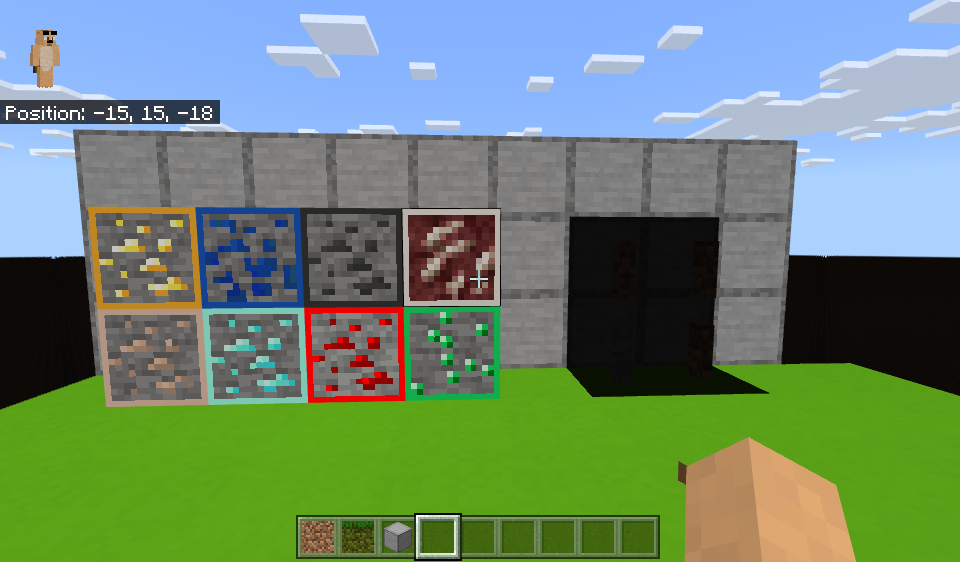
this replaces most natural blocks with the torch model, (dirt, all stone, netherack, and grass)
And also outlines ores.
You must change the file format from a zip to a mcpack for it to work, then just open the file.
More like this
 Fun Minecraft Texture Pack16x Minecraft 1.2 Experimental Texture Pack
 TWISTAxNINJA
•4/15/12 9:54
3.8k 129x 421
TWISTAxNINJA
•4/15/12 9:54
3.8k 129x 421 minecraft chess texture pack16x Minecraft 1.2.5 Experimental Texture Pack
 dodpoo6
•5/31/12 4:01
2.3k 113x 22
dodpoo6
•5/31/12 4:01
2.3k 113x 22

 My minecraft texture pack16x Minecraft 1.3.1 Experimental Texture Pack
 pingpong4zap
•9/25/12 11:15
521 62 1x 21
pingpong4zap
•9/25/12 11:15
521 62 1x 21
 mithivi
 Daxx
Daxx4485024
4





 AirFish Studio


 zanderest
 RalTu
RalTu
 asapacey2

 crackmine_kingstor_drossy_cake
Have something to say?