

• 3/30/23 3:13 pm
- 197 views • 0 today
- 5
- 2
- 3

94
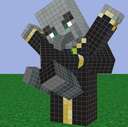
So when I try to edit certain parts of certain mob skins, like axolotl legs or goat beards It has like a second layer on it so when I try to edit that part the second layer stays how it was before. So if I were to replace an axolotl's legs with smiley faces it would still have a smiley face but if you look at it at a certain angle you can still see the original legs and it makes my skins look really low quality or bad. The picture that is attached to this blog is a goat's beard after one of the layers has been removed. (I can't remove the second layer)
As you guys may have noticed I am not very good at explaining things. So just check it out.
As you guys may have noticed I am not very good at explaining things. So just check it out.
More like this

-
-
 Do We have problems with Minecraft, when downloading a mod?Other Blog
 marioandluigilol
•3/24/13 11:21
138 2x 121
marioandluigilol
•3/24/13 11:21
138 2x 121
 AdriMakeRdmThings
 WhoIsR0ry
 MathiasCZ007
 Sir Microwaven
5897895
6













 cloudkitty
 OJ_or_Tea
 NobleRR01
 Ignmqloo
 Hav_5555
Have something to say?