

• 8/22/25 9:21 am
- 250 views • 0 today
- 9
- 5
- 5

445
How to use BBCode on PMC
because PMC's images like to MISBEHAVE
BBCode
What IS BBCode?
"BBCode ("Bulletin Board Code") is a lightweight markup language used to format messages in many Internet forum software. It was first introduced in 1998. The available "tags" of BBCode are usually indicated by square brackets ([ and ]) surrounding a keyword, and are parsed before being translated into HTML."
BBCode on PMC
BBCode is used on PMC to do basically all of this text and image stuff. You're using it any time you make a post and that little text screen comes up. By understanding the actual code instead of using the user friendly version of it, we can make it work a bit better in doing what we want it to do.
BBCode works a bit differently on PMC compared to how it normally works? So I went down a rabbithole, and here's what I learned!
I would really only bother with this if you're having a lot of trouble getting images to do what you want, or have problems getting certain areas of text to be of a certain alignment or size. The normal PMC editor works great for the most part, and I'd recommend using that to start and entering BBCode to polish it up at the end! Definitely helps avoid mistakes.
I found learning BBCode beneficial for giving myself manual control over text and image, and understanding why things go wrong so I can fix it. If that's of interest, I hope this is helpful!
To upload images, you need a link! Discord links to images aren't permanent. I personally use imgbb for this.
Upload to imgbb and make sure it's set to NOT autodelete!
Upload your image and copy the image address. This should give you a link to use.
I spent a good hour or so learning the basics so you don't have to, but I am by no means an expert at this because I only learnt the bare minimum for customizing my PMC profile. I'll be including explanations of the code and the code used for my page so that you can piggyback off of it or reference it, I don't really mind that much, but obviously don't copy my entire profile 'cos that's just rude. (Full code at the bottom of this post)
If you've never done any kind of coding before, this is kind of how these tags will work. Don't worry about what the tags mean just yet, we'll get into it. As you can see, everything is within those center tags, then the underline tag, then the style tags. This is important because we want to make sure we're closing tags in the correct order. Whatever we open with first will close LAST.

This is where you'll find the window in PMC to be doing all of this code- the source code button is located HERE!
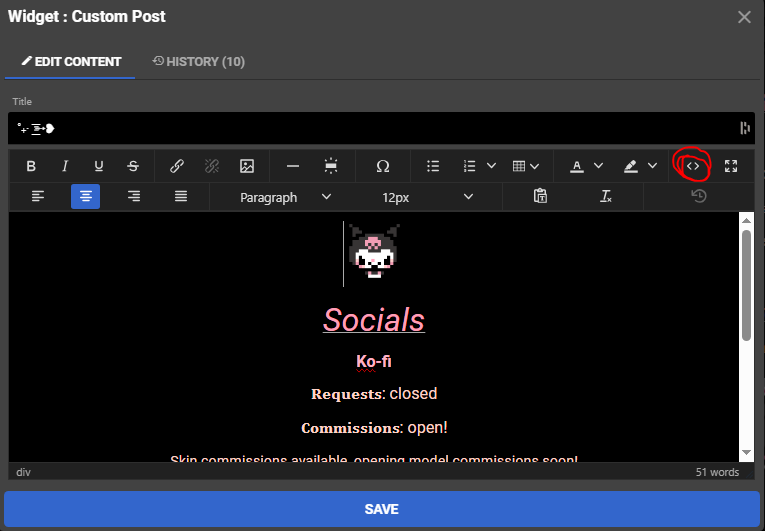
PMC doesn't support BBCode's usual break tag, you can just... press enter! This apparently isn't typical for BBCode, but a win is a win!
BBCode is usually one line of text, to my understanding.
Don't worry about this code too much, we'll go into it a bit deeper in a bit- but here's an example of opening and closing tags and line breaks.
[center][img width=70]https://i.ibb.co/KpQsZ7mX/Kuromi-1.gif[/img]
Socials
[size=18px][url=https://ko-fi.com/xaavia][color=#ffb3c5]Ko-fi[/color][/url][/size]
𝐑𝐞𝐪𝐮𝐞𝐬𝐭𝐬: closed
𝐂𝐨𝐦𝐦𝐢𝐬𝐬𝐢𝐨𝐧𝐬: open!
Skin commissions available, opening model commissions soon!

Discord:
xaavia
[img width=140]https://i.ibb.co/93YDMZkC/thanks.gif[/img][/center]
Socials
Ko-fi
𝐑𝐞𝐪𝐮𝐞𝐬𝐭𝐬: closed
𝐂𝐨𝐦𝐦𝐢𝐬𝐬𝐢𝐨𝐧𝐬: open!
Skin commissions available, opening model commissions soon!
Discord:
xaavia

Since all of those images and text are centered, it's sitting between one set of center tags! See how the image tags also open and close around the image links?
When should you close a tag? The main time you'll need to close tags is when you want to change something. You wouldn't leave an open text size 16 tag if you're about to change your text to size 13. I'd obviously want to close a header tag if I was moving into the paragraph! Sometimes I close tags just to feel neat though. Up to you, because ultimately, if it works it works!
When should you close a tag? The main time you'll need to close tags is when you want to change something. You wouldn't leave an open text size 16 tag if you're about to change your text to size 13. I'd obviously want to close a header tag if I was moving into the paragraph! Sometimes I close tags just to feel neat though. Up to you, because ultimately, if it works it works!
[u][style i size=24px color=#ff9eb5]Discord:[/style][/u]
[style size=16px color=#ffd3c7]xaavia[/style]
Here I closed the underline tag AND style tag to start my new line, which would be of a different size, color and without underline.
Speaking of tags, let's go into them a bit more...
See how everything in that big example before was in that set of center tags? Like I said above, unless you're changing it up, a lot of your text will be within one big set of tags, like how all of this text here is within a size tag and an alignment tag! It's all on the left and all a size 16.
So regardless of that break I just did, it's still within those same two tags. Oh, a color change is coming up! Now we should open up a color tag...
[color=#ffbed1]Style tags[/color] are what you'll be using for changing the style of your text most of the time, and especially if you're making a lot of changes at the same time.We opened and closed a color tag around that colored text below!Style tags are what you'll be using for changing the style of your text most of the time, and especially if you're making a lot of changes at the same time.
Here's some examples of some tags you might see.
hey!
[i]hey![/i]A lot of styles like underline and italics will be like this if you're doing them alone.
woah
[style i color=#ffbed1]woah[/style]Here, you can change the color of the text AND make it italics in the same style tag.
crazyy
[size=14px]crazyy[/size]There's also a size tag, but this also gets swallowed up by the style tag if you're doing it all at once.
oh my gahh
[style i size=18px color=#ffbed1]oh my gahh[/style]Aand there it is- for some reason, everything just becomes a style tag if done together. It seems to be bold/italics, size and then color- but the underline tag is different!
bruh
[u][style b i size=14px color=#ffbed1]bruh[/style][/u]No idea why! But it always does THAT with the underline tags. Here we can see bold AND italic in that style tag!
* If you're ever unsure of what tag to use, you can always edit your text in the default PMC text box and re-enter the BBCode window to see what tags are there! Just make sure you save your code off-site first, it can get a bit unreliable with saving.
Here's the step by step for that:
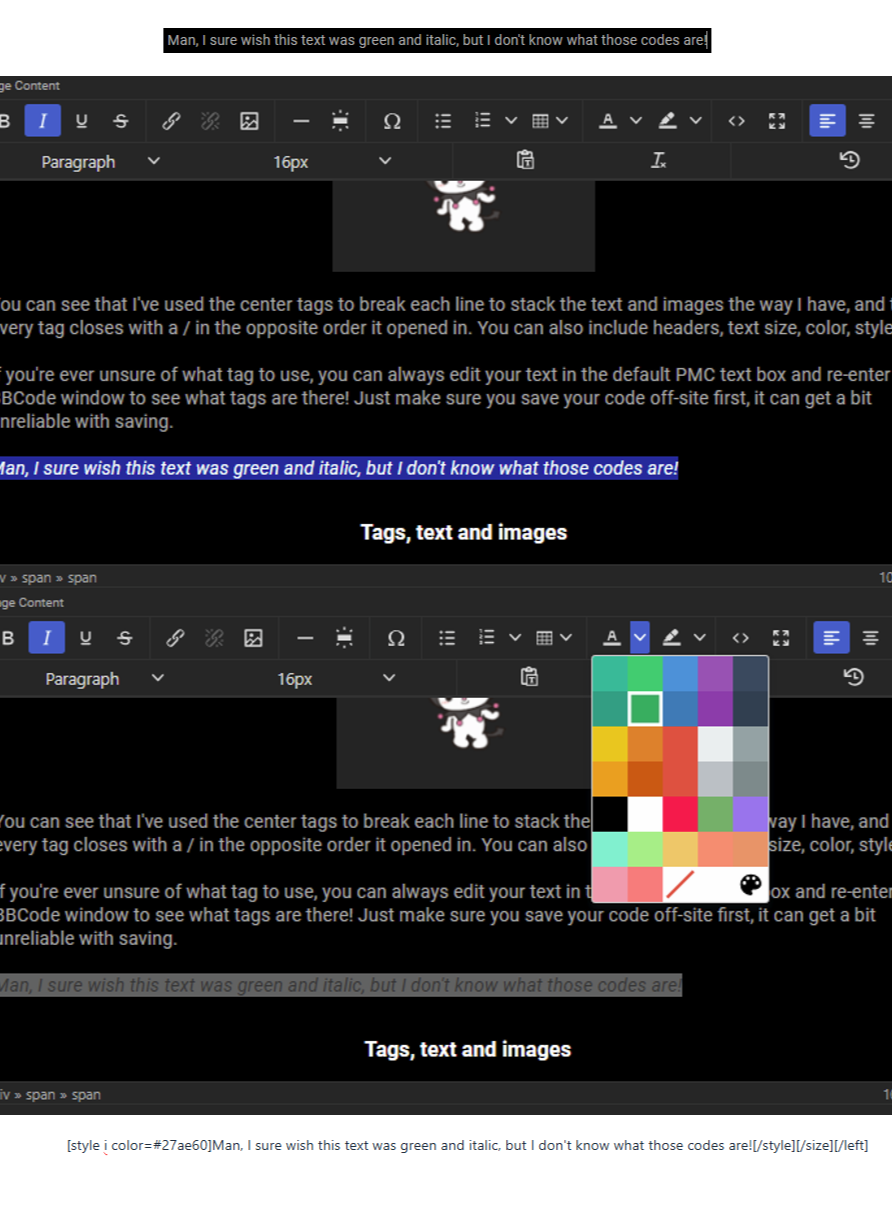
By using the normal editing window and then re-entering the BBCode, I can see the tags that PMC will use for that text and therefore learn from it! It's definitely a lot easier to use the normal editing window as much as possible, but it's really handy to learn and understand the BBCode to better control the layout of posts or fix weird errors.
[center][img width=200]https://i.ibb.co/cKRk8Xnz/my-melody-kuromi.gif[/img][/center]
[center][style i size=18px color=#ffd3c7]𝑜𝒸𝒸𝒶𝓈𝒾𝑜𝓃𝒶𝓁𝓁𝓎 𝒻𝓇𝒾𝑒𝓃𝒹𝓁𝓎 𝓃𝑒𝒾𝑔𝒽𝒷𝑜𝓇𝒽𝑜𝑜𝒹 𝓁𝑒𝓈𝒷𝒾𝒶𝓃[/style][/center]
Here you can see that I've added italics, size and color with a style tag. Regardless of the style tag opening with all of these modifications, it will still only close with a style tag.
You can also see that I've modified the width of an image, but still only close with that basic img tag.
Here's what that code creates!
You can also see that I've modified the width of an image, but still only close with that basic img tag.
Here's what that code creates!

𝑜𝒸𝒸𝒶𝓈𝒾𝑜𝓃𝒶𝓁𝓁𝓎 𝒻𝓇𝒾𝑒𝓃𝒹𝓁𝓎 𝓃𝑒𝒾𝑔𝒽𝒷𝑜𝓇𝒽𝑜𝑜𝒹 𝓁𝑒𝓈𝒷𝒾𝒶𝓃
Here is the header tags in use, pretty easy! Just the header number as found in the usual menu, and the same as a closing tag. Paragraphs don't have a tag, so you're going to want to end the header tag to continue typing normally.
[center][h4]BBCode on PMC[/h4]
yapyapyap...[/center]
And here's what that code creates!
BBCode on PMC
yapyapyap...With BBCode, you can also recolor urls to make them cute and pink!
[size=18px][url=https://ko-fi.com/xaavia][color=#ffb3c5]Ko-fi[/color][/url][/size]Here, I have my link centered with the center tags, and then I want the size of my text to be size 18, so I open a size tag. Then comes the url tag, where I put in my link.
Inside the url tags, you can see a color tag with the hexcode I want my link to be instead of that boring blue. And finally, the text I want to be clickable followed by all my closing tags.
I'm not sure WHY the color goes within the url tags, but it sure does! I typically insert links the normal way on PMC and then add my color tag after to save some effort.
Here's some more examples of BBCode and what it does for reference. Honestly the best way to learn BBCode is to just experiment and see how the site writes the code when you use the normal interface buttons.
[center]texty texty[/center] Center alignment

[left]lefty lefty[/left] Left alignment

[right]righty tighty[/right] Right alignment

[img width=500]image.png[/img] An image with the width set to 500

[img]image.png[/img] An image without a size modification

[style i size=36px color=#ff9eb5]Pink![/style] Pink, italic text at size 36

[/u][style i size=36px color=#ff9eb5]Pink![/style][/u] Pink, italic text at a size 36 with underline

[size=36px]Not pink![/size] Size 36 text

[i]Not pink![/i] Italic text

[color=#ff9eb5]Pink![/color] Pink text

[h2]Header two![/h2] A header
Put it all together! ft. images on either side of text
Okay, so I want to make a post. I want my text to be in the center at a size 16.
I should open up a center tag, and then open up a size tag. I'm not writing anything after it right now, so I should close those tags after!
[center][size=16px]My cool text![/size][/center]My cool text!
Well, I also want that text to be my favorite shade of pink.
Time to put that size tag within the style tag, and add the color! It'll all close with one style tag.
[center][style size=16px color=#ff9eb5]My cool text![/style][/center]My cool text!
What about images on either side of my text? Trying to use PMC normally keeps stacking my text and images, or not letting me change the size after the first pop up.
I'm going to put img opening and closing tags on either side of my text with the img link- outside of the text tags but within the center tags. I want it all to be centered, after all.
[center][img width=50]https://i.ibb.co/qHwpL3F/Pink-Wing-Left.png[/img][style size=16px color=#ff9eb5]My cool text![/style][img width=50]https://i.ibb.co/vvrQsHCd/Pink-Wing-Right.png[/img][/center] My cool text!
Wow, now it's perfect!
Images on either side of text is where I ran into a lot of problems, but it's also pretty straightforward. Since we don't WANT separate lines for this, we're going to stick alllll of those lines within those one set of center tags on the same line of text.
If your images aren't sitting how you want, you might need to add some PADDING to them! This is making the image larger on one side of the image to trick PMC into centering it the way you want it to. That image definitely needs some padding! Or a larger text size/smaller images if you're lazy...
For example, if your image is sitting too high up, like the one above, you should add some transparent padding on the top so that PMC centers the visible part of the image lower down.
Image too large? Now you can change the size in BBCode!
How easy!
Troubleshooting
Sometimes, it doesn't go quite right? I definitely don't know enough about this to tell you WHY, but here's some problems I run into a lot and how I fix them.
A lot of these problems can be avoided by making your post in the normal editor and then refining it within BBCode, which is what I've been doing with this all-over-the-place tutorial! I'm typing in the normal window and resizing my images, centering my images and all that jazz in the BBCode window.
The normal editor is pretty reliable for text, it's mainly just image editing where it can get hard to control, which is where an understanding of BBCode comes in!
Image isn't appearing when I use the img tags!
I use PMC's normal image importer to import the image and THEN add my alignment or size tags. For some reason that fixes it, even though the code looks the same to me. Probably some minor error!
My text is showing all the tags in my actual post??
When this happens, I fix it manually in the normal editor and hope for the best before going back into the BBCode. You've probably messed up a tag somewhere, it happens. When all else fails, remember CTRL + Z exists!
I also like to save my code at random intervals to keep little backups in case I royally mess it up.
My Code
Aaaand here's my code! Happy image resizing and aligning!I don't intend on changing my page any time soon, so feel free to reference what each line is doing to learn!
* I've replaced the links to my models and OCs with other links to protect my work, but the layout should still be pretty readable!
[center][img width=300]https://64.media.tumblr.com/c052ffc16340d164b959406ed221be0a/31c4b8ca9b192df3-f8/s1280x1920/60fb895437c3ebd13c1c0ab6251ed6b5208e1a40.gif[/img]
[img width=50]https://i.ibb.co/qHwpL3F/Pink-Wing-Left.png[/img][style size=36px color=#ff9eb5] 𝕏𝕒𝕒𝕧𝕚𝕒 [/style][img width=50]https://i.ibb.co/vvrQsHCd/Pink-Wing-Right.png[/img]
[img width=40]https://i.ibb.co/Xf7xcFqT/pride-Hearts-NB.gif[/img][style size=18px color=#ffb3c5] 𝘊𝘭𝘰𝘷𝘦𝘳 ☆ 𝘵𝘩𝘦𝘺/𝘵𝘩𝘦𝘮 ☆ 22  [/style][img width=40]https://i.ibb.co/dJx4THwn/pride-Hearts-Lesbian.gif[/img]
𝙳𝚒𝚜𝚊𝚋𝚕𝚎𝚍 𝚊𝚗𝚍 𝚚𝚞𝚎𝚎𝚛 𝚊𝚛𝚝𝚒𝚜𝚝
[img width=200]https://i.ibb.co/cKRk8Xnz/my-melody-kuromi.gif[/img]
𝑜𝒸𝒸𝒶𝓈𝒾𝑜𝓃𝒶𝓁𝓁𝓎 𝒻𝓇𝒾𝑒𝓃𝒹𝓁𝓎 𝓃𝑒𝒾𝑔𝒽𝒷𝑜𝓇𝒽𝑜𝑜𝒹 𝓁𝑒𝓈𝒷𝒾𝒶𝓃
.  . • ☆ . ° .• °:. *₊ ° . ☆[/center]


[center][img width=70]https://i.ibb.co/KpQsZ7mX/Kuromi-1.gif[/img]
Socials
[size=18px][url=https://ko-fi.com/xaavia][color=#ffb3c5]Ko-fi[/color][/url][/size]
𝐑𝐞𝐪𝐮𝐞𝐬𝐭𝐬: closed
𝐂𝐨𝐦𝐦𝐢𝐬𝐬𝐢𝐨𝐧𝐬: open!
Skin commissions available, opening model commissions soon!


Discord:
xaavia
[img width=140]https://i.ibb.co/93YDMZkC/thanks.gif[/img][/center]


[center][style size=36px color=#f69daf]𝙾𝙲𝚜[/style]
[style i size=18px color=#ffd3c7]𝙿𝚛𝚒𝚖𝚛𝚘𝚜𝚎[/style]
[img width=200]https://i.imgflip.com/64sz4u.png?a487704[/img]
𝙴𝚛𝚒𝚜
[img width=200]https://i.imgflip.com/64sz4u.png?a487704[/img][/center]


[center][style size=36px color=#f69daf]𝙼𝚘𝚍𝚎𝚕𝚜[/style]
[img width=200]https://i.imgflip.com/64sz4u.png?a487704[/img]
[img width=200]https://i.imgflip.com/64sz4u.png?a487704[/img]
[img width=200]https://i.imgflip.com/64sz4u.png?a487704[/img][/center]


[center][style size=24px color=#f69daf]𝚂𝚑𝚒𝚋𝚊𝚔𝚘![/style]
[img width=200]https://i.imgflip.com/64sz4u.png?a487704[/img][/center]6708370
6

 mikanana
 Grid Lock


 Ray Rocketchu



Have something to say?
Fish
One troubleshooting tip:
If the BBCode doesn't "take" when saving from the <> window:
Go back into the <> window and check between each opening square bracket " [ " and the start of each tag.
One needs to do this using arrow keys to move the cursor, but there can be a zero-width, invisible character between the two that prevents proper parsing.
e.g. What looks like " [size " may actually be " [👿size " (where the 👿 represents the invisible character).