
• 3/5/23 11:26 am
- 543 views • 0 today
- 1
- 1

0
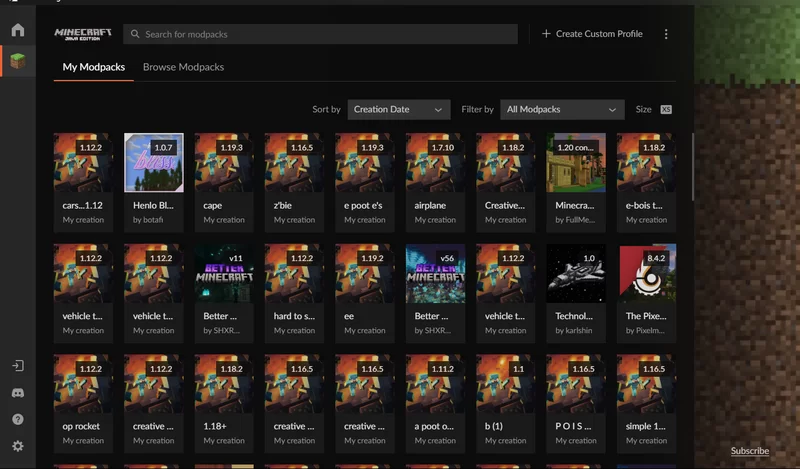
When I first became a fan of CurseForge, I struggled to figure out how to use it. However, I've since learned the ropes. It all started with CurseForge, a fantastic modding application that makes modding easy and efficient.
Here’s a simple guide to get started:
1. Download CurseForge. https://www.curseforge.com/download/app
2. Open the application.
3. Click on "Create a Custom Profile" or search for modpacks, mods, shaders, resource packs, and worlds.
4. Download the desired content.
5. Click "Play" (it will automatically open the Minecraft Launcher, or you can use the CurseForge launcher).
6. Enjoy your modded experience
Here’s a simple guide to get started:
1. Download CurseForge. https://www.curseforge.com/download/app
2. Open the application.
3. Click on "Create a Custom Profile" or search for modpacks, mods, shaders, resource packs, and worlds.
4. Download the desired content.
5. Click "Play" (it will automatically open the Minecraft Launcher, or you can use the CurseForge launcher).
6. Enjoy your modded experience
More like this

 How to add a mod into minecraft!Tutorial Blog
 AlsoKnownAsCreepy
12/1/13 2:45
• posted 11/30/13 5:56
6.7k 17x 1155
AlsoKnownAsCreepy
12/1/13 2:45
• posted 11/30/13 5:56
6.7k 17x 1155 Minecraft Java Edition:How To Add Maximum HealthTutorial Blog
 Minecraft Professional
•6/27/20 9:55
3.1k 1x 153
Minecraft Professional
•6/27/20 9:55
3.1k 1x 153
 how to install mods on Minecraft Java (fabric)Tutorial Blog
 JustAGoober_
•3/22/26 5:56
262 1x 143
JustAGoober_
•3/22/26 5:56
262 1x 143
 Obey_Agony
 killeveryone123
5874419
6

 mcforcollege







 ChronoCreeper
 ICanGamez
Have something to say?