
• 1/15/15 2:48 pm
- 6k views • 1 today
- 2
- 1
- 2

32
This is a tutorial how to use testfor for players!
You need:
Command_block, (give "@p or player name" command_block or "137 works on 1.7.10 and lower versions" 2 )
Gamemode 1,
One block of choice,
Redstone repeater,
Redstone comparator,
Redstone dust,
Redstone torch,
First do a redstone delay.
And after that set a command block
on the redstone delay and then
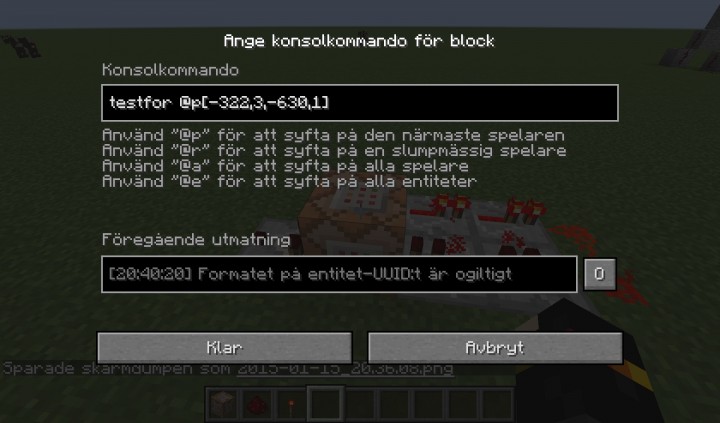
you write: /testfor @p[X,Y,Z,1] I choice (testfor @p[-322,3,-630,1])
In the command block screen.
After that place a redstone comparator
on the other side of the command block
like this
After that place a command block next to the comparator.
In that can you write example title @a / tellraw @a
I use /title @a title
And I said that you need a block, you use it for example for the cheackpoint or spawn but you dont need to have a block if you dont want.
I Think That This Tutorial Was Working And Have A Great Time Bye! :)
You need:
Command_block, (give "@p or player name" command_block or "137 works on 1.7.10 and lower versions" 2 )
Gamemode 1,
One block of choice,
Redstone repeater,
Redstone comparator,
Redstone dust,
Redstone torch,
First do a redstone delay.
And after that set a command block
on the redstone delay and then
you write: /testfor @p[X,Y,Z,1] I choice (testfor @p[-322,3,-630,1])
In the command block screen.
After that place a redstone comparator
on the other side of the command block
like this
After that place a command block next to the comparator.
In that can you write example title @a / tellraw @a
I use /title @a title
And I said that you need a block, you use it for example for the cheackpoint or spawn but you dont need to have a block if you dont want.
I Think That This Tutorial Was Working And Have A Great Time Bye! :)
More like this

 TheScribe
![How To Shade Skins [Tutorial] Minecraft Blog](https://static.planetminecraft.com/files/resource_media/screenshot/1213/SKINBLOG_1855771_thumb.jpg)
 bobgil
 Papa Enny
 jacky5047
 sparkyfive1
3207740
6



 -David_the_Fox-
 ASoldVinylRecord
 Sithfruit

 ChronicInsomnia

 PlanetZedna
 MystSpaTimeTrav
 Sidga420
 LostInMC
Have something to say?