



• • 5/27/26 2:58 pm • 8 logs
- 5.1k views • 0 today
- save_alt 402 downloads
- Compatibility
- Minecraft 1.21
- to version
- Minecraft 26.2
- Changes include
- Advancements
- Functions
- Predicates


61

Datapack
1.21.6+
Better Happy Ghast is a Datapack for 1.21.6+ that improves the Happy Ghast.
There is Player Configs, to change some settings as a player about Happy Ghasts and the Happy Ghast Order Menu with /trigger better_happy_ghast.player_configs.
You can disable sounds and messages from commands of the Datapack, disable the expandation of the camera distance with Happy Ghasts etc...
For admins, there is Configs, to change some settings about Happy Ghasts and to disable some Happy Ghast Order Menu options with /function better_happy_ghast:configs.
Features for Happy Ghasts :
⏫ Increased Flying Speed
The normal flying speed of Happy Ghasts when they have at least a player that controls it is increased by 25%, but not too much to be able to build with it easily.
🏃♂️ Sprint with Happy Ghast and expand the camera distance
If you control a Happy Ghast, you can press your sprint key to sprint with it to fly 45% more faster (combined with the 25% increased normal flying speed) and your 3rd person camera is expanded to allow you to see more things in your field vision.
🪓 Normal Mining Speed
Your mining speed when you are riding a Happy Ghast is the same as when you are not in a vehicle and when you are on the floor, so you don't break blocks slowly like with other vehicles or when you are not in the floor.
📏 Increased Reach on Happy Ghast
When you are on a Happy Ghast, even you are not riding it, your reach is increased to allow you to interact with blocks and entities that are on the floor under the Happy Ghast.
🔼 Increased Safe Fall Distance
When you fall from a Happy Ghast in a height of 5 blocks or less you don't take fall damages, so you have to go down to the floor with the Happy Ghast and dismount to be safe, but if you dismount from more than a height of 5 blocks you will take fall damages.
⚡ Acceleration
You can throw Snowballs items to a Happy Ghast to add 3 more seconds of acceleration per Snowball to it and it is 35% more faster (combined with the 25% normal flying speed and the 45% of sprint)
💖 Tame Happy Ghasts
You can tame Happy Ghasts by throwing to them a Snow Block item, then you unlock the advancement "We'll be happy together for life" (in reference to "Best Friends Forever" and the fact that the Happy Ghast is happy)
📟 Happy Ghast Order Menu
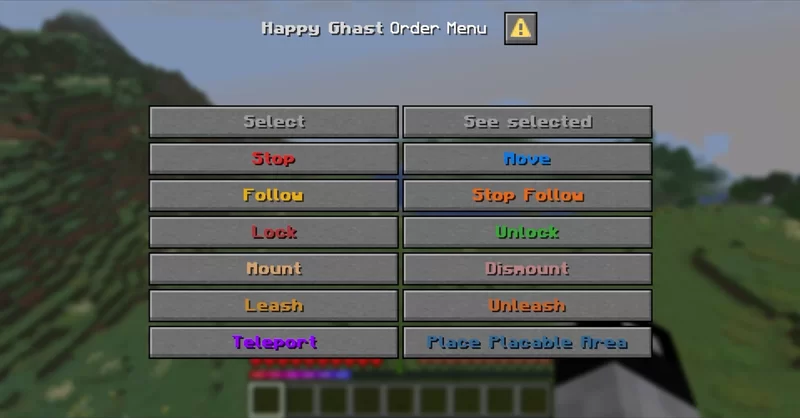
You can open the Happy Ghast Order Menu using the new dialog system with /trigger happy_ghast.
Then you have to select an Happy Ghast by clicking on "Select" to select your tamed Happy Ghast that you are looking at or your nearest tamed Happy Ghast if you are not looking any tamed Happy Ghast.
When you select an Happy Ghast or when you click on "See selected", you can see particles and hear a sound to the Happy Ghast to see wich one is selected.
And you can choose what order you give to it :
Orders
Stop
You stop the Happy Ghast in place, it can't move itself anymore, but you can anyway make it to move yourself by riding it.
Move
You allow the Happy Ghast to move again after you stopped it, and it can move itself or follow you again.
Follow
You make it to follow you for at least a distance of 100 blocks, even if you don't have a Snowball or an Harness in your hand and if you are far of it.
Stop Follow
You stop to make the Happy Ghast to follow you, it can continue to move itslelf or to follow players that have a Snowball or an Harness in their hand.
Lock
You lock the acces of the Happy Ghast from other entities to prevent them to mount in and it eject them if they was already on the Happy Ghast, unless when you force passive mobs to mount with the "Mount" option.
Unlock
You unlock the acces of the Happy Ghast from other entities, to allow them to mount in.
Mount
You force passive mobs to mount on the Happy Ghast instead of some other players.
Dismount
You can force all other entities or only one other entity to dismount from the Happy Ghast (it depends what option you chose in the Player Configs between "All other entities" and "Only one other entity").
Leash
If you have at least 1 Lead in your inventory, you can leash the furthest entity in a certain radius at the bottom of the Happy Ghast to it and it consume the Lead in survival mode, but by default you can leash any mob and vehicle (like Villagers without using boats and Minecarts) (it depends if the option in Configs "Happy Ghast can leash" is set to "Any Mob and Vehicles" or "Leashable Vanilla Entities").
Unleash
You can unleash the furthest entity that is already leashed to the Happy Ghast and you recover the Lead.
Teleport
You teleport the Happy Ghast to you if it is at least at a distance of 50 blocks of you.
Place Placable Area
You can place an area around the Happy Ghast where you can place blocks like if the Happy Ghast wored as a block, the area is Structure Voids that you can replace by another block and they don't replaces the other blocks around that were already here when they are placed, the area disapear after 30 seconds or when you move away or when the Happy Ghast is too away.
You stop the Happy Ghast in place, it can't move itself anymore, but you can anyway make it to move yourself by riding it.
Move
You allow the Happy Ghast to move again after you stopped it, and it can move itself or follow you again.
Follow
You make it to follow you for at least a distance of 100 blocks, even if you don't have a Snowball or an Harness in your hand and if you are far of it.
Stop Follow
You stop to make the Happy Ghast to follow you, it can continue to move itslelf or to follow players that have a Snowball or an Harness in their hand.
Lock
You lock the acces of the Happy Ghast from other entities to prevent them to mount in and it eject them if they was already on the Happy Ghast, unless when you force passive mobs to mount with the "Mount" option.
Unlock
You unlock the acces of the Happy Ghast from other entities, to allow them to mount in.
Mount
You force passive mobs to mount on the Happy Ghast instead of some other players.
Dismount
You can force all other entities or only one other entity to dismount from the Happy Ghast (it depends what option you chose in the Player Configs between "All other entities" and "Only one other entity").
Leash
If you have at least 1 Lead in your inventory, you can leash the furthest entity in a certain radius at the bottom of the Happy Ghast to it and it consume the Lead in survival mode, but by default you can leash any mob and vehicle (like Villagers without using boats and Minecarts) (it depends if the option in Configs "Happy Ghast can leash" is set to "Any Mob and Vehicles" or "Leashable Vanilla Entities").
Unleash
You can unleash the furthest entity that is already leashed to the Happy Ghast and you recover the Lead.
Teleport
You teleport the Happy Ghast to you if it is at least at a distance of 50 blocks of you.
Place Placable Area
You can place an area around the Happy Ghast where you can place blocks like if the Happy Ghast wored as a block, the area is Structure Voids that you can replace by another block and they don't replaces the other blocks around that were already here when they are placed, the area disapear after 30 seconds or when you move away or when the Happy Ghast is too away.
8 Update Logs
Update #8 : by Loupieur 05/27/2026 2:58:54 pmMay 27 @ 6:58 pm UTC
Optimization :
- The detection of the Happy Ghast order menu to know if it's enabled or not is optimised by using the return command
- Now, not all entities, but only mobs and players can be ejected from a Happy Ghast if it is locked
LOAD MORE LOGS
More like this

 Happy Ghast Flight ToggleMinecraft 1.21 Quality of Life Data Pack
 Redlegdaddy
•8/4/25 12:49
457 29x 132
Redlegdaddy
•8/4/25 12:49
457 29x 132
 iheartstriders
 RyguyPacks
 NovaB64
6663911
119








 GlitchPro
 v3locity


Have something to say?
Have you loaded the Datapack ?
All the files and folder of you Datapack is in a folder of the namespace name that you want (like the name of your Datapack) that is in the data folder inside the Datapack folder/ZIP, and you have to put the minecraft folder in the data folder and put a tags folder and the functions folder and the tick.json and load.json tag files to set inside your functions tick.mcfunction (that is executed every tick in game) and load.mcfunction (that is executed when you executes /reload command or when you load a world) of your Datapack. Then you put commands in the functions, and use commands like scoreboard, execute, function, tellraw, summon, etc...
But it's better that you watch a video with images to see really how to do Datapacks
And you are maybe on the bad versions