


• 12/6/21 7:53 pm
- 2.4k views • 0 today
- save_alt 211 downloads
- Compatibility
- Minecraft 1.18
- Changes include
- Recipes

1
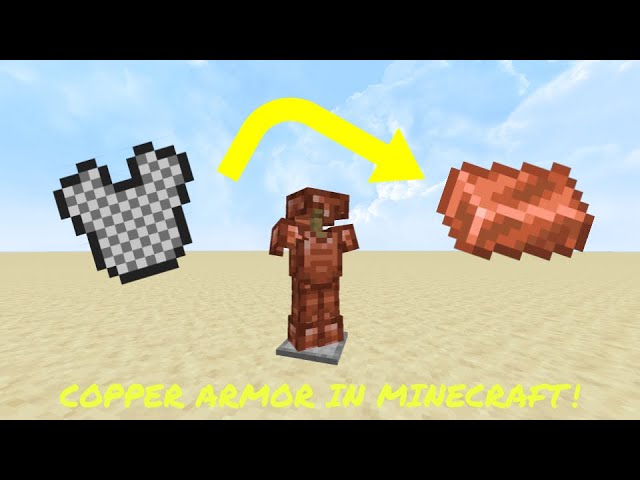
This is a datapack that replaces chainmail armor with copper armor in your Minecraft world!
Because it replaces an existing armor set, this datapack doesn't require the use of optifine, and the items can be crafted like normal in a vanilla Minecraft crafting table. The downside to this is that the stats of the armor is the same as chainmail and you can no longer obtain chainmail armor.
To use this pack, download the folder from the google drive link above. It should download as a zip file. Unzip the file using your computer's zip extractor (should be built it), then open the folder that is created. In it should be three zip files, one is the datapack, and the other two are the two different resource packs. One resource pack is made to fit in with the Jappa Minecraft textures, while the other is meant to be used with the developer textures. Unzip all the files, this should create three folders. Place the resource pack you want to use into your Minecraft resource pack folder, and the datapack into your world's datapack folder. After that you should be good to go. If you are new to datapacks or resource packs, I recommend watching a tutorial video if you are stuck.
I hope you enjoy this pack and it improves your minecraft survival experience in a vanilla friendly way!
*Reminder: You will have to unzip the datapack and resource pack files to use it*
Because it replaces an existing armor set, this datapack doesn't require the use of optifine, and the items can be crafted like normal in a vanilla Minecraft crafting table. The downside to this is that the stats of the armor is the same as chainmail and you can no longer obtain chainmail armor.
To use this pack, download the folder from the google drive link above. It should download as a zip file. Unzip the file using your computer's zip extractor (should be built it), then open the folder that is created. In it should be three zip files, one is the datapack, and the other two are the two different resource packs. One resource pack is made to fit in with the Jappa Minecraft textures, while the other is meant to be used with the developer textures. Unzip all the files, this should create three folders. Place the resource pack you want to use into your Minecraft resource pack folder, and the datapack into your world's datapack folder. After that you should be good to go. If you are new to datapacks or resource packs, I recommend watching a tutorial video if you are stuck.
I hope you enjoy this pack and it improves your minecraft survival experience in a vanilla friendly way!
*Reminder: You will have to unzip the datapack and resource pack files to use it*
More like this
 Golden Tools and Armor from CopperMinecraft 1.13 - 1.19 Crafting Recipe Data Pack
 TechnicolorSkies
•11/27/22 7:52
1.2k 32x 121
TechnicolorSkies
•11/27/22 7:52
1.2k 32x 121 Copper Armor Recipes (1.20.0 - 1.21.8)Minecraft 1.20 - 1.21 Crafting Recipe Data Pack
 MiriFloof
7/16/26 1:45
• posted 9/28/24 4:38
1k 70 3x 142
MiriFloof
7/16/26 1:45
• posted 9/28/24 4:38
1k 70 3x 142 Copper armor and swordMinecraft 1.18 Crafting Recipe Data Pack
 IcyMasterXD
•1/23/22 2:58
509 14x 211
IcyMasterXD
•1/23/22 2:58
509 14x 211
 Craftable Chainmail Armor for 26.1+Minecraft 1.21 - 26.1 Crafting Recipe Data Pack
 Yotomir
•3/29/26 3:22
136 10x 311
Yotomir
•3/29/26 3:22
136 10x 311
 Katzooie
5399533
119





 Jetra
Jetra Ninkonas201

 agent94055


 The wither storm fan


 player_0

Have something to say?