




• • 6/28/20 11:41 am • 2 logs
- 7.5k views • 0 today
- save_alt 1.3k downloads
- Compatibility
- Minecraft 1.16
- Changes include
- Recipes


2
Recipes:
go to the images to view the recipes
saddle (shapeless):
1 iron ingot
1 string
1 leather
horse armor (shaped, any type):
7 pieces of the material that you want to make your horse armor in a "H" formation
grass block (shapeless):
1 piece of grass
1 piece of dirt
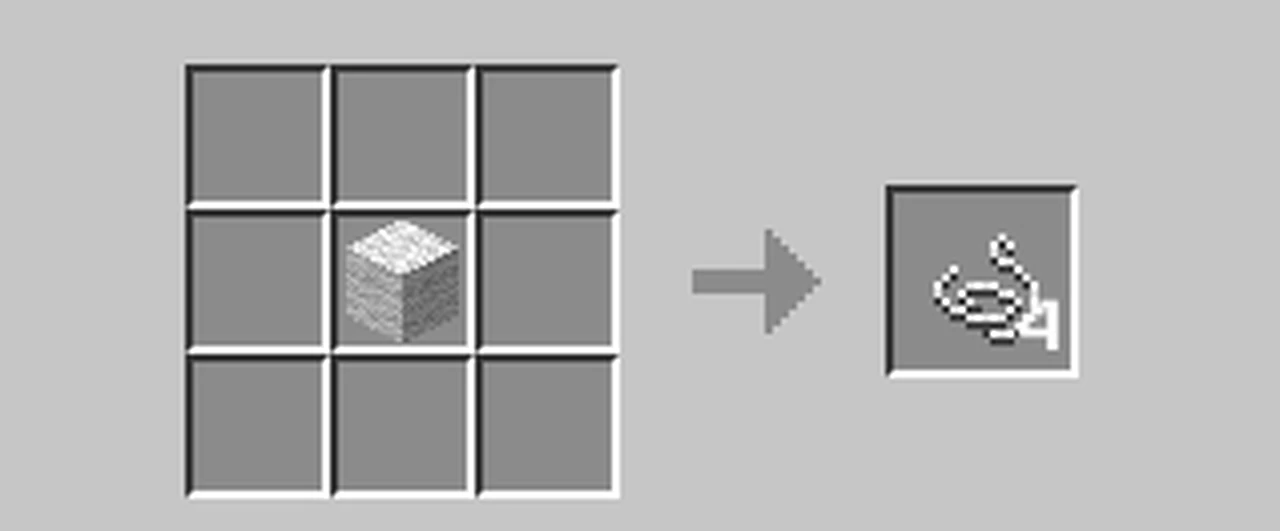
string (shapeless):
1 piece of white wool
enchanted golden apple (shaped):
1 apple surrounded by gold blocks
green dye (shapeless):
1 yellow dye
1 blue dye
nether wart (shapeless)
1 nether wart block
nametag (shaped CHANGED):
top row string to far right
middle row paper in the middle
bottom row paper to the left
trident (shaped):
top row all quartz
middle row blaze rod in middle and prismarine shards on each side
bottom row blazer rod in middle
Sponge (shapeless):
4 white wool
1 yellow dye
How to install:
download the zip file and move it to your desktop. then right-click it and select "Extract All", then click extract.
once you have the folder, open up Minecraft and select edit on the world that you would like the datapack on and select edit then click open world folder and drag folder into the datapack folder in the world files.
NOTE: more crafting recipes are coming please comment what you would like me to add
© EXOEON Mods 2021
go to the images to view the recipes
saddle (shapeless):
1 iron ingot
1 string
1 leather
horse armor (shaped, any type):
7 pieces of the material that you want to make your horse armor in a "H" formation
grass block (shapeless):
1 piece of grass
1 piece of dirt
string (shapeless):
1 piece of white wool
enchanted golden apple (shaped):
1 apple surrounded by gold blocks
green dye (shapeless):
1 yellow dye
1 blue dye
nether wart (shapeless)
1 nether wart block
nametag (shaped CHANGED):
top row string to far right
middle row paper in the middle
bottom row paper to the left
trident (shaped):
top row all quartz
middle row blaze rod in middle and prismarine shards on each side
bottom row blazer rod in middle
Sponge (shapeless):
4 white wool
1 yellow dye
How to install:
download the zip file and move it to your desktop. then right-click it and select "Extract All", then click extract.
once you have the folder, open up Minecraft and select edit on the world that you would like the datapack on and select edit then click open world folder and drag folder into the datapack folder in the world files.
NOTE: more crafting recipes are coming please comment what you would like me to add
© EXOEON Mods 2021
2 Update Logs
Update #2 : by EXOEON123 06/28/2020 11:41:29 amJune 28, 2020 @ 3:41 pm UTC
change-log for 1.2:
fixed installation guide
NEW trident crafting recipe
better nametag recipe
fixed installation guide
NEW trident crafting recipe
better nametag recipe
LOAD MORE LOGS
More like this
 Craftsman Datapack - More Crafting Recipes! (1.13-1.13.2)Minecraft 1.13 Simple Data Pack
 TheDiamondPlayables
4/28/19 10:18
• posted 2/7/19 5:13
12.8k 1.1k 21x 31618
TheDiamondPlayables
4/28/19 10:18
• posted 2/7/19 5:13
12.8k 1.1k 21x 31618 Recipes+ | minecraft custom crafting datapack | V0.0.1Minecraft 1.13 Simple Data Pack
 craptian
•12/3/17 2:45
8.6k 314 1x 198
craptian
•12/3/17 2:45
8.6k 314 1x 198 Better Crafting V3Minecraft 1.15 - 1.18 Crafting Recipe Data Pack
 DerpVN112
7/29/20 1:58
• posted 7/21/20 3:02
5.7k 10 4x 975
DerpVN112
7/29/20 1:58
• posted 7/21/20 3:02
5.7k 10 4x 975
 Crafted! (Datapack version)Minecraft 1.16 - 1.18 Crafting Recipe Data Pack
 Redy1aye
•8/15/21 7:34
1.5k 163x 144
Redy1aye
•8/15/21 7:34
1.5k 163x 144
 sadg_b
4655116
119









 Bitu456
 Conure512
![278: DP Zelda inspired Heavy Boots [Minecraft Datapack Tutorials] Minecraft Data Pack](https://static.planetminecraft.com/files/image/minecraft/data-pack/2026/751/20156125-thumbnail_s.jpg)
 InfernalDevice
 cota5
cota5
 User6556430G
Have something to say?
troubleshooting
-if you are playing in a snapshot try it in the latest release
-or try playing in a newer version or older
if you have more problems I would recommend to contact Mojang Studios support as I am not a expert