


• 1/26/20 1:14 pm
- 10.5k views • 0 today
- save_alt 892 downloads
- Compatibility
- Minecraft 1.13
- to version
- Minecraft 1.16
- Changes include
- Functions

123
Easy Shops | Map Maker's Toolbox
(📦 Latest & All Versions at: https://cloudwolfyt.github.io/)
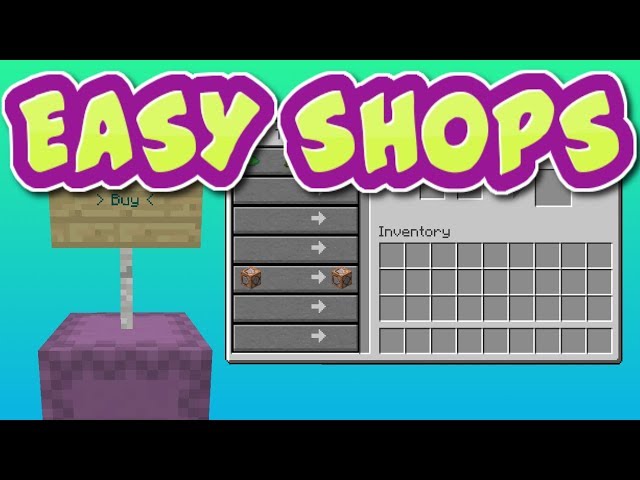
Make Villager and Sign shops in game! The key feature of this is villager shops, the sign shops are fairly limited at the moment. Get the special sign from the menu. Place a shulker box and put the custom sign on top, then put a block on top of the sign and click the sign. It will spawn a villager and format the box. The top row is the buy 1 item and the middle row is the buy 2 item. The last row is the item they sell. This works for custom nbt items as well and updating a shop's rolls is as easy as just clicking the sign again. You can set the villager's profession manually or by using workbenches of the appropriate kind.
NOTE: Video was made on V1.0 and the pack is on V2.0, with added functionality and better look to the shops.
----------------------------------------------------------------------------------------------------------------------------------
This is part of my Map Maker's Toolbox, which is a list of datapacks that work as tools that are useful when making a creation such as an adventure map.
----------------------------------------------------------------------------------------------------------------------------------
Installation:
1) Download the .zip
2) drag it into your .minecraft/saves/(world_name)/datapacks folder
3) Unzip the folder
4) Open the folder, make sure that the first thing you see is "data", if you see the folder name again then drag that outside of the folder.
(📦 Latest & All Versions at: https://cloudwolfyt.github.io/)
Make Villager and Sign shops in game! The key feature of this is villager shops, the sign shops are fairly limited at the moment. Get the special sign from the menu. Place a shulker box and put the custom sign on top, then put a block on top of the sign and click the sign. It will spawn a villager and format the box. The top row is the buy 1 item and the middle row is the buy 2 item. The last row is the item they sell. This works for custom nbt items as well and updating a shop's rolls is as easy as just clicking the sign again. You can set the villager's profession manually or by using workbenches of the appropriate kind.
NOTE: Video was made on V1.0 and the pack is on V2.0, with added functionality and better look to the shops.
----------------------------------------------------------------------------------------------------------------------------------
This is part of my Map Maker's Toolbox, which is a list of datapacks that work as tools that are useful when making a creation such as an adventure map.
----------------------------------------------------------------------------------------------------------------------------------
Installation:
1) Download the .zip
2) drag it into your .minecraft/saves/(world_name)/datapacks folder
3) Unzip the folder
4) Open the folder, make sure that the first thing you see is "data", if you see the folder name again then drag that outside of the folder.
More like this
![Easy Loot(tables) [Map Maker's Toolbox] Minecraft Data Pack](https://static.planetminecraft.com/files/image/minecraft/data-pack/2020/782/12636910-hqdefault_s.jpg) Easy Loot(tables) [Map Maker's Toolbox]Minecraft 1.13 - 1.16 Tool Data Pack
Easy Loot(tables) [Map Maker's Toolbox]Minecraft 1.13 - 1.16 Tool Data Pack Cloud_Wolf
•1/26/20 1:24
7.3k 413x 2149
Cloud_Wolf
•1/26/20 1:24
7.3k 413x 2149![Armorstand Animator/Poser [Map Maker's Toolbox] Minecraft Data Pack](https://static.planetminecraft.com/files/image/minecraft/data-pack/2020/797/12636937-hqdefault_s.jpg) Armorstand Animator/Poser [Map Maker's Toolbox]Minecraft 1.13 - 1.15 Tool Data PackCloud_Wolf
•1/26/20 1:38
6.9k 355 6x 32015
Armorstand Animator/Poser [Map Maker's Toolbox]Minecraft 1.13 - 1.15 Tool Data PackCloud_Wolf
•1/26/20 1:38
6.9k 355 6x 32015![Easy Pathfinding [Map Maker's Toolbox] Minecraft Data Pack](https://static.planetminecraft.com/files/image/minecraft/data-pack/2020/327/12942612-maxresdefault_s.jpg) Easy Pathfinding [Map Maker's Toolbox]Minecraft 1.15 - 1.16 Tool Data PackCloud_Wolf
•5/13/20 1:06
6.3k 263x 12012
Easy Pathfinding [Map Maker's Toolbox]Minecraft 1.15 - 1.16 Tool Data PackCloud_Wolf
•5/13/20 1:06
6.3k 263x 12012![Chat System [Map Maker's Toolbox] Minecraft Data Pack](https://static.planetminecraft.com/files/image/minecraft/data-pack/2020/754/12636850-hqdefault_s.jpg) Chat System [Map Maker's Toolbox]Minecraft 1.13 - 1.15 Tool Data PackCloud_Wolf
•1/26/20 12:58
5.1k 107 2x 276
Chat System [Map Maker's Toolbox]Minecraft 1.13 - 1.15 Tool Data PackCloud_Wolf
•1/26/20 12:58
5.1k 107 2x 276![Easy Spawnpoints [Map Maker's Toolbox] Minecraft Data Pack](https://static.planetminecraft.com/files/image/minecraft/data-pack/2020/626/13383162-maxresdefault_s.jpg) Easy Spawnpoints [Map Maker's Toolbox]Minecraft 1.15 - 1.16 Tool Data PackCloud_Wolf
•9/9/20 12:05
2.7k 84x 173
Easy Spawnpoints [Map Maker's Toolbox]Minecraft 1.15 - 1.16 Tool Data PackCloud_Wolf
•9/9/20 12:05
2.7k 84x 173
4479761
119











 TheGreatestDrone

Have something to say?
https://www.planetminecraft.com/data-pack/shop-amp-currency/
It has stuff like currency and stock