


• • 3/28/25 1:18 pm • 4 logs
- 20.5k views • 1 today
- save_alt 1.7k downloads
- Compatibility
- Minecraft 1.21
- Changes include
- Functions
- Predicates

31
OVERVIEW
Adds the ability to revive dead players in Multiplayer Hardcore worlds, or with clever uses of game mechanics, yourself. While this fundamentally goes against the concept of Hardcore, many server owners already do something similar, with even less of a concrete game mechanic to go with it. This was made to solve that, while also trying to be as customizable as manageable.You can revive the players by building a ritual structure. Then you throw a set 'sacrifice item' on top of it. The ritual will then play an animation to revive the player and explode, with the dead player coming back to life after. Base config settings require the dead player to be within 25 blocks of the ritual to be revived.
Explosion can be disabled via operator config commands.
Base Revival Structure:
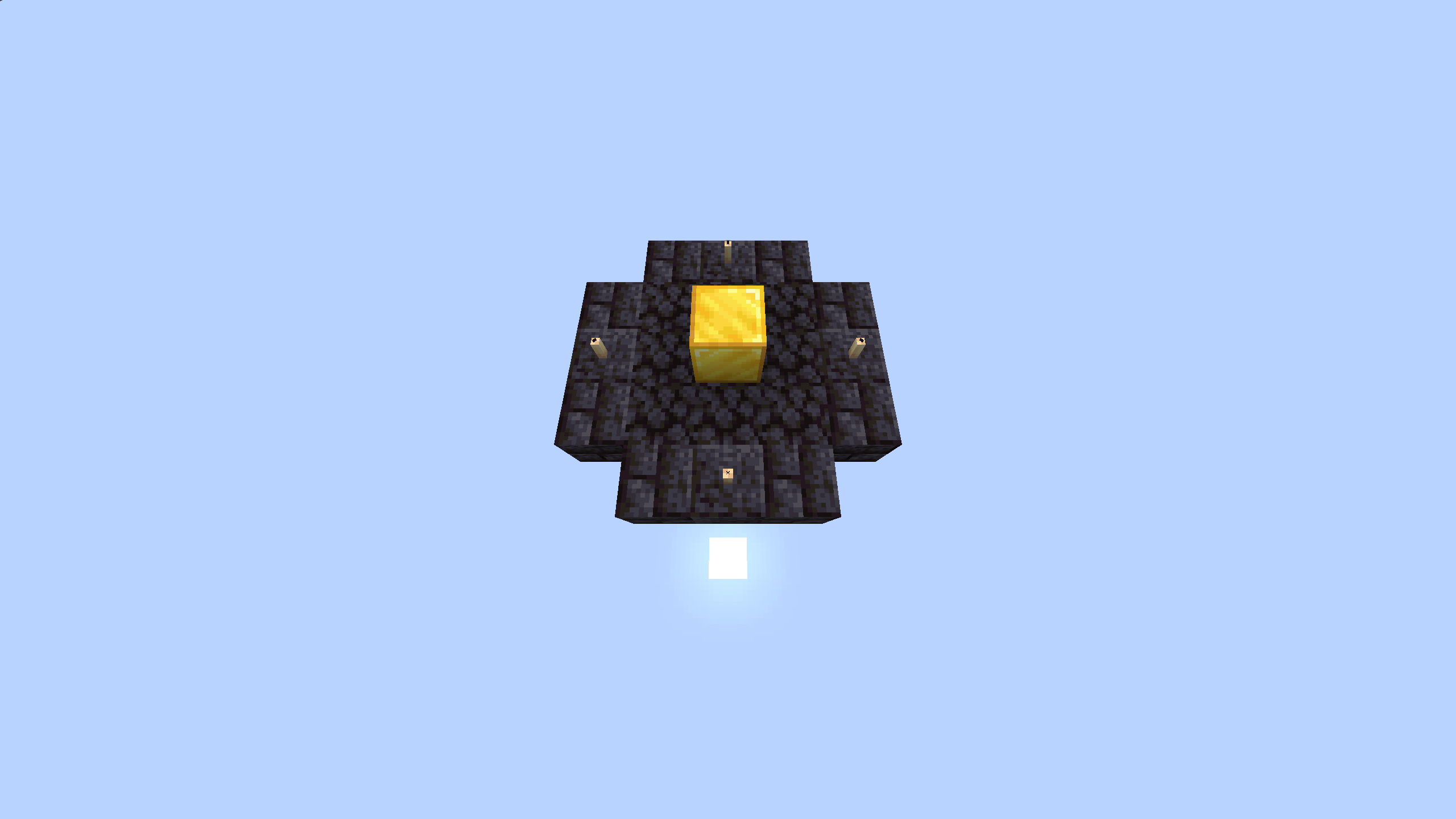
For the basic game setup, without any in game config changes, the pack has the preset 'sacrifice item' set to a totem of undying. The config section of this description will detail how to change these settings, as well as how to customize the ritual structure used.
Operator Config
Operators can change many settings about this pack. Including the item used and a couple presets for the ritual structure itself. Including disabling certain parts of the ritual structure altogether.Binary Settings
If you wish to disable the player range requirement or the explosion of the ritual you can do so with the commands below.Explosive Config
Enable:
scoreboard players set #doesExplode hardcorerev.binarySettings 1
Disable:
scoreboard players set #doesExplode hardcorerev.binarySettings 0
Player Range Requirement
Enable:
scoreboard players set #requiresNearby hardcorerev.binarySettings 1
Disable:
scoreboard players set #requiresNearby hardcorerev.binarySettings 0
Sacrifice Item Editing
Many times operators will want to change the item used. This datapack has full support for that, including with modded namespaced items. If you want to set the item used, run the command shown, changing <item namespace> to the unique identifier of the item, such as minecraft:totem_of_undying or minecraft:diamonddata modify storage hardcorerev:settings item set value "<item namespace>"
This does NOT support NBT detection. Do NOT remove quotation marks.
Ritual Structure Editing
Due to performance reasons, the entire structure itself cannot be edited fully, however, there is support for swapping out and sometimes even disabling parts of the structure. The structure comes in 4 parts, the centerpiece, fill, ring, and decoration. The ring and decoration can be disabled through the use of special indices.ONLY change the number at the end of the command.
data modify storage hardcorerev:settings centerpiece set value 1
data modify storage hardcorerev:settings infill set value 1
data modify storage hardcorerev:settings outring set value 1
data modify storage hardcorerev:settings decoration set value 1
Indices out of range will silently error, and will cause the ritual to no longer work.
Special Indices:
outring - 12 - Disables ring
decoration - 17 - Disables decoration
So this page isn't cluttered, all ritual part images are stored in a Google Drive Folder. Visit there for info on all parts and what they look like by themselves, as well as a basic example of an edited ritual.
Need Help? Have Suggestions?
Join the Discord and ask! I will try to help you to the best of my ability.4 Update Logs
Update #4 - Port to 1.21.5 : by PlayfulPotato 03/28/2025 1:18:28 pmMarch 28, 2025 @ 5:18 pm UTC
Ported to 1.21.5
Older versions can be found under 'Versions' on the Modrinth page.
Older versions can be found under 'Versions' on the Modrinth page.
LOAD MORE LOGS
More like this
 HardLives Datapack: Hardcore with Lives!Minecraft 1.18 Game Mechanic Data Pack
 Zhephyr_
12/15/21 4:55
• posted 12/12/21 7:19
16.6k 2.3k 24x 12828
Zhephyr_
12/15/21 4:55
• posted 12/12/21 7:19
16.6k 2.3k 24x 12828 Multiplayer Sleep PlusMinecraft 1.17 - 1.18 Game Mechanic Data Pack
 Gdebest69
1/3/22 9:03
• posted 1/2/22 4:53
13.1k 2.8k 9x 31214
Gdebest69
1/3/22 9:03
• posted 1/2/22 4:53
13.1k 2.8k 9x 31214 Hardcore reviveMinecraft 1.19 Game Mechanic Data Pack
 NaomiS2
6/8/22 7:54
• posted 1/2/22 5:08
13.9k 959 26x 22627
NaomiS2
6/8/22 7:54
• posted 1/2/22 5:08
13.9k 959 26x 22627 Lego DatapackMinecraft 1.17 - 1.18 Game Mechanic Data Pack
 BlueWill
•12/22/21 9:35
4.6k 271 4x 31011
BlueWill
•12/22/21 9:35
4.6k 271 4x 31011 Big Man's HALFCORE | Semi-Hardcore Lives System DatapackMinecraft 1.19 Game Mechanic Data Pack
 Big Man Max
•5/25/23 6:54
2.2k 103 3x 467
Big Man Max
•5/25/23 6:54
2.2k 103 3x 467
5363766
119













 AhmedTurysta



Have something to say?
Thanks again just in case, and good luck!
PS: This is the best hardcore revival datapack i have ever seen, and that includes mods too!
Have a nice day!