


• 7/7/24 12:38 am
- 5.5k views • 2 today
- save_alt 491 downloads
- Compatibility
- Minecraft 1.14
- to version
- Minecraft 1.21
- Changes include
- Advancements
- Functions
- Loot Tables


2
Overview
This is a personal project about a data pack for Minecraft (Java Edition only), inspired on the iconic mod of the same name, Infernal Mobs, developed by AtomicStryker for CurseForge.
This data pack tries to recreate the same experience of the mod, without needing the user to install additional software on the game or PC, just copy the data pack folder when creating a new world or directly on an existing world's path.
Warning: This data pack is available only for Minecraft main releases, since v.1.14 and above. So if you try to play in minor releases (like 1.19.3, 1.16.2, etc.) it could cause troubles.
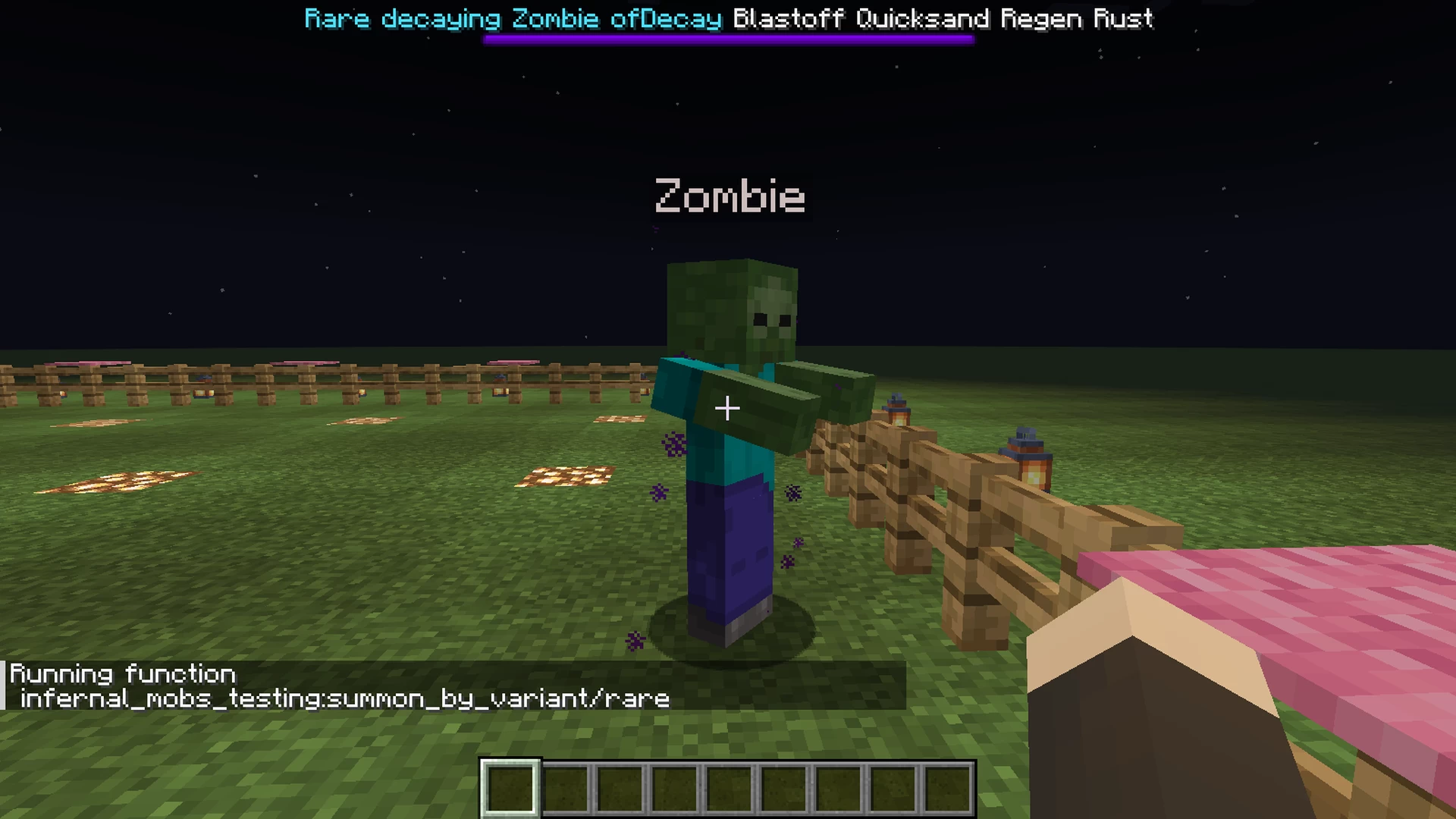
Rare
The most common and "easy" variant to deal with. Not too much to worry about!
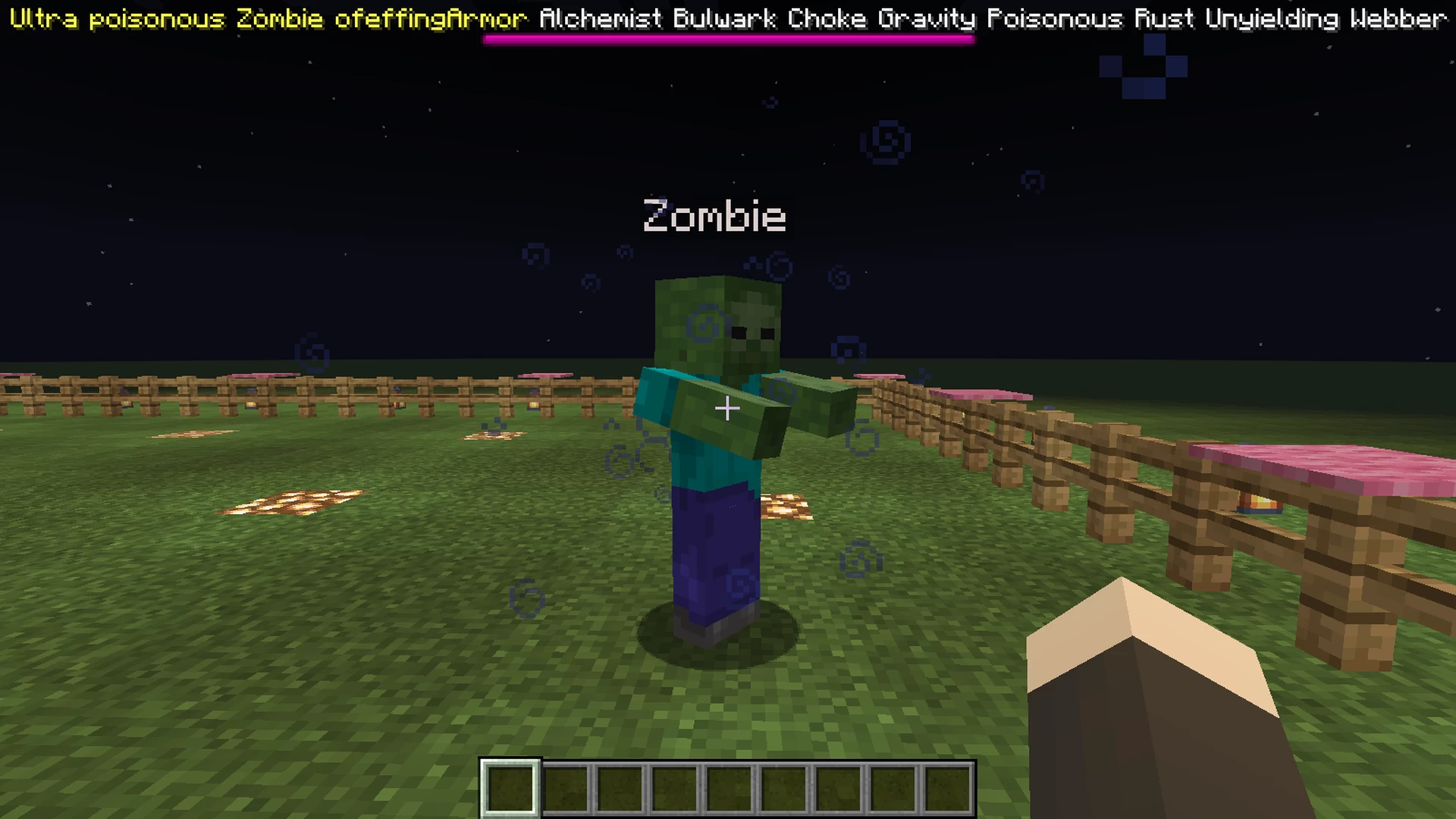
Ultra
A strong variant with more powerful attributes. Recommended to equip a good armor, weapon, and enough food with you!
Infernal
The most difficult variant to fight against. Having items with enchantments (armor, weapons, potions and even food) should be your priority from now!
Important: To see properly the infernal variants bossbars, you should set the GUI scale to 2 in the game settings.
Special Acknowledgments
This is a personal project about a data pack for Minecraft (Java Edition only), inspired on the iconic mod of the same name, Infernal Mobs, developed by AtomicStryker for CurseForge.
This data pack tries to recreate the same experience of the mod, without needing the user to install additional software on the game or PC, just copy the data pack folder when creating a new world or directly on an existing world's path.
Warning: This data pack is available only for Minecraft main releases, since v.1.14 and above. So if you try to play in minor releases (like 1.19.3, 1.16.2, etc.) it could cause troubles.
Main Features
- Natural spawning system for all the hostile (and some neutral) mob variants (random appearing chance for each one).
- Death detection system to generate custom loot when killing a mob variant.
- Random skills for a mob when spawns.
- Custom bossbar name (random prefix and suffix included) and color for each mob.
- Custom death loot table and experience orbs drop for each mob variant.
- Custom particles display for each variant.
Mob Skills
- 1UP: Fully restores its health once it's under 20%
- Alchemist: Throws potions to the player
- Berserk: Deals double damage to the player, but hurts itself when attacking
- Blastoff: Tosses the player into the air
- Bulwark: Mob has a lot more attack resistance
- Choke: Drowns the player on land (available since v.1.20 and later)
- Cloacking: Mob gets invisibility effect
- Darkness: Player gets blindness effect
- Ender: Teleports behind the player
- Exhaust: Player gets mining fatigue effect
- Fiery: Sets the player on fire
- Ghastly: Throws fireballs to the player
- Gravity: Pushes back the player
- Lifesteal: Restores a small amount of health when hitting a player
- Ninja: Teleports behind the player, leaving explotion particle effects in the area
- Poisonous: Player gets poison effect
- Quicksand: Player gets slowness effect
- Regen: Mob restores automatically a small amount of its health
- Rust: Additional damage amount on player's weapon and armor (available since v1.17 and later)
- Sapper: Player gets hunger effect
- Sprint: Movement speed boost to the mob
- Sticky: Steals player's main hand item
- Storm: Summons lighting bolts at player's position
- Unyielding: Mob is invulnerable to attacks' knockback
- Vengeance: deals a small amount of damage to player when the mob is hit
- Weakness: Player gets weakness effect
- Webber: Sets web blocks at player's ground position
- Wither: Player gets wither effect
Mob Variants
Rare
The most common and "easy" variant to deal with. Not too much to worry about!
- Random skills range: 2-4
- Spawning chance: 10% (1 in 10 hostile/neutral mobs could be a Rare one)
- Health boost: 80%
- XP drop boost: 5x 10pts orbs
- Custom death loot table: chainmail items, iron items, cookies
Ultra
A strong variant with more powerful attributes. Recommended to equip a good armor, weapon, and enough food with you!
- Random skills range: 5-8
- Spawning chance: 2% (2 in 100 hostile/neutral mobs could be an Ultra one)
- Health boost: 160%
- XP drop boost: 9x 10pts orbs
- Custom death loot table: chainmail items, iron items, gold items, bow, blaze powder, enchanted book
Infernal
The most difficult variant to fight against. Having items with enchantments (armor, weapons, potions and even food) should be your priority from now!
Important: To see properly the infernal variants bossbars, you should set the GUI scale to 2 in the game settings.
- Random skills range: 9-12
- Spawning chance: 0.66% (6 in 1000 hostile/neutral mobs could be an Infernal one)
- Health boost: 240%
- XP drop boost: 13x 10pts orbs
- Custom death loot table: chainmail items, diamond items, ender pearl, enchanted book
Special Acknowledgments
- AtomicStryker: The main person of the original idea. Thanks to its mod's main code, I was able to code the majority of this data pack.
- BigPapi13: For giving me the idea to develop some skills that involves physical movements to the player (blastoff and gravity) with the Creepers' explosions method from its Delta data pack project and its How to Give Players Motion with Commands | Minecraft Tutorial video.
- Legitimoose: For his Datapack Tutorial playlist on YouTube, for helping me to understand the syntax of Minecraft commands, mainly about the use of NBT Data.
- Cloud Wolf: For his Minecraft Tutorials playlist on YouTube, mainly helping me to implement the predicates, advancements, and bossbars system.
- Timber Forge: For his Data Pack Tutorials - Minecraft Java Edition playlist on YouTube, that helped me to develop the natural spawning system and loot tables for the mobs.
- MaxStuff: For his Minecraft Tutorials YouTube playlist that helped me to create custom bossbars and set them to mobs, getting their current health every moment.
More like this
 Minecraft But We Play As Mobs Data Pack (Morph)Minecraft 1.17 Magic Data Pack
 GamingAkshanGG
•12/1/21 3:09
9k 1.6k 4x 365
GamingAkshanGG
•12/1/21 3:09
9k 1.6k 4x 365 Minecraft SC Buffed Mobs Datapack (V4.0.0)Minecraft 1.14 - 1.17 Mob Data Pack
 JacobSC
8/5/21 1:11
• posted 5/22/20 11:06
8k 780 2x 11816
JacobSC
8/5/21 1:11
• posted 5/22/20 11:06
8k 780 2x 11816![Inferno Mobs [MCPE Addon] Minecraft Data Pack](https://static.planetminecraft.com/files/image/minecraft/data-pack/2020/621/13332698-img_s.jpg) Inferno Mobs [MCPE Addon]Minecraft 1.13 - 1.17 Challenge Data Pack
Inferno Mobs [MCPE Addon]Minecraft 1.13 - 1.17 Challenge Data Pack N0t_UN_Owen
11/3/20 5:49
• posted 8/25/20 11:31
7.4k 580 7x 6103
N0t_UN_Owen
11/3/20 5:49
• posted 8/25/20 11:31
7.4k 580 7x 6103
 OP mob loot data packMinecraft 1.19 - 1.21 Mob Data Pack
 Daniel_Boone_MC
•8/27/24 11:04
1.8k 358 1x 11
Daniel_Boone_MC
•8/27/24 11:04
1.8k 358 1x 11
 Zaksen
6331652
119








 GlitchPro
 v3locity


 AhmedTurysta


Have something to say?
1. Type Win+R to open the Run terminal, there you'll write %appdata% and press Enter
2. After that the file explorer will open showing you some other folders. Look for the ".minecraft" folder and open it.
3. In the ".minecraft" folder, open the "saves" folder.
4. In the "saves" folder, you must search and open the folder with the name of your saved world.
5. Inside your world's folder, there must be another one named "datapacks".
6. Finally, inside that "datapacks" folder, copy and paste the "Infernal Mobs Data Pack" folder
Also, here you have this article from the Planet Minecraft tutorials webpage that explains how to install a data pack (for both ways: when creating a new world, or when having an existing one).
Hoping my answer helped you. Good luck!