




• 6/10/20 2:17 am
- 3.5k views • 1 today
- save_alt 119 downloads
- Compatibility
- Minecraft 1.15
- Changes include
- Functions
- 7
- 5

Required Resource Pack
1
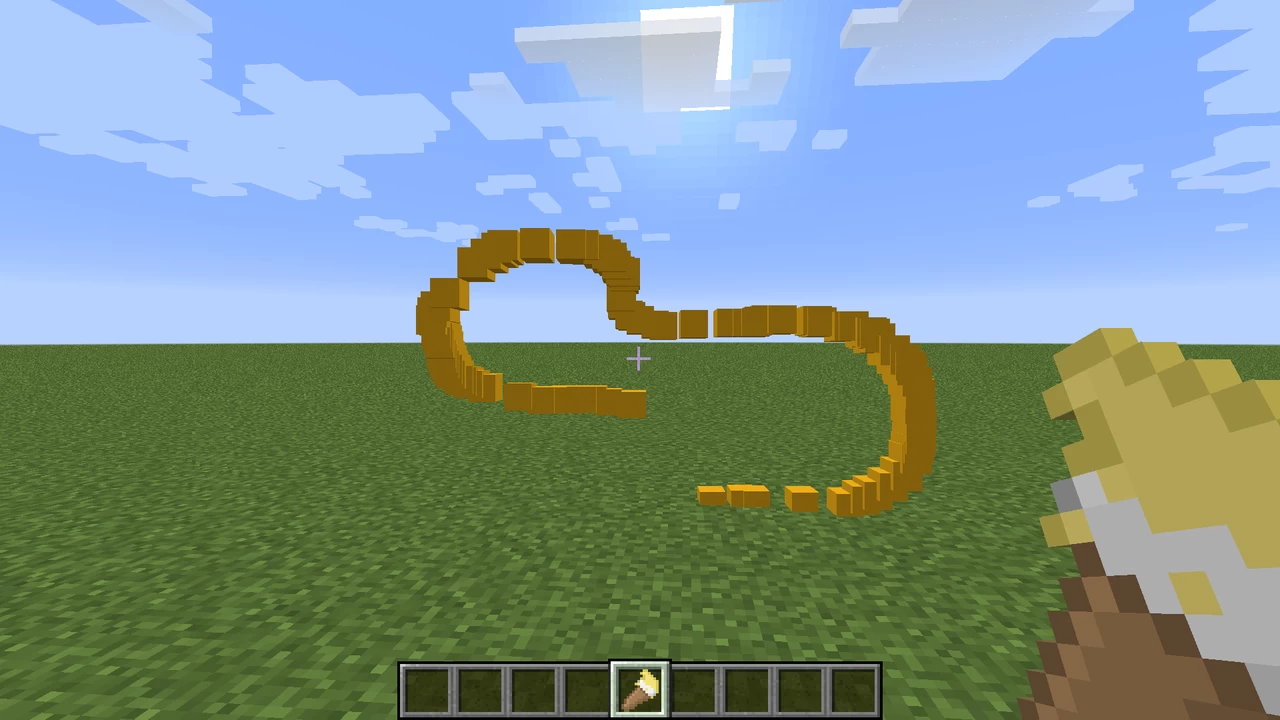
It's never been easier to make art in Minecraft!
Now it's time to paint your world!
This datapack adds:
- Five all-new paintbrushes
- Red
- Green
- Blue
- Yellow
- Black
- An eraser
- use it when your world begins to lag (by that I mean it erases all the paint in that world)
Crafting recipes:
- Throw a stick and a red dye to make a red paintbrush
- Throw a stick and a lime dye to make a green paintbrush
- Throw a stick and a red dye to make a blue paintbrush
- Throw a stick and a red dye to make a yellow paintbrush
- Throw a stick and a black dye to make a black paintbrush
- Throw a grass and a clay ball to make an eraser
Usage
- To paint, have any paintbrush in your main hand and it'll paint!
- To erase, click with the eraser on the floor, and it'll delete any drawings!
Now it's time to paint your world!
This datapack adds:
- Five all-new paintbrushes
- Red
- Green
- Blue
- Yellow
- Black
- An eraser
- use it when your world begins to lag (by that I mean it erases all the paint in that world)
Crafting recipes:
- Throw a stick and a red dye to make a red paintbrush
- Throw a stick and a lime dye to make a green paintbrush
- Throw a stick and a red dye to make a blue paintbrush
- Throw a stick and a red dye to make a yellow paintbrush
- Throw a stick and a black dye to make a black paintbrush
- Throw a grass and a clay ball to make an eraser
Usage
- To paint, have any paintbrush in your main hand and it'll paint!
- To erase, click with the eraser on the floor, and it'll delete any drawings!
More like this

 DartCat25
 GoldenNinjaGaming
 MrObsessive
 blockerlocker
 ddavid050a
4633216
119










Have something to say?