


• 12/20/25 6:58 pm
- 529 views • 0 today
- save_alt 50 downloads
- Compatibility
- Minecraft 1.21
- Changes include
- Functions
- Recipes

5
● Introduction
Thank you for downloading this data pack.
This document contains important notes and instructions for using this data pack.
● Disclaimer
Please note that the author assumes no responsibility for any damages arising from the use of this data pack.
● Usage Notes (To streamers, bloggers, and map creators):
Feel free to create videos, articles, and other content using this data pack.
Furthermore, as long as you stay within the Minecraft Terms of Service, you are free to monetize it through advertising, etc.
However, when using this data pack, please credit this data pack in the video description, article, etc. whenever possible.
(Please feel free to use the content below as is.)
Data Pack Creator: Urushimaru
Distribution URL: youtu.be/wCVH4BmGtEI
●MAL-Link Compatibility
This data pack is compatible with MAL-Link 1.21.11.
(Data packs and maps compatible with MAL-Link 1.21.11 can be installed simultaneously without conflicts.)
For a list of MAL-Link compatible data packs and maps, see:
www.youtube.com/watch?v=EKQ6nWwSyrY&list=PLixgLaVoiz6isvZ7QLB3L8UOfKmX1CpyV
●Conflicts with Other Data Packs and Mods
While we took great care in creating this data pack to avoid conflicts with other authors' data packs and mods, we cannot guarantee that bugs will not occur 100% due to conflicts.
Please note that, as stated in the disclaimer above, the author assumes no responsibility for any bugs that may occur.
When playing with data packs or mods, we strongly recommend that you frequently back up your world data.
●Data Pack Installation Environment
Compatible with Minecraft Java Edition only.
Version: 1.21.11
May also work with multiplayer.
●Installation Instructions (Assuming Japanese is selected in the character settings.)
1. Data Pack
For a video explanation, please click here: youtu.be/uguQFqd0gds
1. Launch Minecraft.
(Make sure the version is compatible with the data pack, such as 1.21.11.)
2. Press the "Settings" button.
3. Press the "Resource Pack" button.
4. Press the "Open Resource Pack Folder" button.
5. File Explorer will appear, so navigate to the ".minecraft" folder.
6. Double-click the "save" folder inside ".minecraft."
7. Open the save data you want to install the data pack into.
8. Place the "mal_shooter_datapack.zip" file, which was included with this book, directly into the "datapacks" folder.
9. Enter the world and you're done!
2. Resource Pack
1. Launch Minecraft.
(Make sure the version is compatible with the data pack, such as 1.21.11.)
2. Press the "Settings" button.
3. Press the "Resource Pack" button.
4. Press the "Open Resource Pack Folder" button.
5. Explorer will appear, so place "mal_shooter_resourcepack.zip" in the displayed folder.
6. Close Explorer and return to Minecraft, then press the "Done" button.
7. Press the "Resource Pack" button again, add "mal_shooter_resourcepack" to the "Current Resource Packs" window on the right, and press the "Done" button to complete the setup!
●Installation Details
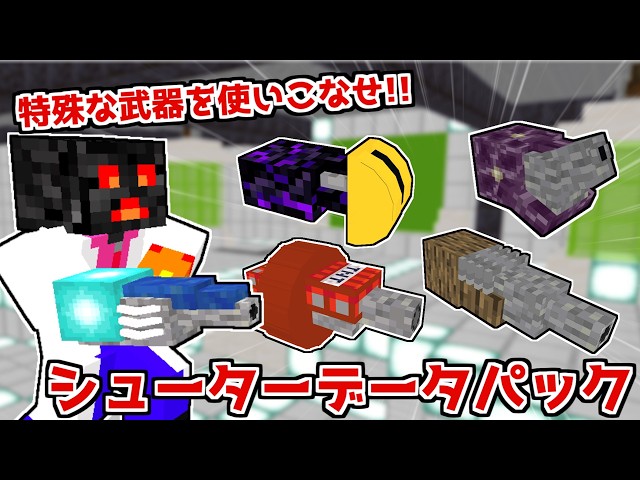
Adds a weapon called a "Shooter."
For crafting recipes, see the included recipe folder.
Thank you very much for reading this far.
I hope you have a great Minecraft life!
Thank you for downloading this data pack.
This document contains important notes and instructions for using this data pack.
● Disclaimer
Please note that the author assumes no responsibility for any damages arising from the use of this data pack.
● Usage Notes (To streamers, bloggers, and map creators):
Feel free to create videos, articles, and other content using this data pack.
Furthermore, as long as you stay within the Minecraft Terms of Service, you are free to monetize it through advertising, etc.
However, when using this data pack, please credit this data pack in the video description, article, etc. whenever possible.
(Please feel free to use the content below as is.)
Data Pack Creator: Urushimaru
Distribution URL: youtu.be/wCVH4BmGtEI
●MAL-Link Compatibility
This data pack is compatible with MAL-Link 1.21.11.
(Data packs and maps compatible with MAL-Link 1.21.11 can be installed simultaneously without conflicts.)
For a list of MAL-Link compatible data packs and maps, see:
www.youtube.com/watch?v=EKQ6nWwSyrY&list=PLixgLaVoiz6isvZ7QLB3L8UOfKmX1CpyV
●Conflicts with Other Data Packs and Mods
While we took great care in creating this data pack to avoid conflicts with other authors' data packs and mods, we cannot guarantee that bugs will not occur 100% due to conflicts.
Please note that, as stated in the disclaimer above, the author assumes no responsibility for any bugs that may occur.
When playing with data packs or mods, we strongly recommend that you frequently back up your world data.
●Data Pack Installation Environment
Compatible with Minecraft Java Edition only.
Version: 1.21.11
May also work with multiplayer.
●Installation Instructions (Assuming Japanese is selected in the character settings.)
1. Data Pack
For a video explanation, please click here: youtu.be/uguQFqd0gds
1. Launch Minecraft.
(Make sure the version is compatible with the data pack, such as 1.21.11.)
2. Press the "Settings" button.
3. Press the "Resource Pack" button.
4. Press the "Open Resource Pack Folder" button.
5. File Explorer will appear, so navigate to the ".minecraft" folder.
6. Double-click the "save" folder inside ".minecraft."
7. Open the save data you want to install the data pack into.
8. Place the "mal_shooter_datapack.zip" file, which was included with this book, directly into the "datapacks" folder.
9. Enter the world and you're done!
2. Resource Pack
1. Launch Minecraft.
(Make sure the version is compatible with the data pack, such as 1.21.11.)
2. Press the "Settings" button.
3. Press the "Resource Pack" button.
4. Press the "Open Resource Pack Folder" button.
5. Explorer will appear, so place "mal_shooter_resourcepack.zip" in the displayed folder.
6. Close Explorer and return to Minecraft, then press the "Done" button.
7. Press the "Resource Pack" button again, add "mal_shooter_resourcepack" to the "Current Resource Packs" window on the right, and press the "Done" button to complete the setup!
●Installation Details
Adds a weapon called a "Shooter."
For crafting recipes, see the included recipe folder.
Thank you very much for reading this far.
I hope you have a great Minecraft life!
More like this

 jonschii4_2
 MattsuDAZE
 User5043029G
 Lun4e
Lun4e![DustyMania [1.21.11] Minecraft Data Pack](https://static.planetminecraft.com/files/image/minecraft/data-pack/2026/998/20013936-logo_s.jpg)
6806260
119


 cadbane86140







 yomikester238
![273: DP Chests that need strength to open [Minecraft 1.21 Datapack Tutorials] Minecraft Data Pack](https://static.planetminecraft.com/files/image/minecraft/data-pack/2026/160/20064976-thumbnail_s.jpg)
 InfernalDevice

 solofire_hc
Have something to say?