



• • 3/27/20 11:23 am • 1 logs
- 5.1k views • 0 today
- save_alt 254 downloads
- Compatibility
- Minecraft 1.15
- to version
- Minecraft 1.16
- Changes include
- Functions


2
Feature :
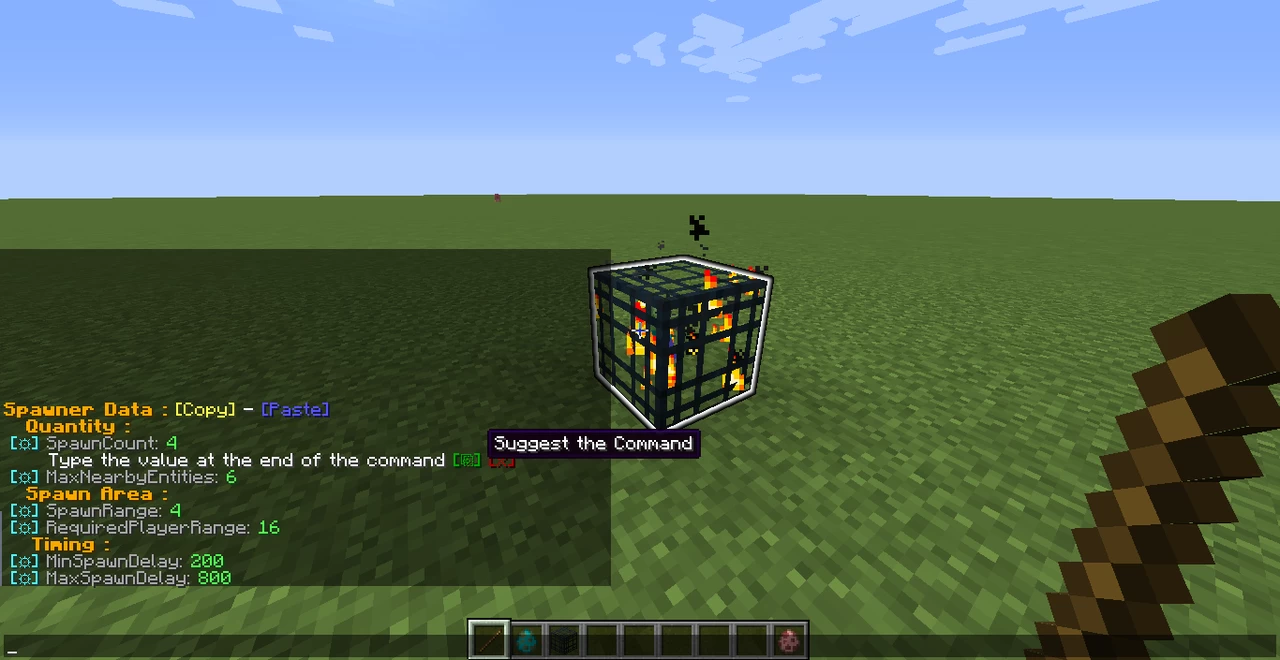
This datapack allow players to edit spawners NBT values ingame, without the need for /setblock /data commands, and without needing an external tool, so you can conveniently modify and test your modifications
The datapack has also be designed Multiplayer compatible, and fairly light to run
It require it's user to be OP, but he likely will be in order to use spawners anyway
How to Start :
How to Edit :
In order to allow the use of your keyboard instead of clicking menu buttons to type the value, an MCcommand is suggested, dont worry, type your value and press enter
Simply follow theses steps :
The datapack will automatically detect the value you entered, and assign it to the edited value
You can't accidentally break things with the command, as it would require you to replace too much characters to modify the command
Once you would got used to it, it would become convenient for you to type directly the value this way
Pro Tips :
You can edit two values at once and set them to the same number
Minecraft Tools Spawner Generator is still useful to get custom eggs to transfer, or to set custom entities spawners directly
F3 + I is your friend, if you want to copy all spawner data, including the entity inside, simply replace the command coordinates with "~ ~ ~" for convenient use
Known limitation :
To transfer the entity inside the spawner back to an egg, it must be a custom egg, because there is a specific tag required to save the entity in it, so the ones in the creative tab won't work
I hope the datapack will met yours expectations and prove itself to be helpful
tell me if there is a bug or if something seems wrong
This datapack allow players to edit spawners NBT values ingame, without the need for /setblock /data commands, and without needing an external tool, so you can conveniently modify and test your modifications
The datapack has also be designed Multiplayer compatible, and fairly light to run
It require it's user to be OP, but he likely will be in order to use spawners anyway
How to Start :
- Rename any item "Handler"
- Aim with that item the spawner to edit
- Use the menu to edit the highlighted spawner
How to Edit :
In order to allow the use of your keyboard instead of clicking menu buttons to type the value, an MCcommand is suggested, dont worry, type your value and press enter
Simply follow theses steps :
- Click the gear icon of the value to edit
- Click the green icon to continue
- Type next the text, after a space, your value, and run the completed command
The datapack will automatically detect the value you entered, and assign it to the edited value
You can't accidentally break things with the command, as it would require you to replace too much characters to modify the command
Once you would got used to it, it would become convenient for you to type directly the value this way
Pro Tips :
You can edit two values at once and set them to the same number
Minecraft Tools Spawner Generator is still useful to get custom eggs to transfer, or to set custom entities spawners directly
F3 + I is your friend, if you want to copy all spawner data, including the entity inside, simply replace the command coordinates with "~ ~ ~" for convenient use
Known limitation :
To transfer the entity inside the spawner back to an egg, it must be a custom egg, because there is a specific tag required to save the entity in it, so the ones in the creative tab won't work
I hope the datapack will met yours expectations and prove itself to be helpful
tell me if there is a bug or if something seems wrong
1 Update Logs
Entity Support : by Loumardes 03/27/2020 11:23:11 amMarch 27, 2020 @ 3:23 pm UTC
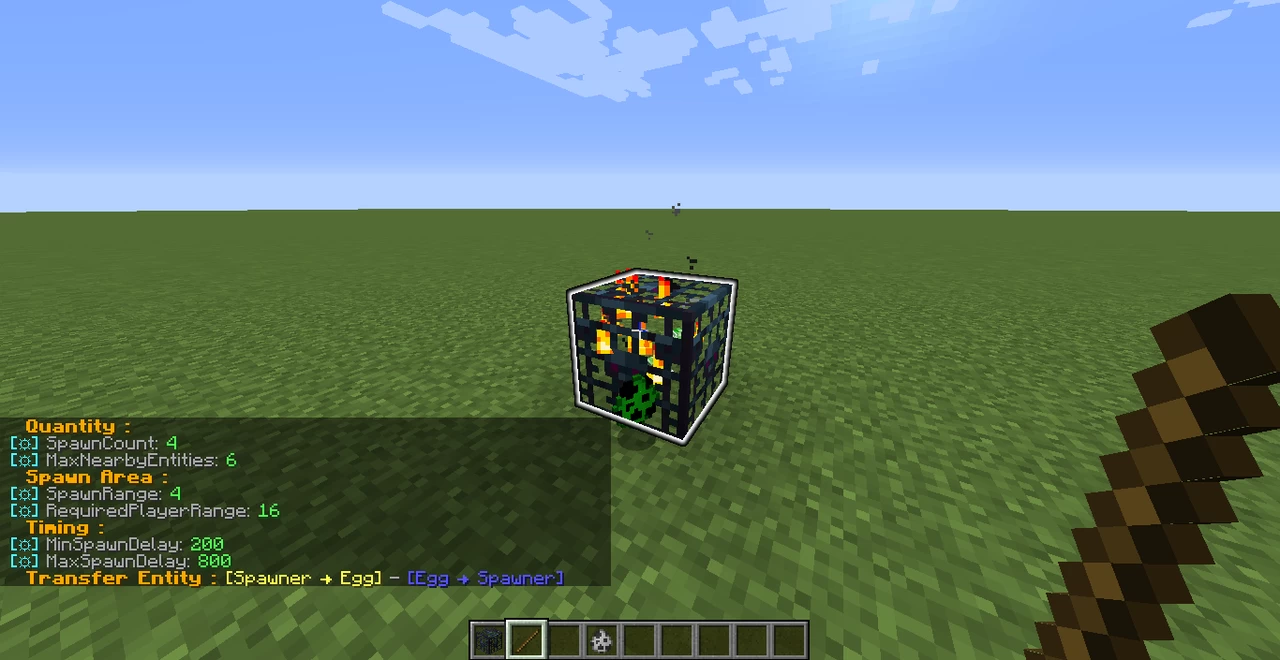
Now you can transfer the entities between
custom eggs and spawners by dropping the egg near it and using the additionals menu buttons
All entities customs tags are now supported, unlike the vanilla right click method wich only change mob type
so you can use external generators like Minecraft Tools to change the entity of a PLACED spawner, or perform tests with the egg
However, make sure while using it that you dont transfer entity data in the wrong direction, as the 2 buttons looks a bit similar
so you can use external generators like Minecraft Tools to change the entity of a PLACED spawner, or perform tests with the egg
However, make sure while using it that you dont transfer entity data in the wrong direction, as the 2 buttons looks a bit similar
More like this
 Armor Stand Customizer v2.2 (1.14+)Minecraft 1.14 - 1.16 Tool Data Pack
 CivetKitty
3/22/20 9:03
• posted 1/16/19 3:59
35.8k 6.3k 11x 74442
CivetKitty
3/22/20 9:03
• posted 1/16/19 3:59
35.8k 6.3k 11x 74442 Silk Touch can get SpawnerMinecraft 1.13 - 1.19 Tool Data Pack
 paul90317
2/9/23 8:57
• posted 2/5/22 1:50
16k 3.7k 14x 12731
paul90317
2/9/23 8:57
• posted 2/5/22 1:50
16k 3.7k 14x 12731
![Sheep toolkit [Outdated] Minecraft Data Pack](https://static.planetminecraft.com/files/image/minecraft/data-pack/2022/762/16195030-screenshot_s.jpg)

 Lamb dude
4496312
119










Have something to say?
There is a problem. When you are going to use an axe to cut wood. When you cut the wood, you must give yourself the axe, it gives you a shulker shell with the axe inside

Of the rest I think it works well
this comes from the fact I often reuse the files of an other datapack to ensure I put functions in the right subfolder
I have not deleted all the files apparently, and a custom loot table was left, alongside an useless blocktag
Everything fixed now, you can redownload the datapack if you wish, it wont affect yours progress