


• 1/4/25 10:49 am
- 1.6k views • 1 today
- save_alt 86 downloads
- Compatibility
- Minecraft 1.21
- Changes include
- Functions
- Recipes
3
1.21.4+ ONLY, DOESNT WORK ON ANY VERSION BELOW THAT!!!
This datapack requires a dependency resourcepack. Both can only be downloaded on Modrinth.
About
This specific URK pack adds postal items, such as envelopes & parcel boxes.
How does it work
- The 2 new types of items are envelopes and parsel boxes which are themed reskins for writable/written books & bundles respectively.
- Each envelope & box can have a cover & a stamp
- Covers are themed reskins of the items themselves. Writable & Written Books turn into open/closed envelopes respectively, and Bundles turn into boxes. There's a total of 20 Cover designs. You can change an item's cover by combining it with a specific item on a smithing table.
- Stamps can be applied on top of covers, they essentially work the same way as armour trims. Each stamp material has a unique look. Stamps are added on a Smithing table as well, they require a resin clump, and any of the 11 armour trim materials.
- All of that adds up to a total of 240 unique cover & stamp combinations.
- Adding stamps or a cover does not affect the content, be that items or text.
- Stamps and covers can be changed at any time.
- Closed envelops can be copied just like regular books. The copies retain the design of the original, that way you can save up on materials.
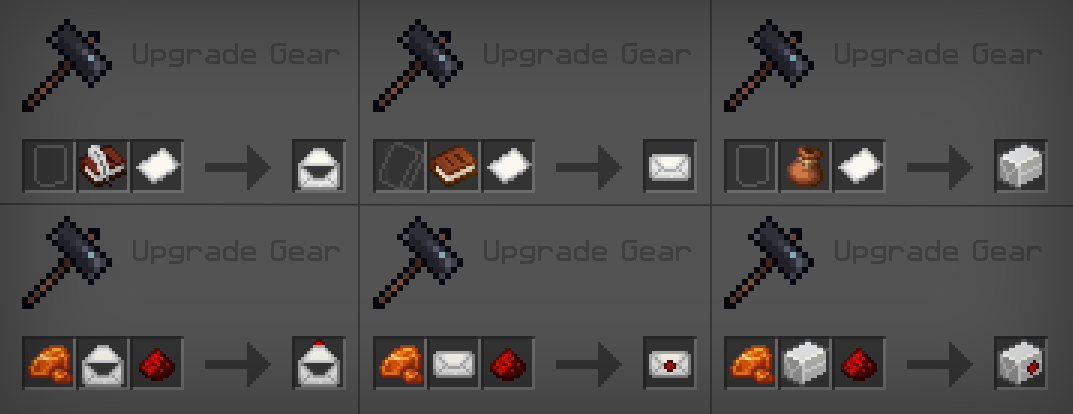
Full list of cover & stamp recipes.
Covers

All the covers are applied on a smithing table, by putting a Book and quill/Written book, or a Bundle of any kind, along with a material mentioned below.
1. Paper - Paper
2. Pale - Open eyeblossom
3. Ancient - Sculk veins
4. Ominous - Ominous bottle
5. Earthy - Grass
6. Regal - Trial key (any)
7. Magmatic - Magma cream
8. Golden - Gold ingot
9. Bamboo - Bamboo
10. Lush - Azalea
11. Prismarine - Prismarine shard
12. Aquatic - Nautilus shell
13. Lunar - Glowink sac
14. Striped - Amethyst crystal
15. Ender - Popped chorus fruit
16. Cherry - Cherry wood sapling
17. Rainbow - Rose bush
18. Netherly - Nether brick
19. Copper - Copper ingot
20. Solar - Glowstone dust
Postal stamps

All stamps are crafted on a smithing table, using resin clump in place of an armour trim template. More stamps will be added as mojang adds new trim materials.
1. Amethyst - Heart
2. Copper - X symbol
3. Diamond - Checkmark
4. Emerald - Emerald
5. Gold - Star
6. Iron - Pickaxe
7. Lapis - Hourglass
8. Quartz - Square
9. Netherite - Skull
10. Redstone - Circle
11. Resin - Exclamation mark
URK items also include a few tooltip tags, which are supposed to signify what can be done with the items, to make the pack easier to use without a tutorial.
The following tags are used in this datapack:
Readable - This item can be used as a written book, and it may contain text.
Container - This item can store items inside it, just like a bundle.
How to install
In order to function properly, this datapack relies on a URK core resourcepack!
The resourcepack adds the models & textures themselves, while the datapack makes the items actually accessible in-game!
Datapack installation
- To install the datapack, you will need to do one of the following:
- If you're creating a new world: in the world creation screen, naviagate to the "More" tab. Find & press the "Data packs" button, and then press "Open Pack Folder" in the new menu. Drag the downloaded file into this folder. After that, enable the newly added datapack via the in-game menu.
- If you're adding the pack to an existing world: drag the downloaded files into your ```.minecraft/saves/[WorldName]/datapacks``` folder, then re-enter the world. You may need to use the /datapack enable [pack_name] command, to activate the datapack.
- If you're creating a new world: in the world creation screen, naviagate to the "More" tab. Find & press the "Data packs" button, and then press "Open Pack Folder" in the new menu. Drag the downloaded file into this folder. After that, enable the newly added datapack via the in-game menu.
- If you're adding the pack to an existing world: drag the downloaded files into your ```.minecraft/saves/[WorldName]/datapacks``` folder, then re-enter the world. You may need to use the /datapack enable [pack_name] command, to activate the datapack.
Removing the packs
- In order to remove the Ultimate Roleplay kit from your world, you can simply delete the datapacks located in the .minecraft/saves/[WorldName]/datapacks folder. Items added by this datapack will no longer be craftable. The items themselves will stay, and can be destroyed. Removing the resourcepack will also remove the item's custom models & texturesAdd collapsed content here
- When updating to a newer version of the Ultimate Roleplay Kit, please update both the [**resourcepack!**] **AND** the datapack!
Knowns issues & Planned features
Issues:
- Stamps cannot be removed, even though they can be replaced.
- envelopes & boxes with a cover cannot be turned back into regular books or bundles.
Plans:
- More envelope & box textures will be added from time to time, depending on my availability.
- More stamp designs will be added whenever Minecraft gets new armour trim materials
All URK Packs:
Mandatory Resourcepack:
Ultimate roleplay kit - Resourcepack - A mandatory dependency resourcepack, utilized by all other Datapacks.
Content Datapcks:
Ultimate roleplay kit - Hats - Adds 22 cosmetic hats, that are sold by the wandering trader.
Ultimate roleaply kit - Mail - Adds 20 envelope & parcel box designs, that can also be customised further with 11 unique stamps.
More like this
 ZMI - Zingle's Modern InteriorsMinecraft 1.14 - 1.16 Cosmetic Data Pack
 oezingle
9/2/20 11:53
• posted 4/10/20 10:02
19.6k 2.5k 2x 43233
oezingle
9/2/20 11:53
• posted 4/10/20 10:02
19.6k 2.5k 2x 43233
 Terrain ReplacerMinecraft 1.16 - 1.17 Cosmetic Data Pack
 skszelson
•10/11/20 7:21
2.9k 143 2x 454
skszelson
•10/11/20 7:21
2.9k 143 2x 454 Better ElytrasMinecraft 1.21 Cosmetic Data Pack
 Team ReCrafted
5/10/25 5:19
• posted 10/1/24 8:14
2.5k 180 1x 2118
Team ReCrafted
5/10/25 5:19
• posted 10/1/24 8:14
2.5k 180 1x 2118 Ultimate Roleplay Kit - HatsMinecraft 1.21 Cosmetic Data Pack
 NoodleDood1e
•1/1/25 7:41
2.4k 265 3x 71414
NoodleDood1e
•1/1/25 7:41
2.4k 265 3x 71414
 SecretFall
6502363
119









Have something to say?