Are you up for a challenge?
palette
A technical art challenge—how well can you predict the colors of your skin?
  • About

    Welcome, welcome to my artistic challenge! 𖦹

    In this jam, you will try to make a full skin—either for a player model or a mob—using the opposite of the colors you want to appear on the final skin. For example, instead of making a black hoodie with a red skull, make a white hoodie with a cyan one! Then, once your skin is finished, invert the colors and see how well you did.

    This event is all about the challenge. It’s okay if your entry doesn’t turn out the way you thought it would—that’s part of the fun!

    𖦹 Rules
    Do not make a skin normally, invert it, and then claim that is the first skin.
    。 Submit your crazy, wacky, inverted skin as your entry, not the final result. 。

    Skins must be new designs (made by you!). No stealing or reposting skins.
    。 No AI can be used in this event. You’re capable of great things if you try. 。
    All PMC Rules apply

    See the Tips & Tricks section for information on inverted colors and an example Minecraft skin.


    Questions? Check out the FAQs or ask in the guestbook! 𖦹


    See any skins you think are stolen or not following the rules? Let me know in the Jam's guestbook or by PMing PersonWhoPlaysMinecraft
    Make sure to include why you are reporting that skin in your message

    Decorative text from Emoji Combos
  • Tips & Tricks


    The inverse of a color is the opposite color and shade (lightness/darkness) on the color wheel.


    Color choice:


    Choose colors opposite the ones you want in relation to the color wheel. Don’t use complementary colors! It will work, but not as well. This image has original colors (top) and their inverses (bottom) to help get you started. Each color is at 50% lightness and taken directly from the default PMCSkin3D palette.


    Shade:


    The inverse of white is black, so it makes sense that a dark color will have a lighter opposite. When shading your skin, use lighter colors for shadows and darker colors for highlights.

    For an example, take a look at my submission for this contest
  • FAQs

    How do invert colors work?
    The inverse of a color is the opposite of the color on the color wheel. It is also the opposite shade. So, the inverse of dark purple is a light green. For this Minecraft skin challenge, you want to use the opposite colors of your final design to make your skin.

    In this image, I have a dark red selected. On the color wheel, you can see the red section I am in is in line with cyan. So, cyan is the inverse of red.


    For more help, check out the Tips & Tricks section.
    How do I invert my skin?
    There are many image inversion tools online. I use the one from Pine Tools, but any will work. Art programs may also have a tool to invert colors.
    What do I submit for my entry?
    Publish the skin you made before inverting it to see if your colors turned out as predicted. You can publish the resulting skin either separately or include it in the description of your entry.

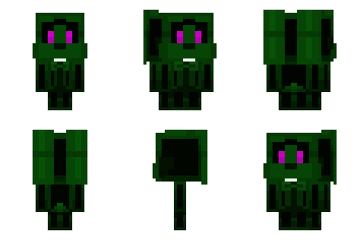
    Example: I wanted to make a skin of a blonde boy in a white and red hoodie. The skin I actually made is mostly black with cyan accents for the hoodie. This is the skin I upload and submit to the contest. In the description, I’ve included an image comparing the two and the skin file for the result of my experiment.


    How many skins can I make?
    For this jam, you can only enter three entries, but there is no limit to how many other skins you make! Enter your favorite three and share the rest with others.
    What type of skin can I enter?
    You can enter a player skin or mob skin of any resolution, as long as it follows the jam rules and theme.
    How do I enter?
    First off, make sure you join the Jam!

    Once you finish your entry, publish it live! Then, come back here to the Jam page and select "enter." You should be able to select your entry, so click "save selection" to finalize it.

    You can also change your entry or edit it in the same way, if you don't like how it turned out or selected the wrong skin.
    My question isn’t answered here!
    Have any additional questions or concerns? Feel free to ask in the Jam's guestbook or by PMing me, PersonWhoPlaysMinecraft
  • Jam Overview

    Entries will open on July 31 @ 8:00 am UTC to October 30 @ 6:59 am UTC
    Jam starts in
    days
    hours
    minutes
    seconds

    Basic Summary

    Unranked Jam accepting up to 3 Mob Skins and Skins from participants.
    Accepts standard and 2x HD resolution skins.
    Accepts all mob models excluding objects.

    Read the about for more information.

    Trophies

    Participant
  • Wall Posts

  • Guest Book

    Login or register to post to their guest book.
  • Joined

    No members to display yet.

  • Supporting Site

  • Supporting Site

Welcome