



• • 9/14/19 9:27 am • 1 logs
- 9.7k views • 0 today
- save_alt 1.1k downloads
- Game Version
- Minecraft 1.14
- Progress
- 100% complete


14
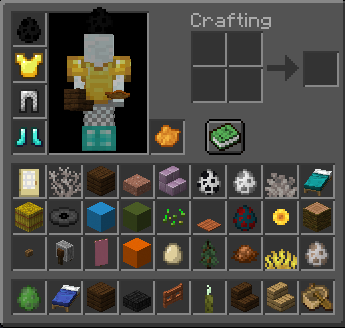
Randomize your entire inventory!
Just install the data pack and reload!
By default the pack randomizes every 60 seconds, edit main.mcfunction to change it.
By default the pack randomizes every slot, edit randomize.mcfunction to change it.
WARNING: THIS PACK WILL DELETE ANY ITEMS IN YOUR INVENTORY, BE CAUTIOUS
Just install the data pack and reload!
By default the pack randomizes every 60 seconds, edit main.mcfunction to change it.
By default the pack randomizes every slot, edit randomize.mcfunction to change it.
WARNING: THIS PACK WILL DELETE ANY ITEMS IN YOUR INVENTORY, BE CAUTIOUS
1 Update Logs
Update #1 : by 1-UP_Nuke 09/14/2019 9:27:21 amSeptember 14, 2019 @ 1:27 pm UTC
Fixed bug where all players received the same items!
Data pack now randomizes items once upon reload, no more waiting for items to come in!
Data pack now randomizes items once upon reload, no more waiting for items to come in!
More like this
![Random Fishing [Bedrock Edition] Minecraft Mod](https://static.planetminecraft.com/files/image/minecraft/mod/2022/202/16345435_s.jpg) Random Fishing [Bedrock Edition]Minecraft 1.19 Other Mod
Random Fishing [Bedrock Edition]Minecraft 1.19 Other Mod MKNETHER114
•12/18/22 1:35
5.3k 1kx 152
MKNETHER114
•12/18/22 1:35
5.3k 1kx 152
 c3l3rno
4398827
7





 Opla Manerda DEV Team





Have something to say?
1. Unzip the pack into a folder.
2. Delete the original .zip file.
3. Edit the files you need to edit.
4. Save them (Usually CTRL + S).
5. Type "/reload" in minecraft, or exit and enter the world.
I wanted to try this on LAN with someone else and try a world where we got random items each but we got the same items. Is there anything I could do to make this a reality?
Thanks!
However, when I do have the time I will try to find a solution, maybe with: "execute as @a run loot replace entity @s"
I'll update you in a day or two if I find a solution!