
• • 1/31/15 7:56 pm • 14 logs
- 10.4k views • 0 today
- save_alt 1.3k downloads
- Game Version
- Minecraft 1.8.1
- Progress
- 100% complete

211
Want a great plugin to suit all your player launching needs?
Need to have different powers per pressure plate?
Want to be able to launch your players with a command too?
Then this plugin is for you!
This plugin allows you to place pressure plates that can launch your players.
What makes it different is that you can configure the power per pressure plate.
That means that I could have one pressure plate at spawn that launches players really far, but then have another one in a minigame that launches them weakly.
It also has better launching calculations, meaning that if you have an x power of 5 and a y power of 0, your players wont go up even if they look up!
It even has a /launch command to launch players without them stepping on a pressure plate!
All this makes PlayerLauncher the best launching plugin that I have seen!
Instead of /playe, you can also use /playerlauncher or /launcher.


Need to have different powers per pressure plate?
Want to be able to launch your players with a command too?
Then this plugin is for you!
This plugin allows you to place pressure plates that can launch your players.
What makes it different is that you can configure the power per pressure plate.
That means that I could have one pressure plate at spawn that launches players really far, but then have another one in a minigame that launches them weakly.
It also has better launching calculations, meaning that if you have an x power of 5 and a y power of 0, your players wont go up even if they look up!
It even has a /launch command to launch players without them stepping on a pressure plate!
All this makes PlayerLauncher the best launching plugin that I have seen!
Tutorial
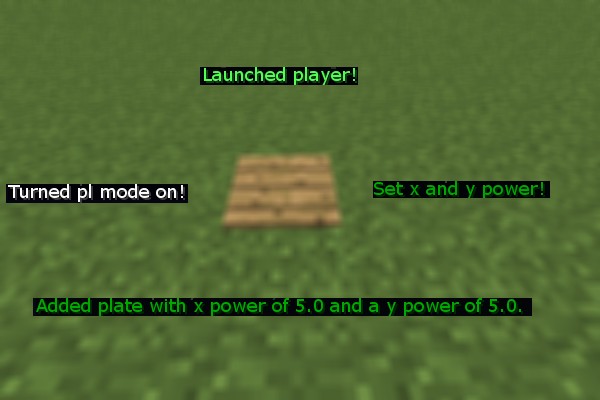
To place a player-launching pressure plate, first do /plate toggle.
You need PlayerLauncher mode on to place and remove PlayerLauncher pressure plates.
Then, set the power with /plate setpower (x power) (y power).
Lastly, place your pressure plate.
Warning: Do not set the x or y power to anything over 10 and make sure that when they are added together, they are smaller than 16.
You need PlayerLauncher mode on to place and remove PlayerLauncher pressure plates.
Then, set the power with /plate setpower (x power) (y power).
Lastly, place your pressure plate.
Warning: Do not set the x or y power to anything over 10 and make sure that when they are added together, they are smaller than 16.
Commands and Permissions
Instead of /playe, you can also use /playerlauncher or /launcher.
| Commands | Description | Permission |
| /plate launch (player) (x power) (y power) | Launches the specified player with that power. Warning: Do not set the x or y power to anything over 10 and make sure that when they are added together, they are smaller than 16. | PlayerLauncher.launch |
| /plate toggle | Toggles PlayerLauncher mode on or off | PlayerLauncher.toggle |
| /plate setpower (x power) (y power) | Sets the x and y power of the next pressure place you place | PlayerLauncher.setPower |
| /plate saveplates | Saves the plates to the config (also happens on server stop). | PlayerLauncher.saveplates |
| /plate info | Tells you information about the plate you're looking at | PlayerLauncher.info |
14 Update Logs
Update #14 : by Techdoodle 01/31/2015 7:56:31 pmFebruary 1, 2015 @ 12:56 am UTC
Awesome updater!
LOAD MORE LOGS
More like this
![[Deprecated] TooMuchTNT Minecraft Mod](https://static.planetminecraft.com/files/resource_media/screenshot/1431/toomuchtnt7921965_thumb.jpg) [Deprecated] TooMuchTNTMinecraft 1.8.1 Server Mod
[Deprecated] TooMuchTNTMinecraft 1.8.1 Server Mod Techdoodle
1/31/15 8:01
• posted 7/29/14 5:50
40.8k 10.9k 48x 1198
Techdoodle
1/31/15 8:01
• posted 7/29/14 5:50
40.8k 10.9k 48x 1198![[Deprecated] SuperEnchants Minecraft Mod](https://static.planetminecraft.com/files/resource_media/screenshot/1430/superenchants7909499_thumb.jpg) [Deprecated] SuperEnchantsMinecraft 1.8.1 Server ModTechdoodle
1/31/15 8:07
• posted 7/26/14 6:05
37.4k 9k 62x 24726
[Deprecated] SuperEnchantsMinecraft 1.8.1 Server ModTechdoodle
1/31/15 8:07
• posted 7/26/14 6:05
37.4k 9k 62x 24726![[Deprecated] LaserGun Minecraft Mod](https://static.planetminecraft.com/files/resource_media/screenshot/1434/lasergun8046665_thumb.jpg) [Deprecated] LaserGunMinecraft 1.8.1 Server ModTechdoodle
1/31/15 7:52
• posted 8/24/14 1:26
15k 2.6k 32x 12410
[Deprecated] LaserGunMinecraft 1.8.1 Server ModTechdoodle
1/31/15 7:52
• posted 8/24/14 1:26
15k 2.6k 32x 12410![[Deprecated] PlayerParticles Minecraft Mod](https://static.planetminecraft.com/files/resource_media/screenshot/1432/main7965787_thumb.jpg) [Deprecated] PlayerParticlesMinecraft 1.8.1 Server ModTechdoodle
1/31/15 7:55
• posted 8/7/14 1:30
8.7k 913 41x 5225
[Deprecated] PlayerParticlesMinecraft 1.8.1 Server ModTechdoodle
1/31/15 7:55
• posted 8/7/14 1:30
8.7k 913 41x 5225![[Deprecated] FusRoDah Minecraft Mod](https://static.planetminecraft.com/files/resource_media/screenshot/1435/fusrodah8060812_thumb.jpg) [Deprecated] FusRoDahMinecraft 1.8.1 Server ModTechdoodle
1/31/15 7:53
• posted 8/27/14 7:47
6.8k 930 14x 1154
[Deprecated] FusRoDahMinecraft 1.8.1 Server ModTechdoodle
1/31/15 7:53
• posted 8/27/14 7:47
6.8k 930 14x 1154
2988284
7


![[Deprecated] PortalGun Minecraft Mod](https://static.planetminecraft.com/files/resource_media/screenshot/1432/portalgun7972653_thumb.jpg)
 Gerenteplugger265






 MrWonderKing12

 Tenbeee
![[BetaFixedPlugin] Bug Fixes and Quality-of-Life Minecraft Mod](https://static.planetminecraft.com/files/image/minecraft/mod/2026/650/20119472-bf_s.jpg)
 aimTuga
![[GoldSilkTouchPlugin] Gold Tools have Silk Touch Minecraft Mod](https://static.planetminecraft.com/files/image/minecraft/mod/2026/664/20119471-silk_s.jpg)

Have something to say?
It could be a while though, I'm quite bust atm.
Then do "/pltoggle" so that its on.
Then, just place your pressure plate!
it wont work
/plate launch (player) (x power) (y power)
/plate setpower (x power) (y power)
and
/plate toggle