


• 7/21/11 11:37 pm
- 5.7k views • 0 today
- save_alt 451 downloads
- Game Version
- Minecraft 1.7 beta
- Progress
- 95% complete
Added CreditMatthewlee1233


14
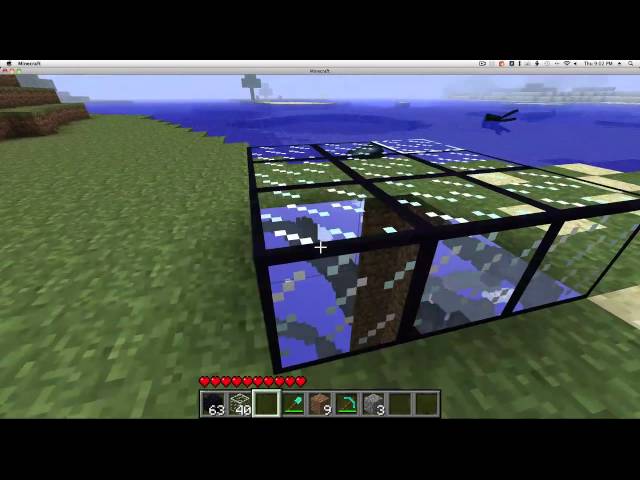
My first mod ever! VoidGlass allows you to see through the ground when you look through the block. It can also be used as a one way window! There is going to be new a update with small fixes like how to block sounds. REQIURES MOD LOADER. Please comment and tell me what you think.
INSTALLATION INSTRUCTIONS
1. Find your bin folder
MAC: ~/Library/Application Support/minecraft/bin/
WINDOWS:%APPDATA%.minecraftbin
2.remane your minecraft.jar to minecraft.zip
3.Unzip minecrfat.zip
4.Download ModLoader from http://www.minecraftforum.net/topic/75440-v173-risugamis-mods-recipe-book-updated/
5.Place all the jar files from the ModLoder folder you downloaded into the minecraft.jar you unzipped SAY YES IF IT ASKS TO REPLACE
6.Place all the files in the VoidGlass folder you downloaded into the minecraft.jar you unzipped.
7.Delete META-INF
8.zip up the minecraft.jar you unzipped.
9.rename it minecraft.jar.
10.Run and enjoy.
INSTALLATION INSTRUCTIONS
1. Find your bin folder
MAC: ~/Library/Application Support/minecraft/bin/
WINDOWS:%APPDATA%.minecraftbin
2.remane your minecraft.jar to minecraft.zip
3.Unzip minecrfat.zip
4.Download ModLoader from http://www.minecraftforum.net/topic/75440-v173-risugamis-mods-recipe-book-updated/
5.Place all the jar files from the ModLoder folder you downloaded into the minecraft.jar you unzipped SAY YES IF IT ASKS TO REPLACE
6.Place all the files in the VoidGlass folder you downloaded into the minecraft.jar you unzipped.
7.Delete META-INF
8.zip up the minecraft.jar you unzipped.
9.rename it minecraft.jar.
10.Run and enjoy.
84854
7


 Gutomat64
 Kowal_96



 Pastelmooncrafting15
 KaaXdev
 Mokey Crue
 Vastiel
 99ki
99ki
Have something to say?
just modify any block in your terrain.png to be transparent