


• 3/22/25 9:06 am
- 11k views • 4 today
- save_alt 2.5k downloads • 1 today
- Progress
- 100% complete
160
DISCLAIMER: You need CurseForge app to install this map and modpack!
CurseForge app Download:https://www.curseforge.com/download/app
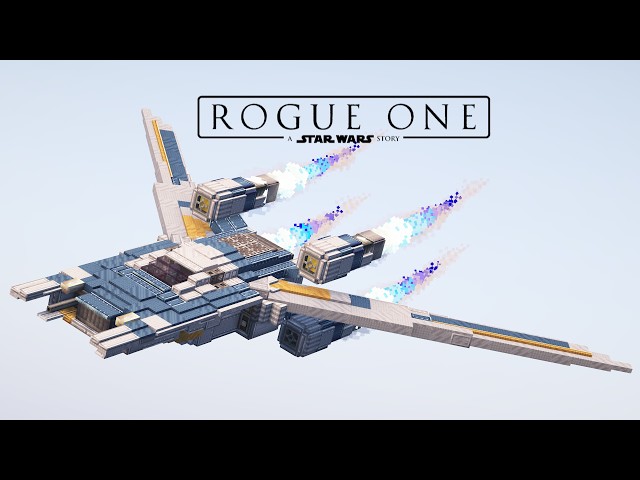
Fully functional U-Wing starfighter from Star Wars in 1:1 scale.
1. Downad the zip. file.
2. Open CurseForge app and from the displayed games choose ''Minecraft''.
3. In the right top corner click on ''Create Custom Profile''.
4. In the window that appears click ''import'' and choose the file that you just downloaded, after that new profile will be created automatically.
5. In new created profile click ''play'' and after loading Minecraft, the map should be located in single player mode.
VMOD SCHEMATIC SETUP TUTORIAL:
1. Remove the Network Backup Block from inside of the ship.
2. Connect the controllers to Tweaked Controller Hub by right clicking, located at the back of the vehicle next to the gyroscope.
3. Connect two creative motors set to 12, to two sequenced gear shifts located right behind the back seats.
4. Connect one creative motor set to 256, to the normal Clutch located at the back of the ship.
5. Check if every creative motor system folds and unfolds correctly, if not just reverse the power.
STERING TUTORIAL:
Right Shoulder - move forward.
Guide Button - move up.
Left +X Axis, Left -X Axis - turn left, right.
Left +Y Axis, Left -Y Axis - pitch up, down.
B Button, X Button - roll left, right.
Left Joystick Click - Fire fixed forward autocanons.
Start Button - fold/unfold wings.
Back Button - extend/retract landing legs.
desert map created by Killerack: https://www.planetminecraft.com/project/theriverby_killerack_15k15k/
Island taiga map created by JoCrafter42: https://www.planetminecraft.com/project/epic-survival-island-2000x2000-blocks/
Star Wars base created by MrMattRanger: https://www.youtube.com/watch?app=desktop&v=wcDL7Y7Rf4U
Original Modpack created by: https://www.youtube.com/@qarsan2
CurseForge app Download:https://www.curseforge.com/download/app
Fully functional U-Wing starfighter from Star Wars in 1:1 scale.
Installation map and modpack
1. Downad the zip. file.
2. Open CurseForge app and from the displayed games choose ''Minecraft''.
3. In the right top corner click on ''Create Custom Profile''.
4. In the window that appears click ''import'' and choose the file that you just downloaded, after that new profile will be created automatically.
5. In new created profile click ''play'' and after loading Minecraft, the map should be located in single player mode.
VMOD SCHEMATIC SETUP TUTORIAL:
1. Remove the Network Backup Block from inside of the ship.
2. Connect the controllers to Tweaked Controller Hub by right clicking, located at the back of the vehicle next to the gyroscope.
3. Connect two creative motors set to 12, to two sequenced gear shifts located right behind the back seats.
4. Connect one creative motor set to 256, to the normal Clutch located at the back of the ship.
5. Check if every creative motor system folds and unfolds correctly, if not just reverse the power.
STERING TUTORIAL:
Right Shoulder - move forward.
Guide Button - move up.
Left +X Axis, Left -X Axis - turn left, right.
Left +Y Axis, Left -Y Axis - pitch up, down.
B Button, X Button - roll left, right.
Left Joystick Click - Fire fixed forward autocanons.
Start Button - fold/unfold wings.
Back Button - extend/retract landing legs.
Credits
desert map created by Killerack: https://www.planetminecraft.com/project/theriverby_killerack_15k15k/
Island taiga map created by JoCrafter42: https://www.planetminecraft.com/project/epic-survival-island-2000x2000-blocks/
Star Wars base created by MrMattRanger: https://www.youtube.com/watch?app=desktop&v=wcDL7Y7Rf4U
Original Modpack created by: https://www.youtube.com/@qarsan2
More like this
 Fully functional Imperial Star Destroyer in Clockwork!Other Map
 KrodoFox
•1/18/25 4:02
17.3k 2.1k 11x 204942
KrodoFox
•1/18/25 4:02
17.3k 2.1k 11x 204942 Star Wars Millennium Falcon in Minecraft Clockwork!Other MapKrodoFox
•7/9/24 8:33
7.5k 1.5k 2x 122222
Star Wars Millennium Falcon in Minecraft Clockwork!Other MapKrodoFox
•7/9/24 8:33
7.5k 1.5k 2x 122222 Working Star Wars Jawa Sandcrawler in Clockwork!Other MapKrodoFox
•9/22/24 6:30
6.6k 1k 3x 204131
Working Star Wars Jawa Sandcrawler in Clockwork!Other MapKrodoFox
•9/22/24 6:30
6.6k 1k 3x 204131 Fully functional Star Wars Delta-class T-3c shuttle in Clockwork!Other MapKrodoFox
•5/19/25 6:02
3.4k 329 2x 201712
Fully functional Star Wars Delta-class T-3c shuttle in Clockwork!Other MapKrodoFox
•5/19/25 6:02
3.4k 329 2x 201712 Fully functional Zeta-class Heavy Cargo Shuttle in Clockwork!Other MapKrodoFox
•12/3/25 1:46
3k 365 1x 201411
Fully functional Zeta-class Heavy Cargo Shuttle in Clockwork!Other MapKrodoFox
•12/3/25 1:46
3k 365 1x 201411
6566672
2


 cadbane86140








 Prince_Wafflezzz
 DreamWanderer

 guardian1200

Have something to say?