



• 8/28/25 12:42 am
- 478 views • 0 today
- save_alt 23 downloads
- Progress
- 100% complete

5
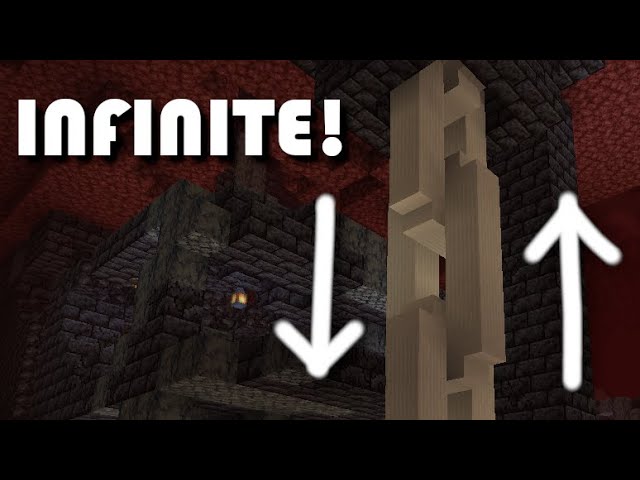
I really enjoy seeing massive builds with chains hanging off of them or giant cranes attempting to lift something impossibly heavy, but what if those chains moved?
So what is this? This is a no-mod animated moving chain made in vanilla Minecraft with Creative Mode!
How does it work? This is an animation technique called Stop Motion Animation. Traditionally it is done with clay figures that are carefully positioned with minute movements then a single picture is taken. Usually Stop Motion Animation is a series of these pictures with 24 or 30 pictures/frames per second of film, sometimes as few as 12 per second.
Here is some additional technical Minecraft information. You can just skip to the next paragraph if you don't care about this part.
Minecraft processes block updates at a rate of 20 times/ticks per second, so that will be our upward limit for fps, however redstone components operate at 2 "game ticks" per "redstone tick". This means that redstone is processed every 2 ticks for a typical rate of 10 frames per second. (Redstone can be offset to run parallel with another circuit but this is not needed for every project)
Ok, but how does it work in Minecraft? I use Structure Blocks to hold each individual frame used in the animation. Then I load each frame in the same location to overwrite the previous frame's blocks creating a Minecraft stop motion animation.
--------------------------------------------Instructions--------------------------------------------
Version:
Created in Java 1.15
Still works in Java 1.20.1
I do not currently know of a way to move these files from Java to Bedrock because Java uses .nbt files and Bedrock uses .mcstructure files
How to import this animation:
Extract this .zip file in the folder named "generated" within the minecraft world save folder you wish to import this animation to.
The path should look like the following: .minecraft\saves\YOUR_WORLD\generated\THIS_ANIMATION
What is in this animation:
A length of really big chain that moves up or down with 4 different speed settings all packaged in one circuit.
===============================WARNING======================================
Make a backup of your world before using ANY structure blocks
You can do this from the world select menu by clicking on your world
Press the Edit button at the bottom
Press the Make Backup button
===============================WARNING======================================
How to load this animation:
Place a structure block on the ground with the Relative Position values as follows: X(1) Y(0) Z(1)
Type into the Structure Name text box the following: cyrdaan_chain_1:circuit
Then press LOAD in the lower right hand corner
How to start the animation:
Click on the Noteblock to toggle between starting or stopping the animation.
Make sure to stop the animation before changing the speed or direction.
Speed and direction can be changed with the stone buttons.
So what is this? This is a no-mod animated moving chain made in vanilla Minecraft with Creative Mode!
How does it work? This is an animation technique called Stop Motion Animation. Traditionally it is done with clay figures that are carefully positioned with minute movements then a single picture is taken. Usually Stop Motion Animation is a series of these pictures with 24 or 30 pictures/frames per second of film, sometimes as few as 12 per second.
Here is some additional technical Minecraft information. You can just skip to the next paragraph if you don't care about this part.
Minecraft processes block updates at a rate of 20 times/ticks per second, so that will be our upward limit for fps, however redstone components operate at 2 "game ticks" per "redstone tick". This means that redstone is processed every 2 ticks for a typical rate of 10 frames per second. (Redstone can be offset to run parallel with another circuit but this is not needed for every project)
Ok, but how does it work in Minecraft? I use Structure Blocks to hold each individual frame used in the animation. Then I load each frame in the same location to overwrite the previous frame's blocks creating a Minecraft stop motion animation.
--------------------------------------------Instructions--------------------------------------------
Version:
Created in Java 1.15
Still works in Java 1.20.1
I do not currently know of a way to move these files from Java to Bedrock because Java uses .nbt files and Bedrock uses .mcstructure files
How to import this animation:
Extract this .zip file in the folder named "generated" within the minecraft world save folder you wish to import this animation to.
The path should look like the following: .minecraft\saves\YOUR_WORLD\generated\THIS_ANIMATION
What is in this animation:
A length of really big chain that moves up or down with 4 different speed settings all packaged in one circuit.
===============================WARNING======================================
Make a backup of your world before using ANY structure blocks
You can do this from the world select menu by clicking on your world
Press the Edit button at the bottom
Press the Make Backup button
===============================WARNING======================================
How to load this animation:
Place a structure block on the ground with the Relative Position values as follows: X(1) Y(0) Z(1)
Type into the Structure Name text box the following: cyrdaan_chain_1:circuit
Then press LOAD in the lower right hand corner
How to start the animation:
Click on the Noteblock to toggle between starting or stopping the animation.
Make sure to stop the animation before changing the speed or direction.
Speed and direction can be changed with the stone buttons.
More like this
![[JAVA] Windmill with Spinning Blades Animated with Structure Blocks Minecraft Map & Project](https://static.planetminecraft.com/files/image/minecraft/project/2025/900/19010241_s.jpg) [JAVA] Windmill with Spinning Blades Animated with Structure BlocksRedstone Device Map
[JAVA] Windmill with Spinning Blades Animated with Structure BlocksRedstone Device Map CyrDaan
8/1/25 8:42
• posted 7/22/25 5:38
926 65 2x 7107
CyrDaan
8/1/25 8:42
• posted 7/22/25 5:38
926 65 2x 7107![[JAVA] Castle Doors that Swing Open Animated with Structure Blocks Minecraft Map & Project](https://static.planetminecraft.com/files/image/minecraft/project/2025/035/19015095_s.jpg) [JAVA] Castle Doors that Swing Open Animated with Structure BlocksRedstone Device MapCyrDaan
•7/27/25 2:58
929 65 3x 951
[JAVA] Castle Doors that Swing Open Animated with Structure BlocksRedstone Device MapCyrDaan
•7/27/25 2:58
929 65 3x 951


 WSCKR
WSCKR Mr_Blue_Sun
 ohio
ohio6686013
2
![[JAVA] Large Moving Chains Animation with Structure Blocks Minecraft Map & Project](https://static.planetminecraft.com/files/image/minecraft/project/2025/013/19025033_s.jpg)



 agent94055



 Gutomat64

 KorinMC

 Hardmuscle
 Janss_33PL

Have something to say?