


• 5/31/13 5:12 am
- 679 views • 0 today
- Progress
- 100% complete
- 11
- 1
- 5

30
This project is about the Version 2.1 of our word-processor, that I built with my brother PsychoGear.
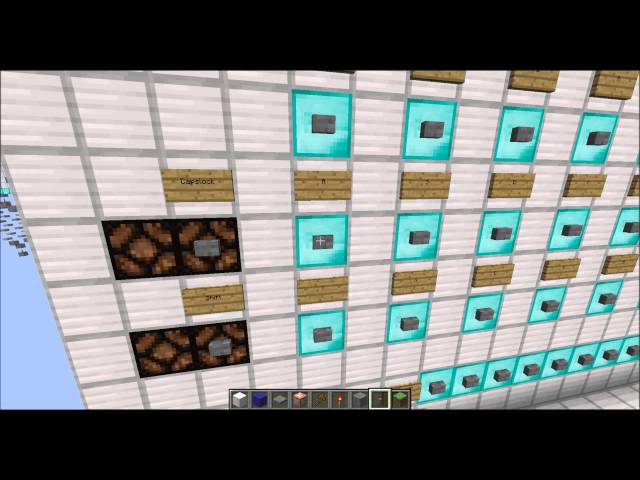
With this device you can write directly onto a display. You can choose between 60 characters including all letters (big and small writing) and all symbols.
A new input will automatic overwrite a existing character.
The hard drive can save up to 60 characters. All input will appear on the screen instantly. The display contains 2 lines of each 10 characters. There are 6 lines available. You can switch through lines and character-slots with 4 arrow keys. As soon as you navigate out of the screen, the lines will switch so that the active line is always on the display. If you leave the screen on the right side, the cursor (a line underneath the active slot) will skip to the first slot of the next line (if there is a next line of course). Same works backwards for the left side.
There are some additional functions as "pos1" (slot skips to 1. character of the 1. line) "end" (10 character 6. line) "new line" (1. character of the next line, also only if possible) "delete" (clears current slot) "backspace" (same as delete but skips to the left hand slot) and "clear all" (kinda explains itself right?^^).
The last thing you can do is to switch the screen on and off (the text will be saved in the hard drive)
Here's a link to our youtube video:
Thanks for reading and have fun, Derya001
With this device you can write directly onto a display. You can choose between 60 characters including all letters (big and small writing) and all symbols.
A new input will automatic overwrite a existing character.
The hard drive can save up to 60 characters. All input will appear on the screen instantly. The display contains 2 lines of each 10 characters. There are 6 lines available. You can switch through lines and character-slots with 4 arrow keys. As soon as you navigate out of the screen, the lines will switch so that the active line is always on the display. If you leave the screen on the right side, the cursor (a line underneath the active slot) will skip to the first slot of the next line (if there is a next line of course). Same works backwards for the left side.
There are some additional functions as "pos1" (slot skips to 1. character of the 1. line) "end" (10 character 6. line) "new line" (1. character of the next line, also only if possible) "delete" (clears current slot) "backspace" (same as delete but skips to the left hand slot) and "clear all" (kinda explains itself right?^^).
The last thing you can do is to switch the screen on and off (the text will be saved in the hard drive)
Here's a link to our youtube video:
Thanks for reading and have fun, Derya001
More like this
 Super Compact Word ProcessorRedstone Device Map
 Peter-
12/28/13 12:48
• posted 3/4/13 5:08
5.1k 697 26x 45110
Peter-
12/28/13 12:48
• posted 3/4/13 5:08
5.1k 697 26x 45110![[redstone] word processor Minecraft Map & Project](https://static.planetminecraft.com/files/resource_media/screenshot/1321/003_5545175_thumb.jpg)
 Word ProcessorRedstone Device Map
 Galovent
1/29/15 12:46
• posted 6/11/14 10:06
1.2k 122 16x 283
Galovent
1/29/15 12:46
• posted 6/11/14 10:06
1.2k 122 16x 283
 variable word processorRedstone Device Map
 happetje2
12/14/12 2:07
• posted 12/9/12 2:58
529 9x 44
happetje2
12/14/12 2:07
• posted 12/9/12 2:58
529 9x 44
2184015
2
![[redstone] word processor version 2.1 Minecraft Map & Project](https://static.planetminecraft.com/files/resource_media/screenshot/1322/2013-04-27_185443_5585733_thumb.jpg)


 SHADOWBLADE1455


 adminwolf99
 Two-Bird
 ASoldVinylRecord


 User6022081G

 SzymoQwertyMC

 unibrandon
Have something to say?