


• • 12/20/16 9:13 pm • 7 logs
- 1.1k views • 0 today
- save_alt 49 downloads
- Progress
- 100% complete
Added CreditSethBling, Tonematrix

22
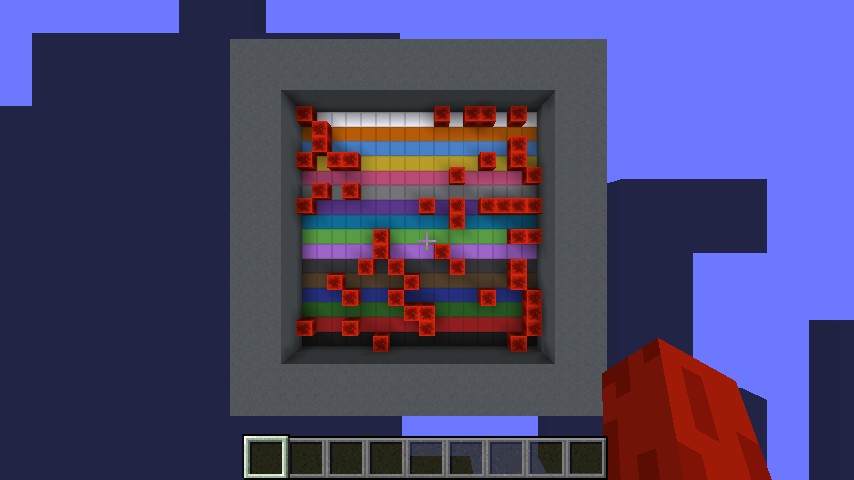
You know that website that lets you make pentatonic scale music on a grid? You know how SethBling did a minecraft version of it but only as a proof of concept? Well proof of concept no more; the Tonematrix is now its own fully-fledged Minecraft map.
Features:
-Full 16×16 grid of notes like the original
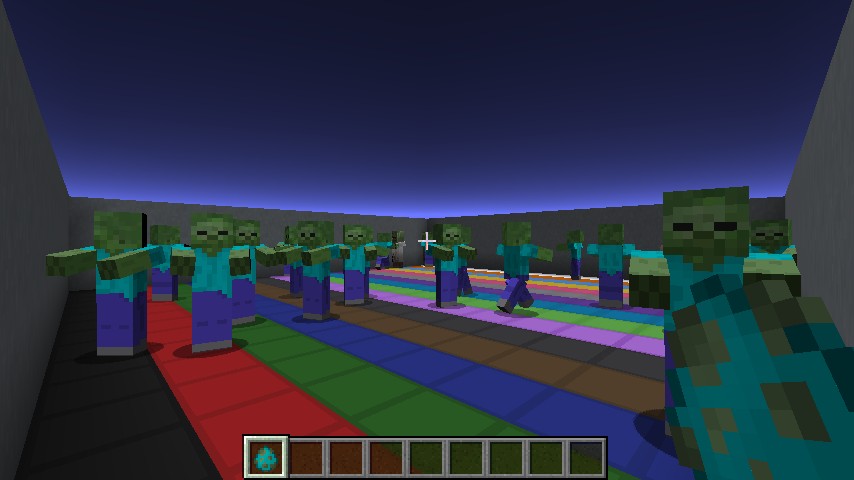
-Entities or Redstone Blocks act as notes in the pentatonic grid
-Transpose the music into any of the 12 standard musical keys; you're not just limited to one key!
-Generate random musical compositions with any amount of notes; up to the size of the board
-save up to 16 board arrangements of your liking!
It's a pretty simple map, so that's about it for the explanation. If you want to customize the sound used as the tone, you have to delete the resources.zip inside the world save file. The resourcepack containing the tone can be located here.
If you liked it, feel free to leave a diamond, and if you have any questions then feel free to leave a comment.
Credits to SethBling for inspiring me to make this. His version was really cool but lacked a proper download, so I thought I'd give it a go, and along the way added the ability to change the key and make random music as well.
Features:
-Full 16×16 grid of notes like the original
-Entities or Redstone Blocks act as notes in the pentatonic grid
-Transpose the music into any of the 12 standard musical keys; you're not just limited to one key!
-Generate random musical compositions with any amount of notes; up to the size of the board
-save up to 16 board arrangements of your liking!
It's a pretty simple map, so that's about it for the explanation. If you want to customize the sound used as the tone, you have to delete the resources.zip inside the world save file. The resourcepack containing the tone can be located here.
If you liked it, feel free to leave a diamond, and if you have any questions then feel free to leave a comment.
Credits to SethBling for inspiring me to make this. His version was really cool but lacked a proper download, so I thought I'd give it a go, and along the way added the ability to change the key and make random music as well.
7 Update Logs
Update 1:6 : by elyisgreat 12/20/2016 9:13:10 pmDecember 21, 2016 @ 2:13 am UTC
-updated for 1.11
-unfortunately, no legacy versions are available.
-unfortunately, no legacy versions are available.
LOAD MORE LOGS
More like this
 Cookie Clicker in MinecraftRedstone Device Map
 alexgaleIII
9/22/13 2:21
• posted 9/10/13 12:16
3.7k 723 3x 131
alexgaleIII
9/22/13 2:21
• posted 9/10/13 12:16
3.7k 723 3x 131 50 Subscriber Special: Minecraft Frogger!Redstone Device Map
 FruitSmootie
9/2/13 2:09
• posted 5/17/13 7:52
1.8k 155 16x 18
FruitSmootie
9/2/13 2:09
• posted 5/17/13 7:52
1.8k 155 16x 18 *Back to the Future PROTOTYPE* Inspired by SethBling!Redstone Device Map
 Red_Bo
•5/14/13 9:01
1.4k 197x 142
Red_Bo
•5/14/13 9:01
1.4k 197x 142
![Team selector - Redstone [Download] Minecraft Map & Project](https://static.planetminecraft.com/files/resource_media/screenshot/1319/2013-05-10_153041_5425385_thumb.jpg) Team selector - Redstone [Download]Redstone Device Map
Team selector - Redstone [Download]Redstone Device Map smythers
5/11/13 4:11
• posted 5/10/13 10:29
611 4x 132
smythers
5/11/13 4:11
• posted 5/10/13 10:29
611 4x 132
 FadoraBoy23
3460798
2










 RicoPico1516
 VINYNIV



Have something to say?
I now dare you to recreate the Bass Line.
I do the same thing with MCComposer, however since only one of the sounds is customizable, but there is more than one sound, I did bundle the resourcepack, only without the customizable sound.
Your saving idea is interesting. I'd imagine that people would record their songs externally and loop it, though one could make a save system by having the entities place redstone blocks on the grid and then cloning the redstone block grid to a particular save position. The main problems with this is:
1. ArmorStands would be needed for each save position. I'm already using 281 ArmorStands for the key changing and randomization. I'm worried that adding more ArmorStands could be laggy, and my computer is already laggy as it is (Remember that on top of this players may be using entities to make their music, and the last thing they want is laggy music making entities). However Invisible, Invulnerable, Marker, Gravity free ArmorStands aren't that laggy, and how many I would need to add would depend on how many save slots would be sufficient. If I added 18 save slots that would only require 299 entities total, 300 including the player. I'd imagine that would be sufficient, but I could probably add up to 50 save slots if you wanted.
2. This is more of a philosophical problem than a technical one, but saving songs only makes sense for static redstone-block grids, not grids of entities, which are dynamic and changing. Saving a grid of entities would only preserve their state at that instant in time, not the past or future ways that the entities will move.
You said that you had a way of implement saving; I'm curious how you would do it!
And yeah, feel free to include it in a YouTube video. I'm glad you like it! Just remember to give credit (my name is pronounced weirdly btw).
2. Well, yes, you would need more armor stands. However, 16 or so extra armor stands won't make it lag (the map currently never lags for me. I never even drop a frame and I only have a decent computer). xD The 1.9 lag reduction is incredible. Anyway, here's how I'd make saves:
1. Add an objective called save as a trigger
2. Make 16 armor stands named save, each with a save score in ascending order: 1, 2, 3, 4... all the way up to 16 (for the 16th armor stand).
3. To save, do /trigger save set (save slot)
4. Then, run these commands:
1. /scoreboard players operation @e[type=ArmorStand,name=Save] save -= @p[score_save_min=1] save
2. /execute @e[type=ArmorStand,name=Save,score_save_min=0,score_save=0] ~ ~ ~ clone (area of the grid) ~ ~ ~
3. /scoreboard players operation @e[type=ArmorStand,name=Save] save += @p[score_save_min=1] save
By subtracting the save score from all the armor stands, whatever armor stand has an exact score of zero is the one you selected. You can then clone the grid to it's position. Then just use a similar technique to load the save:
Add a trigger objective called load
1. /scoreboard players operation @e[type=ArmorStand,name=Save] save -= @p[score_load_min=1] load
2. /execute @e[type=ArmorStand,name=Save,score_save_min=0,score_save=0] ~ ~ ~ clone (relative area of the grid cloned to its position) (grid position)
3. /scoreboard players operation @e[type=ArmorStand,name=Save] save += @p[score_load_min=1] load
Then just set the load and save scores of everyone to -1 (trigger sometimes has a problem if you reset the score, at least in some 1.8 versions).
Hope this way helps shave off some command blocks. Also, with this way you can basically have an infinite number of saves, so that's good.
And yeah, I'll definitely credit you in the vid (and try my best to pronounce your name xD). :)