


• 12/18/12 6:08 am
- 387 views • 0 today
- save_alt 76 downloads
- Progress
- 100% complete

0
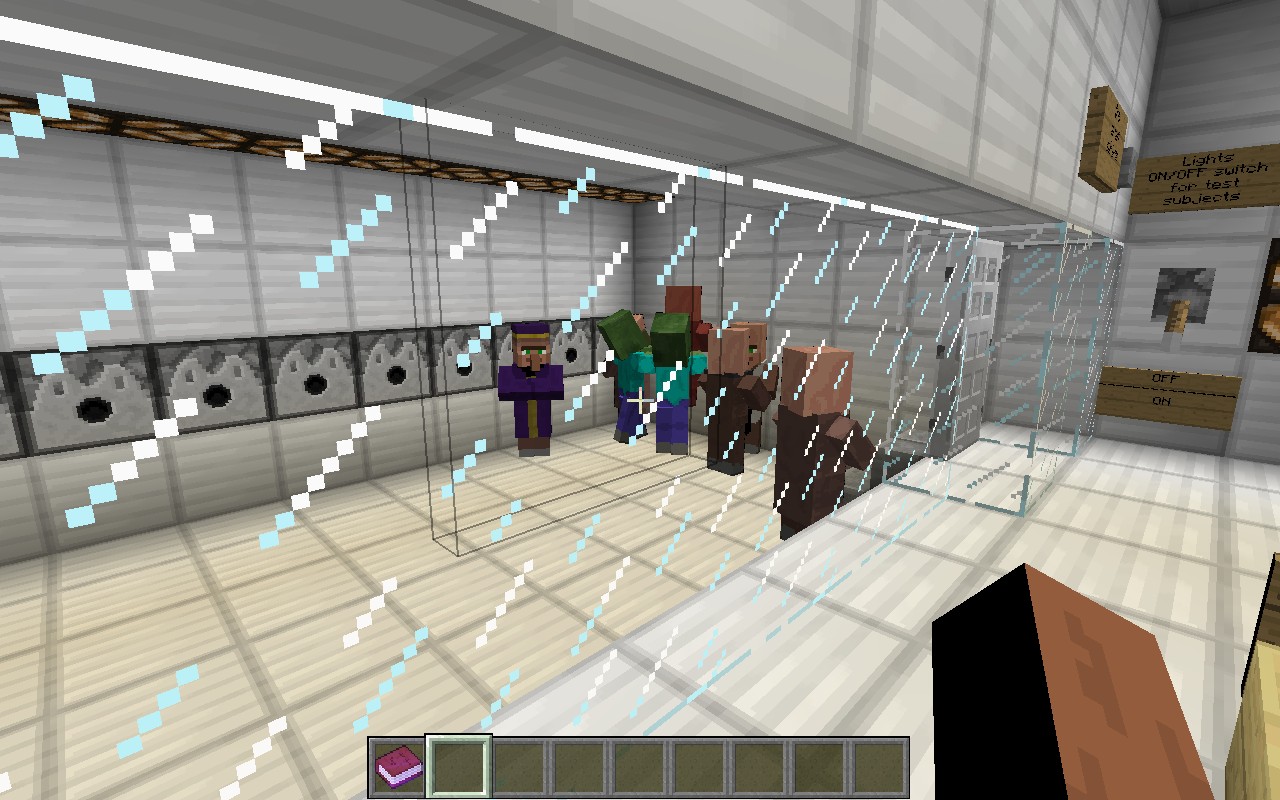
Hi, I'm kind of a newb here, and in minecraft. But I made a world just recently, and it's a flat world with one building, the building is for observing villagers turn into a zombie villager. Your difficulty has to be on hard for the test to be successful. Snow is scattered around because of, snowing, :(.
How to install world on mac:
1. Go on finder and press: Command, Shift, G,
2. Copy and paste this in the box: ~/Library/Application Support/minecraft then press go.
3. Unzip the world you downloaded, (in this case, it would be Zombie Testing place)
4. Place the folder from the unzipped file into the saves folder.
5. Get on Minecraft and play!
How to install on Windows:
Sorry, I never tried it on windows, so I don't really know. But I think it's pretty much the same thing from step 3-5.
How to install world on mac:
1. Go on finder and press: Command, Shift, G,
2. Copy and paste this in the box: ~/Library/Application Support/minecraft then press go.
3. Unzip the world you downloaded, (in this case, it would be Zombie Testing place)
4. Place the folder from the unzipped file into the saves folder.
5. Get on Minecraft and play!
How to install on Windows:
Sorry, I never tried it on windows, so I don't really know. But I think it's pretty much the same thing from step 3-5.
More like this
 NUCLEAR FACILITY AND TEST CENTERLand Structure Map
 BLOCKMAN3000
10/17/13 7:31
• posted 4/29/13 2:10
4.8k 578 5x 333
BLOCKMAN3000
10/17/13 7:31
• posted 4/29/13 2:10
4.8k 578 5x 333


 NightRaven67
 therealginga80
 MozCatXI
 Rivin2e
1757199
2


 Adamic39








 guardian1200
 DreamWanderer


Have something to say?