


• • 1/4/23 9:13 am • 2 logs
- 22.8k views • 5 today
- save_alt 2.2k downloads • 1 today
- Game Version
- Minecraft 1.19
- Resolution
- 16x
- Progress
- 100% complete
- Changes include
- Font
- GUI
646
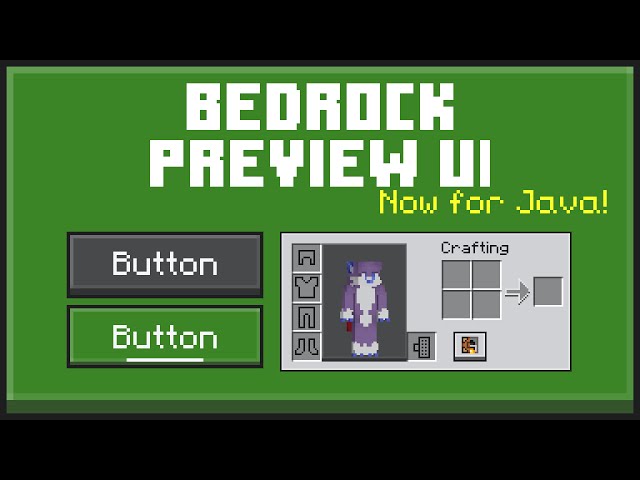
Bedrock Preview UI
Bedrock Preview UI is a pack for Minecraft Java Edition and Bedrock Edition
that changes buttons and other UI elements to look more like the New UI
seen in the new Bedrock Edition UIs. Most GUI elements, such as buttons
and sliders, have a slight 3D effect like the new UI previews.
This pack also changes the button click sound to have more echo, Item
tooltip colours and the icon hover colour for worlds and servers.
Old Downloads
Click for old downloads
These will work in any version before 1.19.3. Using the pack any versions older than 1.12 may have some minor visual bugs
Bedrock Preview UI for 1.19.2 and below
Bedrock Preview UI - Dark for 1.19.2 and below
2 Update Logs
v1.1 and v1.2 : by Enchanted_Games 01/04/2023 9:13:15 amJanuary 4, 2023 @ 2:13 pm UTC
v1.1
- Added a new texture for the hotbar
v1.2
- Updated to 1.19.3 and tweaked a few textures
- Added a new texture for the hotbar
v1.2
- Updated to 1.19.3 and tweaked a few textures
LOAD MORE LOGS
More like this
 New Bedrock UI (In Java)16x Minecraft 1.19 Other Texture Pack
 Hecco
•3/3/22 10:40
14.4k 1.8k 6x 74032
Hecco
•3/3/22 10:40
14.4k 1.8k 6x 74032 Utility UI | Bedrock Tweaks16x Minecraft Bedrock Other Texture Pack
 robonate135
•11/25/22 6:51
12.9k 1.8k 6x 53642
robonate135
•11/25/22 6:51
12.9k 1.8k 6x 53642 Super Dim UI (BEDROCK EDITION)16x Minecraft Bedrock Other Texture Pack
 Enchanted_Games
12/18/21 2:27
• posted 12/4/21 9:48
10.5k 956 7x 62932
Enchanted_Games
12/18/21 2:27
• posted 12/4/21 9:48
10.5k 956 7x 62932 Super Dim UI (JAVA EDITION)16x Minecraft 1.18 Other Texture PackEnchanted_Games
12/17/21 5:41
• posted 12/4/21 9:48
4.8k 556 14x 152116
Super Dim UI (JAVA EDITION)16x Minecraft 1.18 Other Texture PackEnchanted_Games
12/17/21 5:41
• posted 12/4/21 9:48
4.8k 556 14x 152116
 Faentum
5638530
4

![Custom Outline Creator [website] Minecraft Texture Pack](https://static.planetminecraft.com/files/image/minecraft/texture-pack/2025/225/18925752-custom-outlines-banner-export_s.jpg)
![Custom XP Generator [website] Minecraft Texture Pack](https://static.planetminecraft.com/files/image/minecraft/texture-pack/2024/835/17856951-custom-xp-banner_s.jpg)




 Opla Manerda DEV Team





 Pom_177
 Yumi_20s
 FlameNotSus
 ABZED141
 BLVCK_STVR
Have something to say?
In Ore UI the background UI is gray but the buttons are white, you did the opposite. Even if I made an Ore UI pack, it's not a competition. Just saying you should probably look again at Ore UI and see what I'm saying :)
Keep it going!!