


• 9/23/24 8:27 am
- 12.2k views • 4 today
- save_alt 2.4k downloads
- Game Version
- Minecraft 1.21.1
- Resolution
- 16x
- Progress
- 100% complete
- Changes include
- Mobs
26
Custom Damage Overlay Color
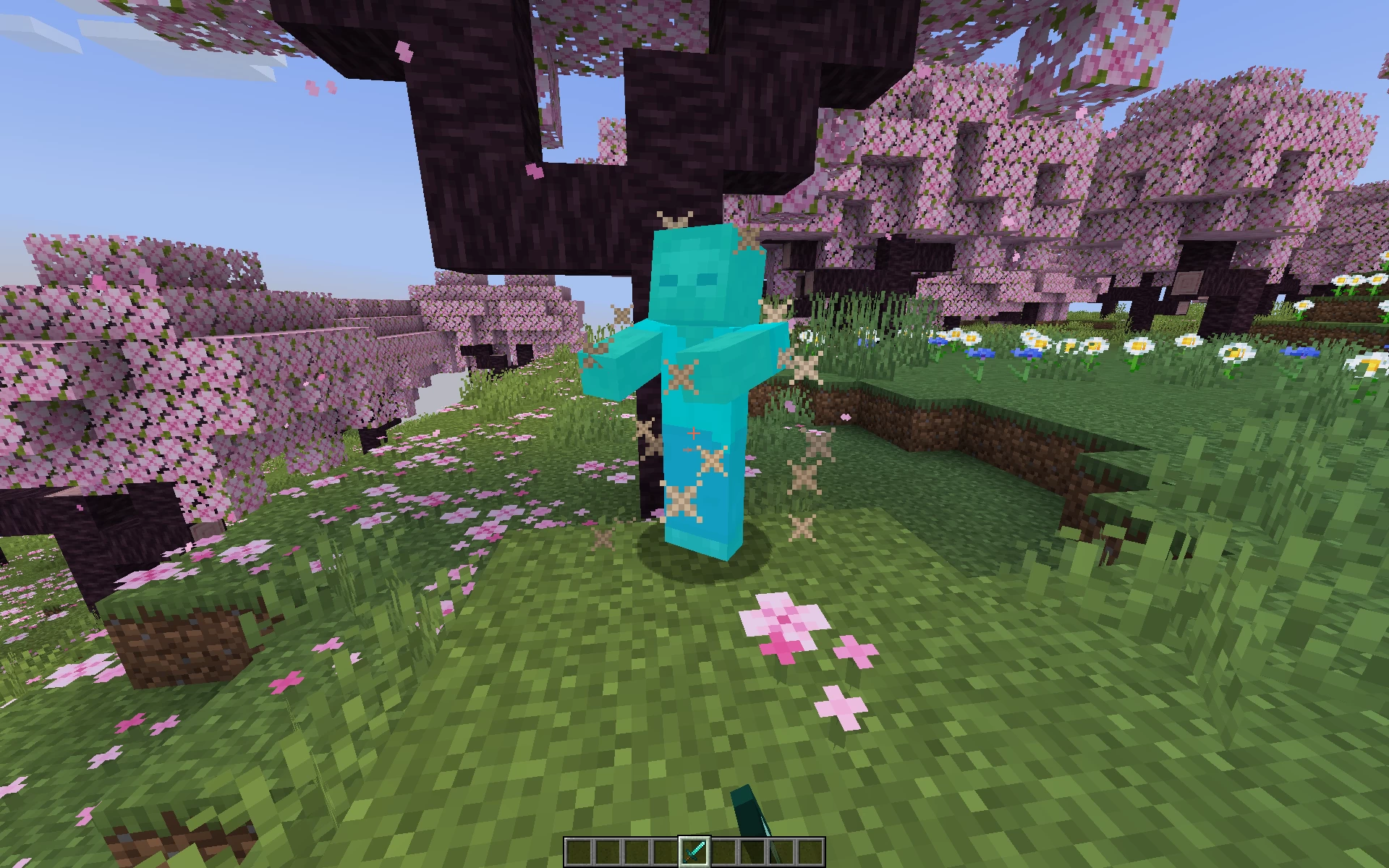
This resource pack allows to change hit color of all entities. By defult this resource pack changes it to green, as an example.
Versions: 1.17 — 1.21.1+
Works with both Optifine and Sodium.
How to change the color
Go into the resource pack and open a file assets/minecraft/shaders/include/change_damage_overlay.glsl, choose a color and put it into the second line of the file. For example if you want to change the color to purple (#AA00FF) with 50% transparency, the second line of the file would look like this:
vec4 RGBColor = vec4(170,0,255,127);And if you want cyan (#00FFFF) color with the same transparency as in vanilla, it would look like this:
vec4 RGBColor = vec4(0,255,255,178);More like this
 Better Sky Overlay (custom sky overlay!)16x Minecraft 1.16.5 Experimental Texture Pack
 Yuruze
12/8/20 5:08
• posted 11/12/20 5:38
73.4k 8.2k 16x 45968
Yuruze
12/8/20 5:08
• posted 11/12/20 5:38
73.4k 8.2k 16x 45968 Colorful Space Overlay (custom sky overlay!)16x Minecraft 1.16 Experimental Texture PackYuruze
9/17/20 4:51
• posted 5/27/20 7:25
46.5k 6.1k 10x 63838
Colorful Space Overlay (custom sky overlay!)16x Minecraft 1.16 Experimental Texture PackYuruze
9/17/20 4:51
• posted 5/27/20 7:25
46.5k 6.1k 10x 63838 Dragon Sky Overlay (custom sky overlay)16x Minecraft 1.14 Experimental Texture PackYuruze
8/23/20 7:15
• posted 8/15/20 6:10
22.9k 3.6k 6x 52520
Dragon Sky Overlay (custom sky overlay)16x Minecraft 1.14 Experimental Texture PackYuruze
8/23/20 7:15
• posted 8/15/20 6:10
22.9k 3.6k 6x 52520 Remove Damage Overlay16x Minecraft 1.21.1 Other Texture Pack
 SuperAnt_
•9/23/24 8:20
9.4k 1.8k 10x 21614
SuperAnt_
•9/23/24 8:20
9.4k 1.8k 10x 21614
 KYFI
KYFI6417535
4



 Percevejo





 Eraplusan
 Duq
Duq
 Tysig
Tysig
 Soby
Soby
 javierbendezuv
Have something to say?
"vec4 RGBColor = vec4(255,255,255,178);"
Also, if you are using a shaderpack, it will disable your changes.