




• • 10/30/12 1:35 pm • 3 logs
- 8.2k views • 1 today
- save_alt 2k downloads
- Game Version
- Minecraft 1.4
- Resolution
- 16x
- Progress
- 100% complete
- Changes include
- Armor
- Art
- Environment
- GUI
- Items
- Mobs
- Terrain

20
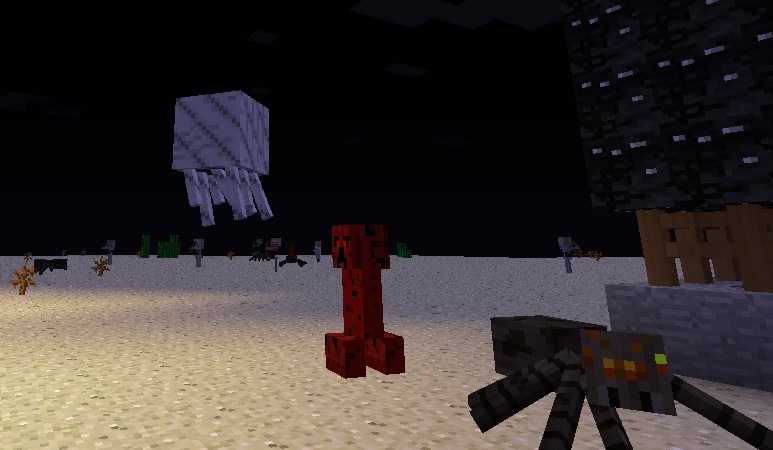
This is a nice little pack I made that is Halloween themed. It's use isn't necessarily limited to Halloween but that's the theme. It's for Minecraft 1.4. I decided that I should leave you with this pack, since I haven't been active in a while.
Here are some (NOT ALL) changes made to the default textures in this pack:
-Villagers got a makeover, they don't have unibrows, they have more detailed clothing, and some of them have hair.
-Creepers are red, skeletons have red eyes, undead are more realistic style, villager undead has villager clothing, iron golems are more grey colored, bats have red glowing eyes.
-Yellow flower is now cyan
-GUI changes
-The sun is round
-Default player skin is edited
-Bedrock, Ladders, enchantment tables, gravel, sand, dirt, iron doors, torches, redstone torches, and more have some major/minor changes.
-Nether has a black and white style
-Armor has many changes.
-Diamond and gold swords have been changed
-Enchantment table books are different (red glowing text and purple cover binding,
-Books and maps have whiter paper with less aging effects
-Apples are darker colord
-Mojang logo changed
-Art has changes
________________________________
Don't forget to leave comments, suggestions, and/or questions!
Here are some (NOT ALL) changes made to the default textures in this pack:
-Villagers got a makeover, they don't have unibrows, they have more detailed clothing, and some of them have hair.
-Creepers are red, skeletons have red eyes, undead are more realistic style, villager undead has villager clothing, iron golems are more grey colored, bats have red glowing eyes.
-Yellow flower is now cyan
-GUI changes
-The sun is round
-Default player skin is edited
-Bedrock, Ladders, enchantment tables, gravel, sand, dirt, iron doors, torches, redstone torches, and more have some major/minor changes.
-Nether has a black and white style
-Armor has many changes.
-Diamond and gold swords have been changed
-Enchantment table books are different (red glowing text and purple cover binding,
-Books and maps have whiter paper with less aging effects
-Apples are darker colord
-Mojang logo changed
-Art has changes
________________________________
Don't forget to leave comments, suggestions, and/or questions!
3 Update Logs
The all natural update! : by Suprememessage 10/30/2012 1:35:34 pmOctober 30, 2012 @ 5:35 pm UTC
I have changed most natural blocks in this update, here is what's new:
-Grass and dirt blocks now have different textures
-Stone and ores have different textures
-Clay has a different texture
-Chests are mimics
-Some more GUI changes
-Art has been changed somewhat
-Several tweaks
-Grass and dirt blocks now have different textures
-Stone and ores have different textures
-Clay has a different texture
-Chests are mimics
-Some more GUI changes
-Art has been changed somewhat
-Several tweaks
LOAD MORE LOGS
More like this
 Halloween Texture Pack16x Minecraft 1.4 Themed Texture Pack
 superficial_Gamer
•10/30/12 7:17
17k 3k 17x 4176
superficial_Gamer
•10/30/12 7:17
17k 3k 17x 4176 ScienceCraft 1.416x Minecraft 1.4 Themed Texture Pack
 Suprememessage
11/4/12 3:53
• posted 10/31/12 1:22
6.4k 1.2k 18x 7136
Suprememessage
11/4/12 3:53
• posted 10/31/12 1:22
6.4k 1.2k 18x 7136 Halloween Texture Pack 1.19.432x Minecraft 1.19.4 Themed Texture Pack
 Electro Gamerz
10/18/23 7:07
• posted 10/4/23 10:33
2.9k 336 13x 10138
Electro Gamerz
10/18/23 7:07
• posted 10/4/23 10:33
2.9k 336 13x 10138
 Halloween Pack Update #416x Minecraft 1.4 Themed Texture Pack
 iAmHunterific
•10/25/12 5:04
1k 79 5x 61
iAmHunterific
•10/25/12 5:04
1k 79 5x 61
 marlob03
1575676
4




 Fredi_250510






 Paravoxel
 Hakks
Hakks
 Gutomat64
 lockheartlove
 EvePlayzEaglercraft
Have something to say?
2.) Right click on the folder and copy it
3.) Click on the top that shows your current folder and enter "%appdata%" without quotes.
4.) Click .Minecraft folder
5.) Go into texture packs folder
6.) Paste the folder of my texture pack
7.) Start minecraft, and select it under texture packs.
If that is too complicated, open up minecraft, and go to texturepacks. Then hit open texturepacks folder, and just paste my texture pack in.