


• 7/31/20 3:23 pm
- 6.5k views • 0 today
- save_alt 2k downloads
- Game Version
- Minecraft 1.8.9
- Resolution
- 16x
- Progress
- 100% complete
- Changes include


11
Injataex
Description:
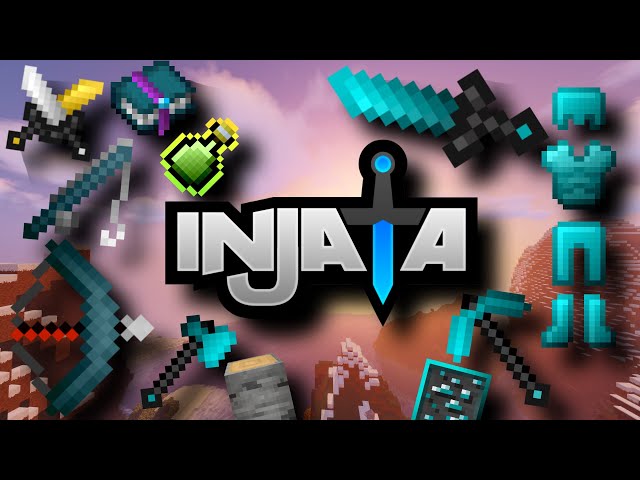
This pack contains many features such as low fire, Short swords, better particles and custom GUI looks.
It also contains many custom textures including blocks, items, mobs, and GUI textures. This texture pack is mainly intended for the purposes of pvp, but I also kept survival/skyblock players in mind.
How to Install:
First, click the download button.
(for Windows users)
Once you have downloaded the pack, Go to %appdata%, click on the minecraft folder,
click on resource packs and drag the pack into there.
Then launch minecraft and go to options, resource packs, then drag and drop "Injataex" from the
left on to the right. You should now have the resourcepack fully installed.
(For Mac users)
Do NOT unzip the resource pack just move the .zip file to minecraft's resource pack folder (Should be at ~/Library/Application Support/minecraft/resourcepacks)
Open up Minecraft and login to your account
At the main menu select "Options", then "Resource Packs"
Now select your new resource pack and then select done
Description:
This pack contains many features such as low fire, Short swords, better particles and custom GUI looks.
It also contains many custom textures including blocks, items, mobs, and GUI textures. This texture pack is mainly intended for the purposes of pvp, but I also kept survival/skyblock players in mind.
How to Install:
First, click the download button.
(for Windows users)
Once you have downloaded the pack, Go to %appdata%, click on the minecraft folder,
click on resource packs and drag the pack into there.
Then launch minecraft and go to options, resource packs, then drag and drop "Injataex" from the
left on to the right. You should now have the resourcepack fully installed.
(For Mac users)
Do NOT unzip the resource pack just move the .zip file to minecraft's resource pack folder (Should be at ~/Library/Application Support/minecraft/resourcepacks)
Open up Minecraft and login to your account
At the main menu select "Options", then "Resource Packs"
Now select your new resource pack and then select done
More like this
 Astolfo PvP Texture Pack16x Minecraft 1.8.9 PvP Texture Pack
 ssoap
5/25/21 8:57
• posted 5/21/21 9:29
13.8k 1.3k 5x 553
ssoap
5/25/21 8:57
• posted 5/21/21 9:29
13.8k 1.3k 5x 553 Toycatw's PvP Pack32x Minecraft 1.8.9 PvP Texture Pack
 Toycatw
10/6/25 2:38
• posted 3/6/25 11:42
12.1k 2.6k 6x 1557
Toycatw
10/6/25 2:38
• posted 3/6/25 11:42
12.1k 2.6k 6x 1557


 RoskasTP
 CPT_N3MO
 SwftzZ
4686738
4


![[1.8] INJATA PACK [PvP] Minecraft Texture Pack](https://static.planetminecraft.com/files/resource_media/screenshot/1934/thumbnail-1566291671_thumb.jpg)




 MinecrafterMP




Have something to say?