
• 10/21/11 5:57 pm
- 2.5k views • 0 today
- save_alt 316 downloads
- Game Version
- Minecraft 1.8 beta
- Resolution
- 16x
- Progress
- 100% complete
- Changes include
- Armor
- Art
- Environment
- Font
- GUI
- Items
- Misc
- Mobs
- Particles
- Terrain


17
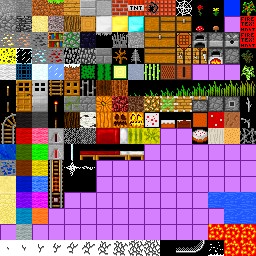
more brighter colors now you can see stuff brighter than befor
how i did it: i used a program called microsoft office 2010, i know what your thinking "its 2011" i just used what i had and so i changed the color tone to bright.
if you want more just leave a comment or if you want me to make anther texture pack leave me a comment
how i did it: i used a program called microsoft office 2010, i know what your thinking "its 2011" i just used what i had and so i changed the color tone to bright.
if you want more just leave a comment or if you want me to make anther texture pack leave me a comment
More like this
 Terrafirmas pack16x Minecraft 1.5 Other Texture Pack
 pancakeperril_
•3/27/13 12:24
2.1k 364 1x 52
pancakeperril_
•3/27/13 12:24
2.1k 364 1x 52


 nicknack7
 miniswede
 Metallicus94
 SkyrimDash
255427
4


 User6676817G
 Aedan5
 SeattleBones





 Toycatw
 NekuroMC
 AdamixGaming
 AdamkoAxoDragon
 lit_muneeb
Have something to say?
and not just making it brighter...
but texture packs were made so that minecraft would look better
than how it is by default and to me, this texture pack isn't good enough
cause I can tell you didn't work hard on it
sorry :(