
• 2/3/13 10:27 am
- 781 views • 0 today
Added CreditLogblock Creator
- 2
- 0

29
Hi guys, GraveRunner here, I am making this submission to teach you how to use logblock!
Requirements:
So basically, you would first want to find a place that you want to know who made or griefed it. If you are concerned, then follow these steps:
Finding out who made something:
That is how to use logblock everyone! Hope this helped! I will be making a CoreProtect tutorial so please say it in the comments if you would like me to continue!
Thanks,
~Grave
Requirements:
- Bedrock (Just on is needed)
- A Place to use logblock on
- The actual plugin logblock
So basically, you would first want to find a place that you want to know who made or griefed it. If you are concerned, then follow these steps:
Finding out who made something:
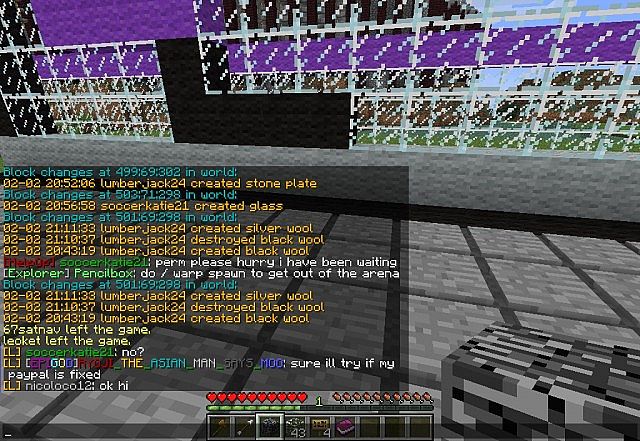
- Type /lb toolblock in the chat if you haven't already. A Bedrock should appear in your inventory
- Once the bedrock has shown up in your inventory, left-click any part of the build
- Orange writing should pop up saying the date, who did it and what time they did it
- If you want to get rid of it, simply use another item to hit that item because if you have logblock turned on, it won't break the item
- Type /lb toolblock in your chat to make the bedrock appear
- Find a griefed place anywhere
- Go to an open space that you think was griefed
- Right-click the blocks over and under the space
- It should say "[Name] broke cobblestone" (If cobblestone was griefed)
That is how to use logblock everyone! Hope this helped! I will be making a CoreProtect tutorial so please say it in the comments if you would like me to continue!
Thanks,
~Grave
More like this

 Niterider11
 DerpyKat
 ccrom1
 HarleLP
 jakehaker
1841572
6



 DrSkunk
 Janss_33PL
 TexGaymer






 Adventures of WildGoat
 uzvarua
 Xeno_X1
 princess tratinczica
 Aedan5
Have something to say?