
- 8
- 6
- 2

74
Okay, create a new world.
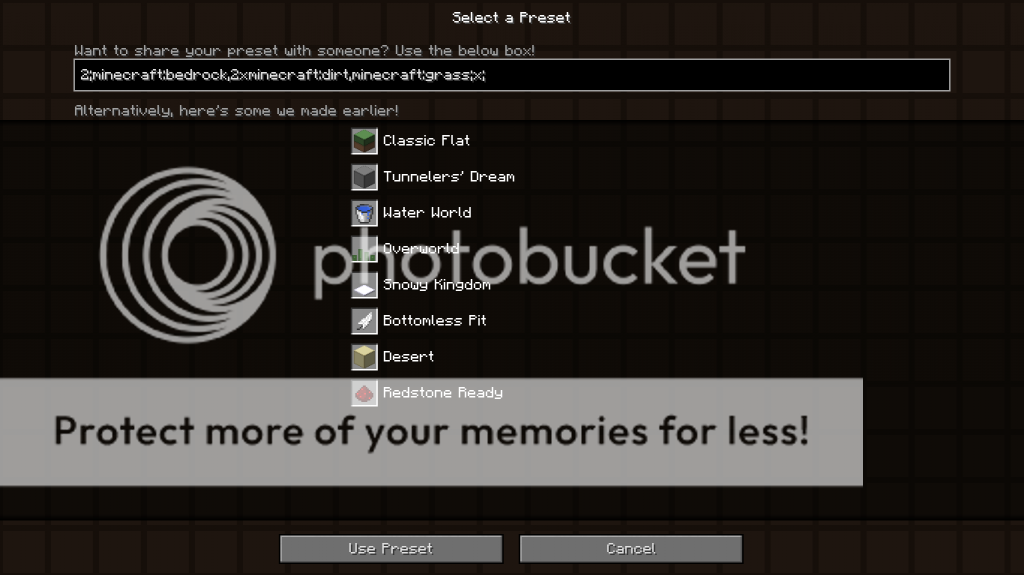
In the world options, switch the world type to Superflat and click Customize. There, click Presets. Now delete the text in the box at the top and I'll show you what you can do with the basics.
Tips:
Do NOT go over layer 255. Or Minecraft will crash.
Some Biome IDs will not work
The order of layers is from layer 0 to layer 255(left to right).
The last statement does not need a semicolon at the end.
Block ID list, Click here
Type in the box to start 2;. This is the version number, so if this gets updated, you can still use this code.
Next, after the ; type an id (Ex: minecraft:bedrock). Don't type a semicolon(;) this time, instead, add a comma for an extra layer.
Now here is how to make a block in multiple layers. Let's say you want to make 2 layers of dirt. Type axb,. a is the amount of layers the block will have(1-255), and b is the block id. We're done with that.
We're going to top it off with a grass block layer (yes, we're making Classic Superflat). This time type minecraft:grass and close it with a semicolon. It should look like "2;minecraft:bedrock,2xminecraft:dirt,minecraft:grass;".

After that code, type a biome ID then end it off with a semicolon.
Biome IDs:
0- Ocean
1- Plains
2- Desert
3- Extreme Hills
4- Forest
5- Taiga
6- Swampland
7- River
8- Hell
9- Sky
10- FrozenOcean
11- FrozenRiver
12- Ice Plains
13- Ice Mountains
14- MushroomIsland
15- MushroomIslandShore
16- Beach
17- DesertHills
18- ForestHills
19- TaigaHills
20- Extreme Hills Edge
21- Jungle
22- JungleHills
Now it should look like this: "2;minecraft:bedrock,2xminecraft:dirt,minecraft:grass;x;" x is the Biome Number
Decorators:
biome_1: Ores spawn! (Note: Stone must be in the preset.)
village: Villages will spawn in your world.
stronghold: Strongholds will spawn in your world.
mineshaft: Mineshafts will spawn in your world.
lake: Water lakes will spawn in your world. Try adding the prefix lava_ for lava lakes.
decoration: Biome decoration will spawn(Ex. Trees, tall grass, etc.)
dungeon: Dungeons will spawn in your world.
to use decorators, just add one of those after the last semicolon
Sample Preset:
2;minecraft:bedrock,63xminecraft:iron_block;1;
This will create a Superflat World with Bedrock as the first layer and 63 Iron Block Layers
Other Presets:
2;minecraft:bedrock,2xminecraft:dirt,minecraft:grass;21;decoration -It Should create a Jungle Biome with fully grown trees
2;minecraft:bedrock,minecraft:lava,62xminecraft:wood;1 -It Should create a Wood World with Lava just above the Bedrock
2;minecraft:bedrock,57xminecraft:stone,5xminecraft:dirt,minecraft:grass;1;biome_1 -It Should create a Normal Superflat but with Ores

In the world options, switch the world type to Superflat and click Customize. There, click Presets. Now delete the text in the box at the top and I'll show you what you can do with the basics.
Tips:
Do NOT go over layer 255. Or Minecraft will crash.
Some Biome IDs will not work
The order of layers is from layer 0 to layer 255(left to right).
The last statement does not need a semicolon at the end.
Block ID list, Click here
Type in the box to start 2;. This is the version number, so if this gets updated, you can still use this code.
Next, after the ; type an id (Ex: minecraft:bedrock). Don't type a semicolon(;) this time, instead, add a comma for an extra layer.
Now here is how to make a block in multiple layers. Let's say you want to make 2 layers of dirt. Type axb,. a is the amount of layers the block will have(1-255), and b is the block id. We're done with that.
We're going to top it off with a grass block layer (yes, we're making Classic Superflat). This time type minecraft:grass and close it with a semicolon. It should look like "2;minecraft:bedrock,2xminecraft:dirt,minecraft:grass;".
After that code, type a biome ID then end it off with a semicolon.
Biome IDs:
0- Ocean
1- Plains
2- Desert
3- Extreme Hills
4- Forest
5- Taiga
6- Swampland
7- River
8- Hell
9- Sky
10- FrozenOcean
11- FrozenRiver
12- Ice Plains
13- Ice Mountains
14- MushroomIsland
15- MushroomIslandShore
16- Beach
17- DesertHills
18- ForestHills
19- TaigaHills
20- Extreme Hills Edge
21- Jungle
22- JungleHills
Now it should look like this: "2;minecraft:bedrock,2xminecraft:dirt,minecraft:grass;x;" x is the Biome Number
Decorators:
biome_1: Ores spawn! (Note: Stone must be in the preset.)
village: Villages will spawn in your world.
stronghold: Strongholds will spawn in your world.
mineshaft: Mineshafts will spawn in your world.
lake: Water lakes will spawn in your world. Try adding the prefix lava_ for lava lakes.
decoration: Biome decoration will spawn(Ex. Trees, tall grass, etc.)
dungeon: Dungeons will spawn in your world.
to use decorators, just add one of those after the last semicolon
Sample Preset:
2;minecraft:bedrock,63xminecraft:iron_block;1;
This will create a Superflat World with Bedrock as the first layer and 63 Iron Block Layers
Other Presets:
2;minecraft:bedrock,2xminecraft:dirt,minecraft:grass;21;decoration -It Should create a Jungle Biome with fully grown trees
2;minecraft:bedrock,minecraft:lava,62xminecraft:wood;1 -It Should create a Wood World with Lava just above the Bedrock
2;minecraft:bedrock,57xminecraft:stone,5xminecraft:dirt,minecraft:grass;1;biome_1 -It Should create a Normal Superflat but with Ores
3 Update Logs
Update #3 : by Dudamesh 02/21/2015 3:20:25 amFebruary 21, 2015 @ 8:20 am UTC
Minor Changes
LOAD MORE LOGS
More like this
 TNT Run - Superflat PresetTutorial Blog
 Taterpotato
7/12/15 1:44
• posted 7/11/15 9:54
19.9k 3x 11
Taterpotato
7/12/15 1:44
• posted 7/11/15 9:54
19.9k 3x 11
 Creative Superflat for Builders - How To/Tutorial - Minecraft 1.19Tutorial Blog
 ChopChopBuilds
•7/10/22 4:12
1kx 164
ChopChopBuilds
•7/10/22 4:12
1kx 164 How to make BLANK WORLDS (Customizing Superflat)!Tutorial Blog
 Chilylugia2
•9/4/14 1:09
980 2x 121
Chilylugia2
•9/4/14 1:09
980 2x 121
 Hotdogbananaman
3239191
6
![[1.13+] Making Kill Skills in Minecraft Minecraft Blog](https://static.planetminecraft.com/files/resource_media/screenshot/1831/2018-08-04-08-05-29-1533341559_thumb.jpg)

![[1.13+] Making Custom Shops and Currency Minecraft Blog](https://static.planetminecraft.com/files/resource_media/screenshot/1831/2018-08-03-07-36-37-1533261719_thumb.jpg)




 Limioodo



 GBpchan
 Adventures of WildGoat
 Xeno_X1
 princess tratinczica
 Aedan5
Have something to say?