
• 7/2/24 12:26 pm
- 713 views • 0 today
- save_alt 12 downloads
- Compatibility
- Minecraft 1.21
- Changes include
- Functions


34
Welcome to Binary Mushrooms Data Pack!
What does it Do?
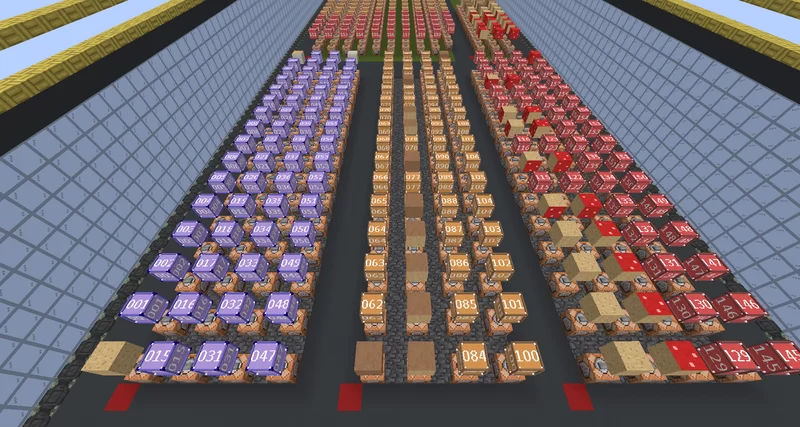
Data pack just uses Functions to Place Binary Mushroom's Command blocks, Used in Binary Mushroom Map.
Command blocks are for 1.21+ (yea they changed), so rip.
How to Use?
For anything under folder "command_block_placement"
1: make sure you are centered at block.
2: run command "tp ~ ~ ~ 180 0" (you can choose NORTH, EAST, SOUTH, WEST.)
the commands are run Relative to where you are and away from you using the new "^ ^ ^" positioning.
Spoiler: you have to add buttons/Place blocks yourself. (best to use Map).
This is Really if you want to take it out of the Map, into some other area.
What does it Do?
Data pack just uses Functions to Place Binary Mushroom's Command blocks, Used in Binary Mushroom Map.
Command blocks are for 1.21+ (yea they changed), so rip.
How to Use?
For anything under folder "command_block_placement"
1: make sure you are centered at block.
2: run command "tp ~ ~ ~ 180 0" (you can choose NORTH, EAST, SOUTH, WEST.)
the commands are run Relative to where you are and away from you using the new "^ ^ ^" positioning.
Spoiler: you have to add buttons/Place blocks yourself. (best to use Map).
This is Really if you want to take it out of the Map, into some other area.
More like this


 Rotted Logs DataPackMinecraft 1.17 - 1.19 Block Data Pack
 FactoryCrafter
•11/22/21 1:30
2.3k 281 1x 21112
FactoryCrafter
•11/22/21 1:30
2.3k 281 1x 21112 Simple Oak PlanksScaffolding DataPackMinecraft 1.13 - 1.15 Block Data Pack
 ErosVH1
•11/30/19 10:51
2.2k 70x 132
ErosVH1
•11/30/19 10:51
2.2k 70x 132
 MarcelForever
 Rende
Rende JKN21
JKN214474899
119








 cadbane86140


Have something to say?