


• • 9/28/20 6:32 am • 2 logs
- 4.8k views • 0 today
- save_alt 190 downloads
- Compatibility
- Minecraft 1.16
- Changes include
- Functions

7
Cloud Storage 2.0
You can't get any items when you inventory (and your hot bar) is full. If things are not important, you may just throw it away. Or just put things inside a chest to free the slot.
But sometimes, you want to keep all the item and bring it back to your home. Bringing ender chest is a good idea, but it has limited size, and also what if you didn't bring it with you, you just can't craft one with the items on hand!
With cloud storage, what is needed is just a chest and a small amount of your XP!
3 Mode of access:
You can't get any items when you inventory (and your hot bar) is full. If things are not important, you may just throw it away. Or just put things inside a chest to free the slot.
But sometimes, you want to keep all the item and bring it back to your home. Bringing ender chest is a good idea, but it has limited size, and also what if you didn't bring it with you, you just can't craft one with the items on hand!
With cloud storage, what is needed is just a chest and a small amount of your XP!
How to use:
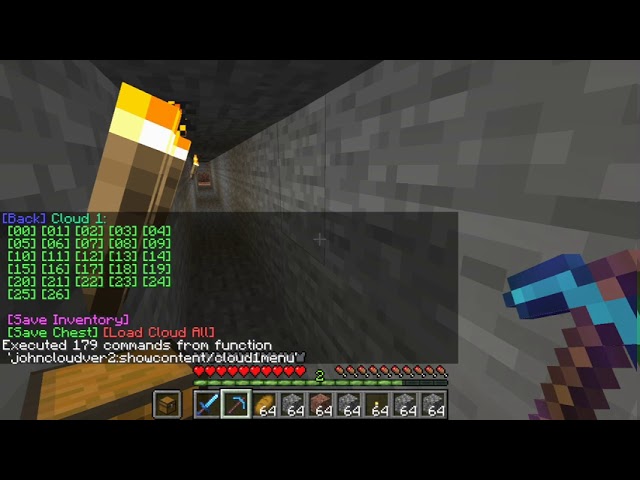
Hold a chest offhand (left hand), crouch quickly to pop up the main menu
Then navigate the cloud, store/get items to/from cloud
Then navigate the cloud, store/get items to/from cloud
3 Mode of access:
By Inventory [Save]
-Select the option [Save Inventory] to store your inventory to a empty cloud, consuming 1 XP point per slot saved in best effort way.
By slot [Save/Load]
-Select an item in hot bar, and click on [XX], the item will be stored to the cloud
-Click on [XX] to get the item back from the cloud
-Click on [XX] to get the item back from the cloud
By Chest [Save/Load]
-stand on the chest, and click [Save Cloud] of a empty cloud to store all items inside chest to the cloud
-stand on a empty chest, and click [Load Cloud All] of a cloud to get all items from cloud into the chest
-stand on a empty chest, and click [Load Cloud All] of a cloud to get all items from cloud into the chest
TLDR
Key Features:
-a storage system similar to ender chest
-expands the size of cloud storage in addition to current ender chest
-provide earlier game alternative to ender chest
-introduce XP system and Unlock system to balance the over power functionality
-interact directly with item slot or through chest
-expands the size of cloud storage in addition to current ender chest
-provide earlier game alternative to ender chest
-introduce XP system and Unlock system to balance the over power functionality
-interact directly with item slot or through chest
Some Notes:
-upload items to a slot requires 1 xp points, as a balance and also a metaphor for handling fee
-get items from cloud does not need any xp, as the fee is already covered
-unlock extra cloud storage requires ender eye, as a balance and also a metaphor for paying additional storage fee
-each cloud has same size of a chest (27 slots)
-items' count (stack of items), tag (enchantment and display name inside tag) are preserved in the cloud
-reload the data pack will not reset all cloud storage states
-this data pack is tested in single player mode, and theocratically the clouds are shared by all players
-get items from cloud does not need any xp, as the fee is already covered
-unlock extra cloud storage requires ender eye, as a balance and also a metaphor for paying additional storage fee
-each cloud has same size of a chest (27 slots)
-items' count (stack of items), tag (enchantment and display name inside tag) are preserved in the cloud
-reload the data pack will not reset all cloud storage states
-this data pack is tested in single player mode, and theocratically the clouds are shared by all players
Reinstall
replace the folder and reload, NO NEED UNINSTALL
Uninstall:
/function johncloudver2:cleanup
2 Update Logs
Update #2 : by tom147 09/28/2020 6:32:22 amSeptember 28, 2020 @ 10:32 am UTC
Added New Feature! Now you can save your inventory directly to the cloud
LOAD MORE LOGS
More like this
 Advanced Storage SingleplayerMinecraft 1.13 - 1.16 Quality of Life Data Pack
 Xarong03
•2/12/21 1:52
6k 387 3x 21710
Xarong03
•2/12/21 1:52
6k 387 3x 21710 Temporary Armor StorageMinecraft 1.17 Quality of Life Data Pack
 tom147
•11/26/20 9:58
3.3k 98x 352
tom147
•11/26/20 9:58
3.3k 98x 352 Advanced Storage 1.19Minecraft 1.19 Quality of Life Data PackXarong03
•3/29/23 4:38
3.2k 158x 2105
Advanced Storage 1.19Minecraft 1.19 Quality of Life Data PackXarong03
•3/29/23 4:38
3.2k 158x 2105 Faster armor unequip and pack armor standMinecraft 1.16 Quality of Life Data Packtom147
•9/24/20 6:57
2.5k 108 2x 1044
Faster armor unequip and pack armor standMinecraft 1.16 Quality of Life Data Packtom147
•9/24/20 6:57
2.5k 108 2x 1044![Vanilla Experience Storages [DISCONTINUED] Minecraft Data Pack](https://static.planetminecraft.com/files/image/minecraft/data-pack/2022/328/15378147_s.jpg) Vanilla Experience Storages [DISCONTINUED]Minecraft 1.13 - 1.18 Quality of Life Data Pack
Vanilla Experience Storages [DISCONTINUED]Minecraft 1.13 - 1.18 Quality of Life Data Pack Helmo2019
•2/6/22 4:11
1.6k 56x 421
Helmo2019
•2/6/22 4:11
1.6k 56x 421
4773527
119











 TIBR
TIBR
Have something to say?