
• 5/8/21 3:50 am
- 11.2k views • 0 today
- save_alt 1.9k downloads
- Compatibility
- Minecraft 1.13
- to version
- Minecraft 1.20
- Changes include
- Functions

28
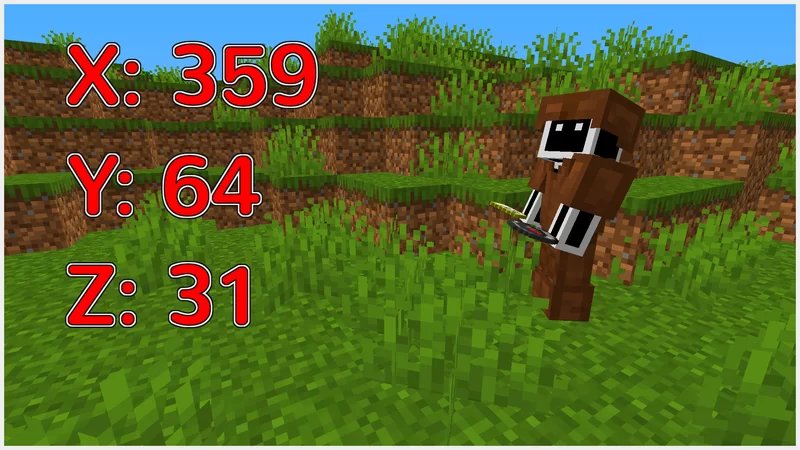
This Data Pack displays your x, y and z coordinates above your hotbar. This means that you don't need to use the F3 menu nearly as often. I made this Data Pack with video recording in mind, but you can also use this for your regular world.
More like this
 Mob Health Bar / DisplayMinecraft 1.19 - 1.20 Quality of Life Data Pack
 Cloud_Wolf
1/5/24 4:39
• posted 8/4/21 8:43
33.5k 8.6k 18x 16481
Cloud_Wolf
1/5/24 4:39
• posted 8/4/21 8:43
33.5k 8.6k 18x 16481 Coordinates DisplayMinecraft 1.21 Quality of Life Data Pack
 TheCommander33
•7/30/24 2:26
16.7k 5k 5x 31115
TheCommander33
•7/30/24 2:26
16.7k 5k 5x 31115![Coordinate List - Display Coordinates in Server List [now 1.21] Minecraft Data Pack](https://static.planetminecraft.com/files/image/minecraft/data-pack/2024/076/17466662-thumb_s.jpg) Coordinate List - Display Coordinates in Server List [now 1.21]Minecraft 1.20 - 1.21 Quality of Life Data Pack
Coordinate List - Display Coordinates in Server List [now 1.21]Minecraft 1.20 - 1.21 Quality of Life Data Pack imalittlhigh
8/2/24 7:23
• posted 1/15/24 2:06
16.3k 4.4k 16x 13941
imalittlhigh
8/2/24 7:23
• posted 1/15/24 2:06
16.3k 4.4k 16x 13941 Easy Coordinates!Minecraft 1.14 - 1.20 Quality of Life Data Pack
 Okaythenno
•11/10/23 7:48
10.6k 3.2kx 11012
Okaythenno
•11/10/23 7:48
10.6k 3.2kx 11012 Better Iten DisplayingMinecraft 1.13 - 1.20 Quality of Life Data Pack
 Sturmbueffel100
12/27/23 8:09
• posted 10/13/23 11:05
2.8k 204 4x 51112
Sturmbueffel100
12/27/23 8:09
• posted 10/13/23 11:05
2.8k 204 4x 51112
5111236
119



 Eroxen
 TIBR
TIBR
Have something to say?
Did you unzip the folder first? If you did, make sure that there is only one folder named coordinate-display.
Did you put the zipped folder in the data pack folder of your world? If that's the case, do you have any modification (like other data packs that display text above the hotbat)? In that case, disabling those parts should make it work.