
• 9/10/26 5:03 pm
- 9 views
- save_alt 1 downloads
- Compatibility
- Minecraft 26.3 snapshot
- Changes include
- Advancements
- Functions
- Predicates
- Recipes

161
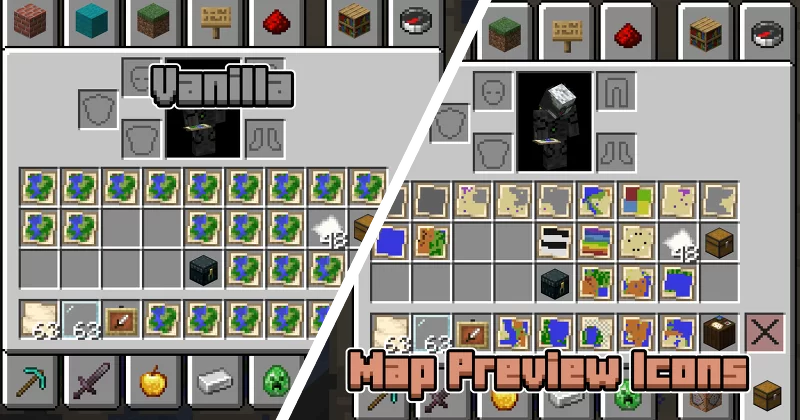
If you've ever used maps in Minecraft, you've probably ran into the issue where you have dozens of maps in your inventory, and now you need to hold them one by one to find the one you're looking for. With Map Preview Icons, that's a thing of the past! Map item icons now show a little preview of the map, so you can tell them apart at a glance.
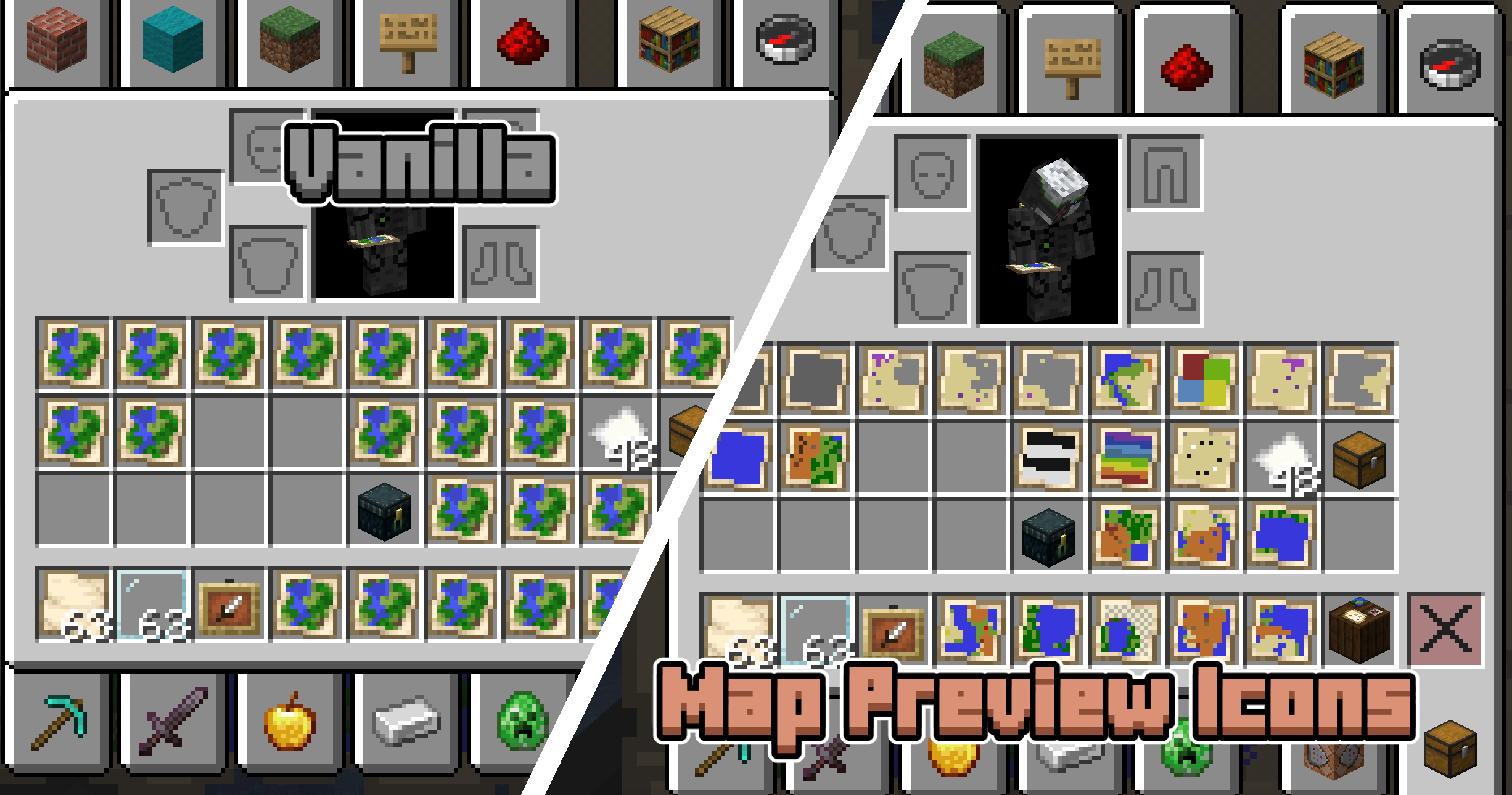
This project uses both a datapack and a resourcepack. The resource pack makes the map item model a composite of a bunch of pixels that can individually be coloured through custom model data. When you're holding a map, the datapack scans the blocks around you to set the right colours on that custom model data.
One technical limitation of Datapacks is that they cannot read map data. Map Preview Icons tries to circumvent this issue by tracking where each map was made with a custom system. The moment you create a new map your position is recorded and stored, and when you use a Cartography Table your inventory is monitored for changes. This way of doing things has some limitations! First of all, any maps you made before installing this pack will not show a preview, since the pack was not there to record you making the map. Also, in some rare edge cases the monitoring of the Cartography Table may not give correct results. Both of these issues can be fixed by manually setting the map's metadata. You can do this by using the Quick Actions (default keybind: G) and following the instructions that pop up.
One more note: this datapack disables the vanilla recipe to extend (zoom out) maps in the Crafting Table. You can now only extend maps in the Cartography Table.
How it works + limitations
This project uses both a datapack and a resourcepack. The resource pack makes the map item model a composite of a bunch of pixels that can individually be coloured through custom model data. When you're holding a map, the datapack scans the blocks around you to set the right colours on that custom model data.
One technical limitation of Datapacks is that they cannot read map data. Map Preview Icons tries to circumvent this issue by tracking where each map was made with a custom system. The moment you create a new map your position is recorded and stored, and when you use a Cartography Table your inventory is monitored for changes. This way of doing things has some limitations! First of all, any maps you made before installing this pack will not show a preview, since the pack was not there to record you making the map. Also, in some rare edge cases the monitoring of the Cartography Table may not give correct results. Both of these issues can be fixed by manually setting the map's metadata. You can do this by using the Quick Actions (default keybind: G) and following the instructions that pop up.
One more note: this datapack disables the vanilla recipe to extend (zoom out) maps in the Crafting Table. You can now only extend maps in the Cartography Table.
7045596
119






 SelfishGold69




 adminwolf99


 TIBR
TIBR
Have something to say?