


• 7/25/25 9:07 am
- 1.6k views • 0 today
- save_alt 134 downloads
- Compatibility
- Minecraft 1.17
- to version
- Minecraft 1.21
- Changes include
- Recipes
- 19
- 19
- 6
Required Resource Pack
34

RESOURCE PACK REQUIRED TO CORRECTLY VIEW ITEMS IN-GAME

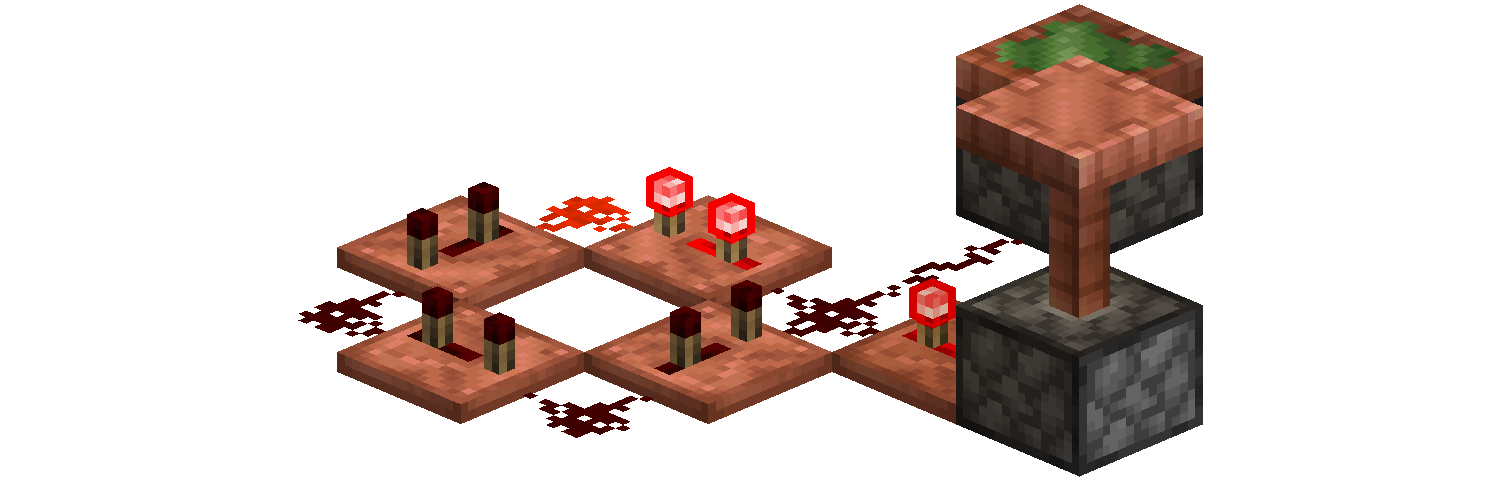
The changed recipes are:
- Redstone Repeaters and Comparators, replacing Stone.
- Hoppers, replacing Iron Ingots.
- Pistons, replacing Iron Ingots and Planks.
Installation and Compatibility
Copper Tech is fully compatible with MC 1.17 and all its later versions, including the latest 1.21.8.
Copper Tech's Resource Pack is also compatible with the Vanilla Tweaks Bedrock parity Piston model.
To properly install Copper Tech, both the Data Pack and the Resource Pack must be installed.
To manually install the Data Pack, simply drop the corresponding .zip file in the 'datapack' folder inside your world folder.
To manually install the required Resource Pack, drop the corresponding .zip file in the 'resourcepacks' folder inside your main MC directory.
Copper Tech is extremely lightweight and is compatible with Multiplayer, as long as the Resource Pack is correctly loaded.
Support
If you like my Data Packs, Resource Packs or textures, consider donating, it would really mean a lot to me. If you are interested in commissioning any content, contact me on any available platform, I'll try to reach out to you as fast as I can.
Suggestions for future Minecraft content are also well received. Thank you for taking a look at my content. :)
More like this
 Honeycomb + Piston = Sticky PistonMinecraft 1.13 - 1.20 Quality of Life Data Pack
 Sensei_Jayway
•1/17/21 11:24
7k 626 1x 1159
Sensei_Jayway
•1/17/21 11:24
7k 626 1x 1159 Copper Rails!Minecraft 1.17 - 1.21 Quality of Life Data Pack
 Napino
•7/25/25 12:27
1.7k 106 5x 8119
Napino
•7/25/25 12:27
1.7k 106 5x 8119 Chunk LoadersMinecraft 1.21 Quality of Life Data Pack
 Halet
10/4/25 6:54
• posted 8/10/25 7:30
1.5k 159 1x 422
Halet
10/4/25 6:54
• posted 8/10/25 7:30
1.5k 159 1x 422![Itz-Crafting-Tweaks [1.21] Minecraft Data Pack](https://static.planetminecraft.com/files/image/minecraft/data-pack/2024/466/17997656-image_s.jpg) Itz-Crafting-Tweaks [1.21]Minecraft 1.21 Quality of Life Data Pack
Itz-Crafting-Tweaks [1.21]Minecraft 1.21 Quality of Life Data Pack ItzMqxim
•7/19/24 9:21
847 70x 954
ItzMqxim
•7/19/24 9:21
847 70x 954 Blasting Ages All Copper Blocks (+Waxed)Minecraft 1.21 Quality of Life Data Pack
 yazoocraft
•2/8/26 3:54
186 18x 11
yazoocraft
•2/8/26 3:54
186 18x 11
6679056
119








 jetterg


 ChaosMaster127

 orp888

 ThebloodbeastMC
 MoonDogg750
 BoterBramKroket
Have something to say?
You can find it on one of the download links. I suggest opening the Modrinth Page since it's more accessible. Go to the Version section and select a release compatible with your MC version. Opening the release should show you both the download to the Data Pack, both the download to the Texture Pack. ^^