




• • 7/22/25 12:16 pm • 1 logs
- 3.5k views • 0 today
- save_alt 538 downloads
- Compatibility
- Minecraft 1.21
- Changes include
- Advancements
- Recipes

34

Resource Pack needed to correctly view the items!
GearPlus is a group of small Data Packs that focuses on adding tools,weapons or armor to Minecraft to thematically and aesthetically diversify the range of acquirable gear without breaking the balance of the vanilla game experience.
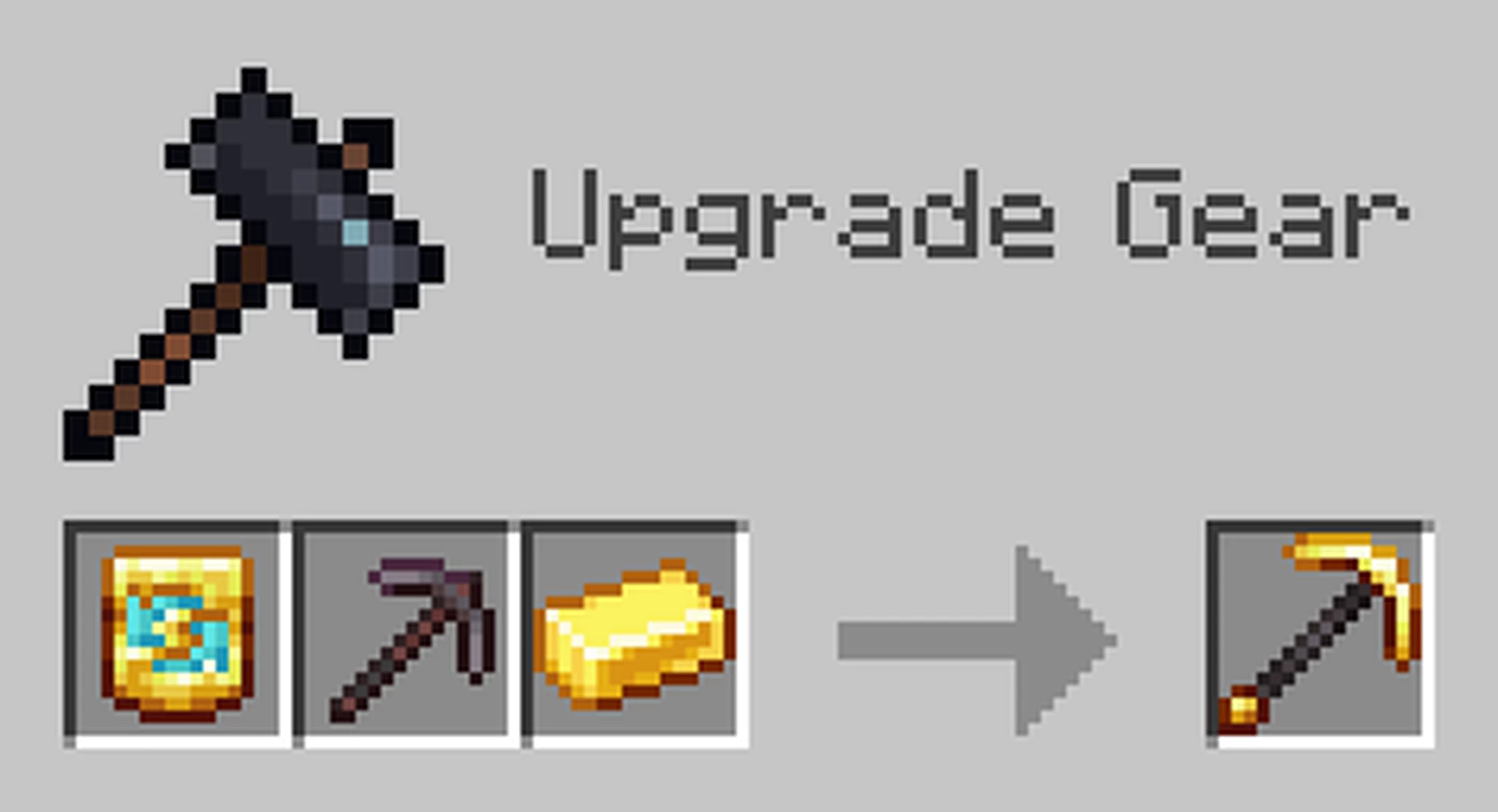
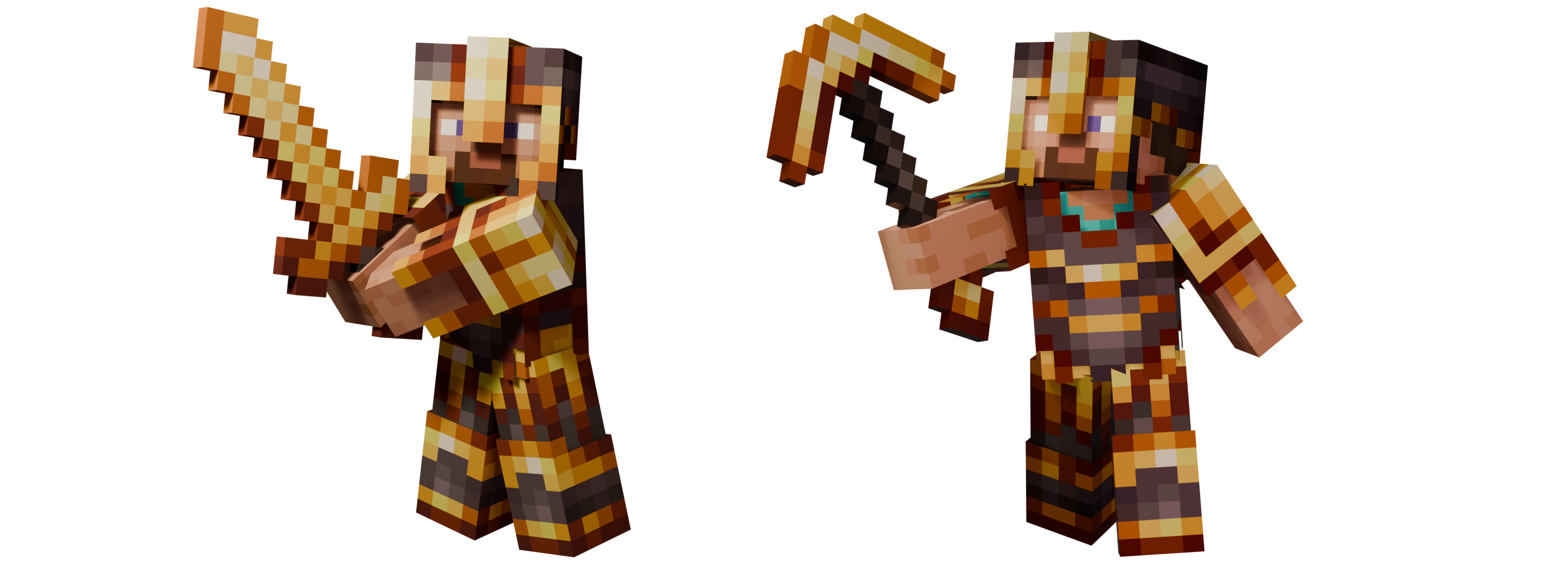
The 'Gilded Netherite module' adds the Gilded Transmuter, a new Smithing Template which can be used to give Netherite one last small upgrade and smith Netherite equipment into Gilded Netherite!

Gilded Netherite equipment works exactly like the base Netherite one. Tools and armor keep the same durability, armor, damage and mining speed.
However, aside from looking absolutely stunning, wearing any piece of Gilded Netherite armor prevents Piglins to be aggressive towards the player, acting as a piece of Golden armor too and making them neutral.
Installation
To properly view and use the module, both the Data Pack and the Resource Pack must be installed.
To manually install the Data Pack, simply drop the corresponding .zip
file in the 'datapack' folder inside your world folder. To manually
install the required Resource Pack, drop the corresponding .zip file in
the 'resourcepacks' folder inside your main MC directory.
The module is extremely lightweight and is compatible with Multiplayer, as long as the Resource Pack is correctly loaded.
Currently supported versions: 1.21.2+
The downloadable version in this site is currently compatible with 1.21.5+.
Visit the Modrinth page for the 1.21.1-1.21.4 versions.
Also consider checking out my account for donations or commitions for textures or Data Packs, it would really mean a lot!
1 Update Logs
v1.2 : by Napino 07/22/2025 12:16:54 pmJuly 22, 2025 @ 4:16 pm UTC
- The updated version is now compatible with MC 1.21.5+
- Added proper support for MC 1.21.7-1.21.8 in pack.mcmeta.
- Added proper support for MC 1.21.7-1.21.8 in pack.mcmeta.
More like this
 G+ | Sculk Weapons and ToolsMinecraft 1.21 Weapons and Armor Data Pack
 Napino
7/22/25 11:50
• posted 6/25/25 5:55
4.9k 1k 19x 62436
Napino
7/22/25 11:50
• posted 6/25/25 5:55
4.9k 1k 19x 62436
 Gilded NetheriteMinecraft 1.20 Weapons and Armor Data Pack
 ElGeroIngles
•12/10/23 5:14
2.8k 103 2x 7109
ElGeroIngles
•12/10/23 5:14
2.8k 103 2x 7109 G+ | Copper and Rose Gold toolsMinecraft 1.21 Weapons and Armor Data PackNapino
•5/27/25 9:03
1.9k 211 1x 7158
G+ | Copper and Rose Gold toolsMinecraft 1.21 Weapons and Armor Data PackNapino
•5/27/25 9:03
1.9k 211 1x 7158![No Template Netherite Tool Upgrades - [PurpurPack] Minecraft Data Pack](https://static.planetminecraft.com/files/image/minecraft/data-pack/2023/725/17047652-aeefecacebcaccbecaf_s.jpg) No Template Netherite Tool Upgrades - [PurpurPack]Minecraft 1.20 - 1.21 Crafting Recipe Data Pack
No Template Netherite Tool Upgrades - [PurpurPack]Minecraft 1.20 - 1.21 Crafting Recipe Data Pack RhythmicSys
•8/8/23 11:30
706 66x 221
RhythmicSys
•8/8/23 11:30
706 66x 221
 Drizzo
6629427
119











![Darks Random Stuff [WIP] Minecraft Data Pack](https://static.planetminecraft.com/files/image/minecraft/data-pack/2026/444/20192877-immagine_s.jpg)
 Darkie__
 AhmedTurysta
Have something to say?
Has it been updated or what?? its literally impossible to play with it on 1.21, the gear and tools dont exist.
"The downloadable version in this site is currently compatible with 1.21.5+.
Visit the Modrinth page for the 1.21.1-1.21.4 versions."
So, which version of 1.21 are you currently using? Since you're talking about the resource pack, then the gears and tools should at least appear, but with missing textures. If that's the problem, I suggest to just download the version for your specific version of MC 1.21. Otherwise, given how little information I have on your issue, I'd ask you to tell me more, possibly with a calmer tone.
If you still have some problems check if you downloaded the files for your version of Minecraft, or try describing what error are you having if none of the tips above seem to work so that I can help you fix it^^