
• 9/4/25 1:17 am
- 729 views • 1 today
- save_alt 41 downloads
- Compatibility
- Minecraft 1.21
- Changes include
- 3
- 3

Required Resource Pack
14
This is a library!
What does this pack do?
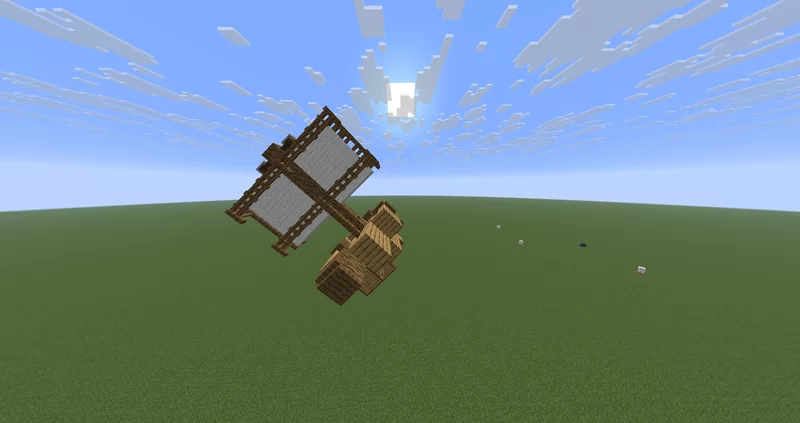
It allows you to convert blocks and structures into display entities. How do I do this you may ask:
What can I do with this?
Having structures as display entities allows you to create moving structures. This can be used in numerous ways.
How do I move a structure?
If you want to have other entities in the structure, for example: chest minecarts, happy ghasts, your weird uncle Paul, etc. Do the following:
A resource pack has to be used when working with hitboxes, because this pack uses shulkers as hitboxes. If you don't have the resource pack, any structure with hitboxes will look like an ugly blob of purple shulkers. When hitboxes aren't used, a resource pack isn't required.
Limitations
This pack does have some known issues that I have no idea how to fix:
What does this pack do?
It allows you to convert blocks and structures into display entities. How do I do this you may ask:
- Build your structure. (Tip: the structure is always saved with south as the front and north as the back)
- Make sure your structure isn't connected to the ground.
- Run /function display:user/transform_structure or /function display:user/transform_structure_hitbox. This will transform your structure into block displays (and summon shulkers as hitboxes if you ran the second one)
What can I do with this?
Having structures as display entities allows you to create moving structures. This can be used in numerous ways.
How do I move a structure?
- Select the structure. This can be done in multiple ways. /function display:user/set_nearest_structure_as_input sets the closest structure as an input and /function display:user/set_struct_with_this_entity_as_input should be run as an entity that is part of a structure (shulker, block display, etc.).
- Run /function display:user/move_structure, et voilà! The structure will be moved to your location, rotation and all. This function can also be run at any location and as any entity.
If you want to have other entities in the structure, for example: chest minecarts, happy ghasts, your weird uncle Paul, etc. Do the following:
- Select the structure. This can be done in multiple ways. /function display:user/set_nearest_structure_as_input sets the closest structure as an input and /function display:user/set_struct_with_this_entity_as_input should be run as an entity that is part of a structure (shulker, block display, etc.).
- Run the function /function display:user/append_entity as the entity you want to append. Make sure that this entity is at the location you want it to be.
A resource pack has to be used when working with hitboxes, because this pack uses shulkers as hitboxes. If you don't have the resource pack, any structure with hitboxes will look like an ugly blob of purple shulkers. When hitboxes aren't used, a resource pack isn't required.
Limitations
This pack does have some known issues that I have no idea how to fix:
- Minecraft just doesn't like rendering some blocks as block displays. Mob (wall) heads aren't rendered properly. Rotation isn't saved. Chest aren't rotated and lose the state of being a double or a single chest. Banners don't rotate properly. Twisting vines and weeping vines are also weird. This is just janky behavior from Minecraft. There's probably more of these I haven't found.
- When scanning really big structures, the pack eventually just ends up hitting the command limit, which isn't too great. It will send error messages if my failsafes go off!
More like this
 Displayed CoordinatesMinecraft 1.13 - 1.19 Other Data Pack
 Luckey0
•6/10/22 11:54
14.9k 4.7k 9x 1510
Luckey0
•6/10/22 11:54
14.9k 4.7k 9x 1510 Solar's Block Display VehiclesMinecraft 1.20 Other Data Pack
 Solar Builds
•3/24/24 8:10
4.4k 319 11x 14845
Solar Builds
•3/24/24 8:10
4.4k 319 11x 14845![Smart Ore Generation [Library] Minecraft Data Pack](https://static.planetminecraft.com/files/image/minecraft/data-pack/2024/186/18368650-original-icon_s.jpg) Smart Ore Generation [Library]Minecraft 1.21 - 26.1 Other Data Pack
Smart Ore Generation [Library]Minecraft 1.21 - 26.1 Other Data Pack Stoupy
4/18/26 7:13
• posted 11/27/24 11:14
1.7k 46 1x 396
Stoupy
4/18/26 7:13
• posted 11/27/24 11:14
1.7k 46 1x 396

 Dream82342
 mieprenzo
6716634
119






 JirachiPlayz
 shapeshifter_
 MyAndy

 TIBR
TIBR
Have something to say?