

• 10/13/25 4:47 pm
- 625 views • 0 today
- save_alt 28 downloads
- Compatibility
- Minecraft 1.21
- Changes include
- Functions

14
This data pack adds many new uses to the smithing table that should make working with your tools and armor much less of a pain. All "recipes" work by combining certain items by throwing them on top of a smithing table.
You can use /function gear_tinkering:_config to access a config menu, allowing you to disable any features you don't like. By default, all features are enabled.
If you want to uninstall the data pack, it's recommended to run the /function gear_tinkering:_uninstall command to get rid of the scoreboards this data pack adds.
Here's a full list of every included feature :
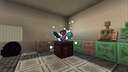
Combine amethyst shards with an item to lower its repair cost! This can be done as many times as you'd like, with each amethyst shard lowering repair cost by one. You'll know the repair cost is at its minimum when a white puff of smoke appears on the item and amethyst shards don't combine with it anymore.
This should make enchanting using books less of a struggle and make repairing using an anvil somewhat of a viable option compared to mending.
(For those who don't know, in vanilla Minecraft, every time an item is repaired or combined with another item at an anvil, the hidden "repair cost" value of the item goes up and makes repairing and combining it more expensive until the anvil displays a "Too Expensive!" message that makes working with the item further impossible.)
Combine a diamond with a trimmed armor piece item to remove its trim! For some reason, there isn't a way to remove armor trims in vanilla. Because of the way this is implemented, it should work with the Tool Trims mod, Elytra Trims mod, and really any other mod that adds trims (as long as the trims work using a trim component and not a custom component, so it wouldn't work with the Tool Trims data pack for example).
Combine an echo shard with a cursed item (an item with curse of vanishing or binding) to remove the curses! Be careful though, as doing this will summon a vex... (this is configurable, so you can make it not spawn a vex if you want. But that's no fun.)
Combine an enchanted item with a regular book to transfer the enchantments from the item to the book! There are tons of ways this could be useful, for example extracting enchantments from gold tools found in ruined portal chests or iron tools found in end cities in order to have those enchantments on actual useful gear. Some might consider this a bit overpowered, but that's why there's a configuration menu that lets you disable this if you don't want it.
Combine an written, signed book with a feather and an ink sac to unsign the book! This lets you write in it again as if it had never been signed, though the author and title of the book will be lost. Useful for if you've accidentally signed a book you weren't done with!
You can use /function gear_tinkering:_config to access a config menu, allowing you to disable any features you don't like. By default, all features are enabled.
If you want to uninstall the data pack, it's recommended to run the /function gear_tinkering:_uninstall command to get rid of the scoreboards this data pack adds.
Here's a full list of every included feature :
Repair Cost Resetting
Combine amethyst shards with an item to lower its repair cost! This can be done as many times as you'd like, with each amethyst shard lowering repair cost by one. You'll know the repair cost is at its minimum when a white puff of smoke appears on the item and amethyst shards don't combine with it anymore.
This should make enchanting using books less of a struggle and make repairing using an anvil somewhat of a viable option compared to mending.
(For those who don't know, in vanilla Minecraft, every time an item is repaired or combined with another item at an anvil, the hidden "repair cost" value of the item goes up and makes repairing and combining it more expensive until the anvil displays a "Too Expensive!" message that makes working with the item further impossible.)
Trim Removal
Combine a diamond with a trimmed armor piece item to remove its trim! For some reason, there isn't a way to remove armor trims in vanilla. Because of the way this is implemented, it should work with the Tool Trims mod, Elytra Trims mod, and really any other mod that adds trims (as long as the trims work using a trim component and not a custom component, so it wouldn't work with the Tool Trims data pack for example).
Curse Removal
Combine an echo shard with a cursed item (an item with curse of vanishing or binding) to remove the curses! Be careful though, as doing this will summon a vex... (this is configurable, so you can make it not spawn a vex if you want. But that's no fun.)
Enchantment Transferring
Combine an enchanted item with a regular book to transfer the enchantments from the item to the book! There are tons of ways this could be useful, for example extracting enchantments from gold tools found in ruined portal chests or iron tools found in end cities in order to have those enchantments on actual useful gear. Some might consider this a bit overpowered, but that's why there's a configuration menu that lets you disable this if you don't want it.
Book Unsigning (1.21.5 and up only)
Combine an written, signed book with a feather and an ink sac to unsign the book! This lets you write in it again as if it had never been signed, though the author and title of the book will be lost. Useful for if you've accidentally signed a book you weren't done with!
2 Update Logs
1.0.2 : by azeolii_ 08/08/2026 7:26:29 pmAugust 8 @ 11:26 pm UTC
Added support for 26.2
- Fixed a predicate that cause the entire pack to break in version 26.2, making it now compatible with that version (while still supporting previous versions)
- Tweaked the pack icon
- Fixed a predicate that cause the entire pack to break in version 26.2, making it now compatible with that version (while still supporting previous versions)
- Tweaked the pack icon
LOAD MORE LOGS
More like this
 Softer Silk TouchMinecraft 1.20 Quality of Life Data Pack
 NateRich
12/18/23 8:09
• posted 7/6/23 5:23
5.2k 478 10x 41714
NateRich
12/18/23 8:09
• posted 7/6/23 5:23
5.2k 478 10x 41714 More Netherite Gear 1.21.3Minecraft 1.21 Quality of Life Data Pack
 Johnvh
11/5/24 5:40
• posted 4/23/24 8:01
3.9k 414 6x 51416
Johnvh
11/5/24 5:40
• posted 4/23/24 8:01
3.9k 414 6x 51416 Faster armor unequip and pack armor standMinecraft 1.16 Quality of Life Data Pack
 tom147
•9/24/20 6:57
2.5k 108 2x 1044
tom147
•9/24/20 6:57
2.5k 108 2x 1044 Anvil RepairMinecraft 1.21 Quality of Life Data Pack
 ZyRail
6/15/24 2:52
• posted 5/27/24 10:24
2.4k 181 1x 256
ZyRail
6/15/24 2:52
• posted 5/27/24 10:24
2.4k 181 1x 256 DirectionviewMinecraft 1.21 - 26.1 Quality of Life Data Pack
 StarmanMine142
•6/22/26 11:27
172 11x 444
StarmanMine142
•6/22/26 11:27
172 11x 444
6748400
119




 RUTH DABS
 Mortality SMP




 TIBR
TIBR
 CraftingMeister8
Have something to say?
So you can dupe enchantments
It would be nice if it got fixed
Edit : I released a version that should fix this, thanks again (: