
• • 10/31/25 10:26 am • 1 logs
- 6.3k views • 3 today
- save_alt 383 downloads
- Compatibility
- Minecraft 1.16
- to version
- Minecraft 1.20
- Changes include
- Functions
Added CreditRequested by Aquarexz


90
The direct download link supports Minecraft versions 1.18 to 1.20.4. Older Minecraft versions are available on GitHub.
This data pack was created for relqxd's request.
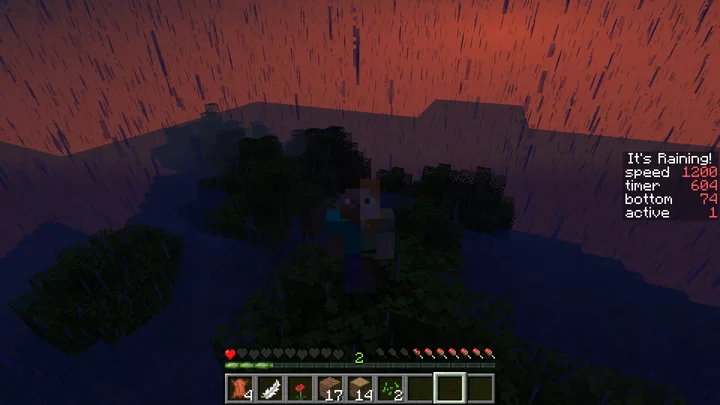
In this data pack, it's always raining. Raining too much. Water will slowly move up, into your mineshaft and then to the ground, and pushing you up and up – until you reach height 255, when invisible blocks make sure you can't go further.
When the game starts, you cannot move and can only make some configurations. If you don't see the configuration items, run /reload.
The book controls the display of information in the side of the screen, disabled by default. Drop it to show the information, then drop again to rehide it and so on. When enabled, the following information will be shown:
speed: The water is moving up every amount of ticks that equals to this number. Configurable, default to 1200. 20 ticks are a second, 1200 ticks are a minute. Notice that the higher the number is, the slower the water moves and the lower the number is the faster the water moves. Don't change this to below 600.
bottom: The current Y position of the water. Configurable before the game starts, in order to change the start height.
timer: The timer that controls the water. After you start, this increases by one each tick and when it reaches the speed (see above) it resets to 0 and the water moves up.
active: 1 if the timer is moving, 0 if not.
Some more configuration (speed, and bottom) are available using commands. Read above to see what they mean. The syntax to configure an option is:
scoreboard players set <option> raining_water <amount>Replace <option> with the name of the option you wish to configure and <amount> with the number you wish it to be. For example, this causes the water to move every two minutes, instead of one:scoreboard players set speed raining_water 2400This causes the water to start on Y 30 instead of 0:scoreboard players set top raining_water 30After everything is configured, drop the water bucket to start and good luck!
1 Update Logs
It's Raining! 2.0.0 : by One_Nose 10/31/2025 10:26:30 amOctober 31, 2025 @ 2:26 pm UTC
Updated to versions 1.18-1.20.4. Fixed a bug where exitting and reentering a world would reset the data pack.
More like this
 Meteor RainMinecraft 1.13 - 1.15 Minecraft, but Data Pack
 Awhikax
7/15/20 1:21
• posted 7/14/20 2:16
16.6k 2.5k 9x 12329
Awhikax
7/15/20 1:21
• posted 7/14/20 2:16
16.6k 2.5k 9x 12329 Creeper Rain DatapackMinecraft 1.16 - 1.19 Challenge Data Pack
 _BOBE
6/8/22 5:35
• posted 4/26/21 7:00
8k 1k 5x 1109
_BOBE
6/8/22 5:35
• posted 4/26/21 7:00
8k 1k 5x 1109 Arrow RainMinecraft 1.16 - 1.17 Challenge Data Pack
 iheartstriders
•12/31/20 3:33
6.2k 737 5x 487
iheartstriders
•12/31/20 3:33
6.2k 737 5x 487 Minecraft, But its Raining TNTMinecraft 1.20 Minecraft, but Data Pack
 DrewGo
•12/21/23 10:35
5.4k 1.2kx 148
DrewGo
•12/21/23 10:35
5.4k 1.2kx 148 Minecraft but it rains killer rabbits every secondMinecraft 1.16 Minecraft, but Data Pack
 TupplesYT
•8/30/20 3:08
5.8k 720 15x 1109
TupplesYT
•8/30/20 3:08
5.8k 720 15x 1109
4729890
119



 elizeeeyre








 AhmedTurysta

Have something to say?
/scoreboard players set active raining_water 0See the data pack's description for more configurations.