


• 10/10/19 7:27 pm
- 7.1k views • 0 today
- save_alt 240 downloads
- Compatibility
- Minecraft 1.15
- Changes include
Added Credit@MukiTanuki


25
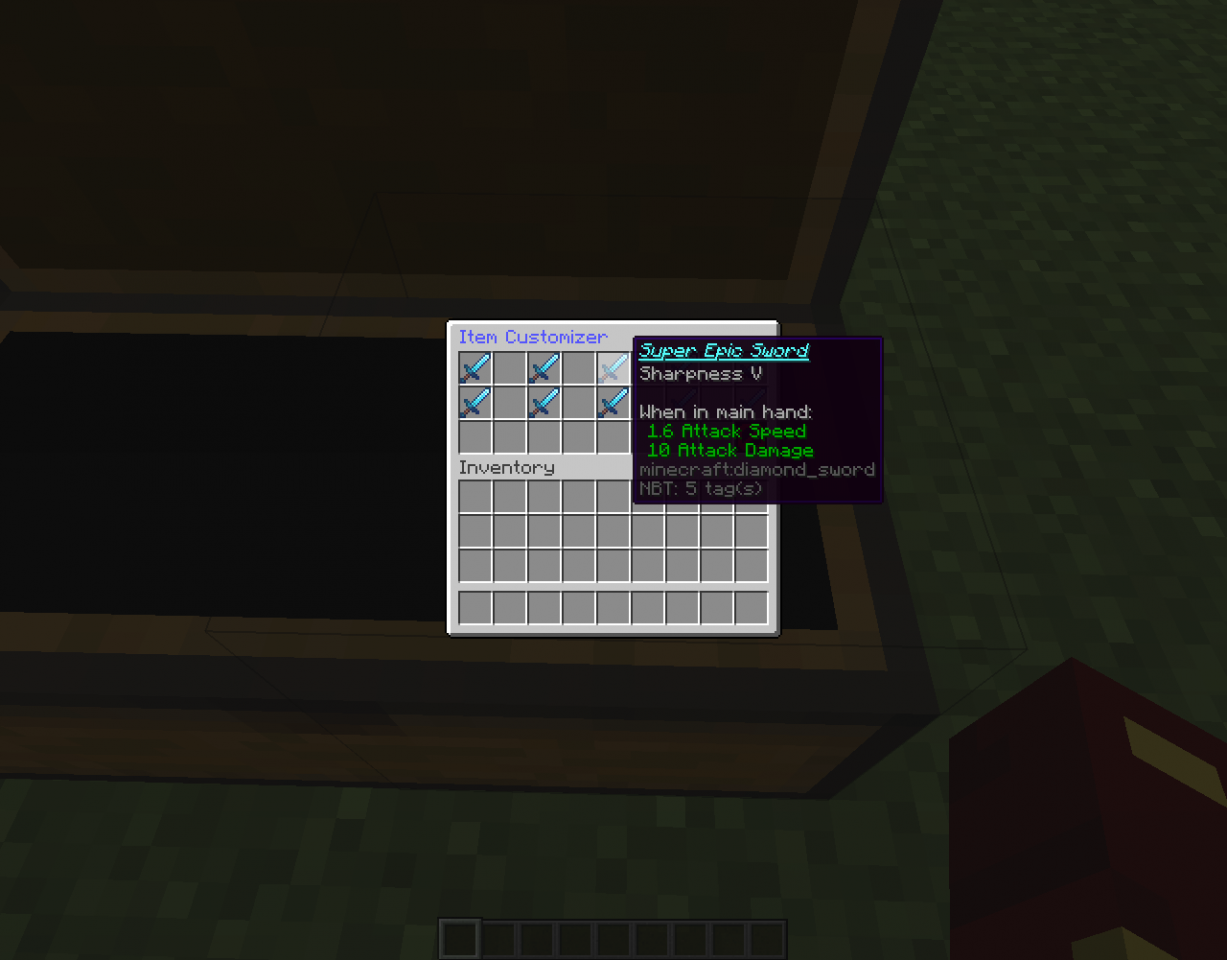
Did you ever want to give your favorite, most OP sword a fitting name that is not just in that plain old aqua color or are you just triggered by the fact that whenever you enchant an item, the name becomes italic? This is the solution for you:
With this table you can control the color of your item's name and the font. You like to have it bold and underlined? Or italic and strikethrough? Or EVERYTHING EXCEPT UNDERLINED?
Maybe have the sword in a beautiful red tone or aqua?
It's all possible with this device.
NOTE:
This data pack requires my "general" data pack which can be found here:
https://www.planetminecraft.com/mod/a-datapack-for-datapack-stuff-like-right-click-detection-etc/
This data pack will interfere with data packs that have the namespace "customization"
This data pack will interfere with datapacks that use right-click detection for a Carrot On A Stick with the CustomModelData:13
Usage:
Since there is no crafting process or recipe yet, you have to give yourself the item with the following command:
/give @p minecraft:carrot_on_a_stick{CustomModelData:13,Unbreakable:1b}
You can now place that item normally in survival. If you want, you can give it a texture.
Upon placing the item, a chest with texture will appear. This happens due to the new 1.15 rendering engine. If fixed, a new version of the data pack will be released. Additionally, an invisible Armor Stand holding the exact item that you gave yourself will appear. Again, if the chest rendering is fixed, the chest will be invisible and you can make your own texture pack that covers the chest with whatever texure you want. Just don't be confused that there is something hanging in the air ;)
When you open the chest, you will see an interface with four options: Change Color, Change Font, Change Name and Remove Name Formatting. Change Name is not yet implemented.
Change Color:
When you click on "Change Color", a new screen with a hopper will appear. The hopper says "Input Item Here". Replace the Hopper with the Item that you want to change the Name-Color of. If your item has a custom name, and only then(!), you will be given a list of items with different Name-Colors. If you choose one of these items, you will be directed back to the main screen.
Change Font:
When you click on "Change Font", a new screen with a hopper will apper. Similarly to "Change Color" you input your customly named item and you will be given a list of items. There is a list of five different fonts that can be applied to an item: Bold, Italic, Underlined, Strikethrough and Obfuscated. In the GUI, these styles are sorted in that order, as well. In the top row, the style is "true" and in the bottom row the style is "false". Again, you can pick one item and will be redirected to the main menu.
Change Name:
Not yet implemented
Remove Name Formatting:
For the item-name to change the color or the font, there is a custom name format applied. Before you rename any item that you changed the color or the font of you HAVE to remove the name format, first. On the screen with the hopper, input the item that you want to remove the name format from and the format will instantly be removed. To go back to the main menu, click the "Back"-Button, that is available on every screen.
Credits:
Big, big, incredible shoutouts to MukiTanuki for basically creating everything in this datapack. He had the idea for a station like this and created a datapack that lets you customize your item's name, but you need to summon in a 19x19 structure. I wanted to make that great project into a one-block device. I was very happy that he gave me permission to do that. Link to his project and his channel follow:
https://www.planetminecraft.com/mod/item-name-formatting-station-1-14-datapack/
https://www.planetminecraft.com/member/mukitanuki/
With this table you can control the color of your item's name and the font. You like to have it bold and underlined? Or italic and strikethrough? Or EVERYTHING EXCEPT UNDERLINED?
Maybe have the sword in a beautiful red tone or aqua?
It's all possible with this device.
NOTE:
This data pack requires my "general" data pack which can be found here:
https://www.planetminecraft.com/mod/a-datapack-for-datapack-stuff-like-right-click-detection-etc/
This data pack will interfere with data packs that have the namespace "customization"
This data pack will interfere with datapacks that use right-click detection for a Carrot On A Stick with the CustomModelData:13
Usage:
Since there is no crafting process or recipe yet, you have to give yourself the item with the following command:
/give @p minecraft:carrot_on_a_stick{CustomModelData:13,Unbreakable:1b}
You can now place that item normally in survival. If you want, you can give it a texture.
Upon placing the item, a chest with texture will appear. This happens due to the new 1.15 rendering engine. If fixed, a new version of the data pack will be released. Additionally, an invisible Armor Stand holding the exact item that you gave yourself will appear. Again, if the chest rendering is fixed, the chest will be invisible and you can make your own texture pack that covers the chest with whatever texure you want. Just don't be confused that there is something hanging in the air ;)
When you open the chest, you will see an interface with four options: Change Color, Change Font, Change Name and Remove Name Formatting. Change Name is not yet implemented.
Change Color:
When you click on "Change Color", a new screen with a hopper will appear. The hopper says "Input Item Here". Replace the Hopper with the Item that you want to change the Name-Color of. If your item has a custom name, and only then(!), you will be given a list of items with different Name-Colors. If you choose one of these items, you will be directed back to the main screen.
Change Font:
When you click on "Change Font", a new screen with a hopper will apper. Similarly to "Change Color" you input your customly named item and you will be given a list of items. There is a list of five different fonts that can be applied to an item: Bold, Italic, Underlined, Strikethrough and Obfuscated. In the GUI, these styles are sorted in that order, as well. In the top row, the style is "true" and in the bottom row the style is "false". Again, you can pick one item and will be redirected to the main menu.
Change Name:
Not yet implemented
Remove Name Formatting:
For the item-name to change the color or the font, there is a custom name format applied. Before you rename any item that you changed the color or the font of you HAVE to remove the name format, first. On the screen with the hopper, input the item that you want to remove the name format from and the format will instantly be removed. To go back to the main menu, click the "Back"-Button, that is available on every screen.
Credits:
Big, big, incredible shoutouts to MukiTanuki for basically creating everything in this datapack. He had the idea for a station like this and created a datapack that lets you customize your item's name, but you need to summon in a 19x19 structure. I wanted to make that great project into a one-block device. I was very happy that he gave me permission to do that. Link to his project and his channel follow:
https://www.planetminecraft.com/mod/item-name-formatting-station-1-14-datapack/
https://www.planetminecraft.com/member/mukitanuki/
More like this
![[Minecraft 1.16] Bonsai Pots Data Pack! (MICRO TREE FARMS) Minecraft Data Pack](https://static.planetminecraft.com/files/image/minecraft/data-pack/2020/129/12635190-bonsaipots_s.jpg) [Minecraft 1.16] Bonsai Pots Data Pack! (MICRO TREE FARMS)Minecraft 1.13 - 1.16 Farming and Food Data Pack
[Minecraft 1.16] Bonsai Pots Data Pack! (MICRO TREE FARMS)Minecraft 1.13 - 1.16 Farming and Food Data Pack BlueCommander
•1/25/20 2:04
29.5k 5.6k 10x 15955
BlueCommander
•1/25/20 2:04
29.5k 5.6k 10x 15955 Minecraft Bingo 1.15+ DatapackMinecraft 1.15 Challenge Data Pack
 Swiep
•2/21/20 5:33
16.8k 1.7k 2x 12124
Swiep
•2/21/20 5:33
16.8k 1.7k 2x 12124 Minecraft But there are five different data packs!Minecraft 1.15 Minecraft, but Data Pack
 TheMorse
•1/1/20 9:09
9.6k 709 1x 11514
TheMorse
•1/1/20 9:09
9.6k 709 1x 11514 Custom Item Data-pack and Resource-packMinecraft 1.20 Item Data Pack
 Mythstar
•6/28/23 9:59
6k 228 2x 364
Mythstar
•6/28/23 9:59
6k 228 2x 364 🛌 One Player Sleep Data Pack (Minecraft 1.15)Minecraft 1.13 - 1.15 Quality of Life Data Pack
 MadCat_G
•3/29/20 8:04
5.2k 426x 154
MadCat_G
•3/29/20 8:04
5.2k 426x 154
4418420
119




 JeZoofyGopter17






 AvatarKage
 arbar52
 Oyot
Oyot
 CryngelDust

Have something to say?